tokconnect
- Add a text box, tap it, tap Text-to-speech and pick a voice. The voice reads that box while it is on screen.
- It reads text boxes on the video, never the caption you type on the Post screen. Short boxes of one or two sentences sound far more natural than one long one.
- TikTok publishes no voice list. Three 2026 guides name different line-ups and agree only on Jessie, because voices change by country and season.
- Text to speech types a voice for you, a voiceover records your own, and voice effects change your own. They are three different buttons.
- If the option is missing, update the app, try English as the app language, and re-add the text box. TikTok has not published where the feature is unavailable.
TikTok text to speech turns words you type on your video into a spoken voice. To use it, add a text box in the editor, tap the box, tap Text-to-speech, and pick a voice. The voice reads that box out loud while it is on screen, and you change the voice later by tapping the box again.
The rest of this page covers voices, slideshows, voice effects, speed and what to do when the button is missing. The steps match guides published between January and August 2026. TikTok does not publish which app version added or moved these menus, so if something looks different, update the app first.
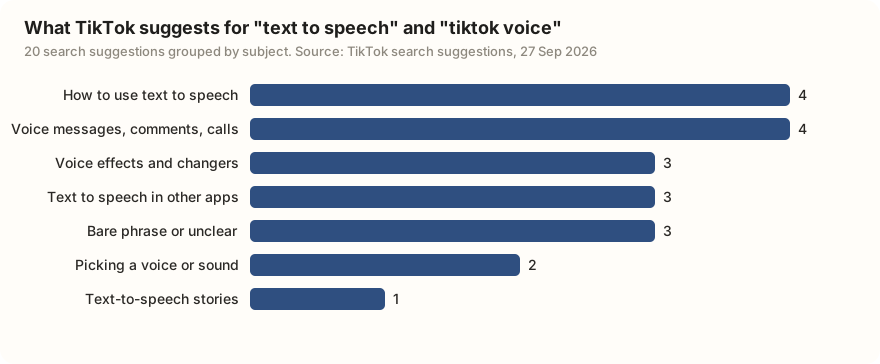
"TikTok voice" means at least three different things to the people searching for it. Some want the robot narrator, some want to change their own voice, and a good share want voice messages or voice comments, which have nothing to do with editing a video.
Data: TikTok search suggestions via TokConnect, pulled 27 September 2026, two phrases, ten suggestions each. Snapshot. The groups are our own reading; five suggestions were in Burmese and are translated in the snapshot.
How to do text to speech on TikTok
The steps are the same on iPhone and Android.
- Tap + and record a clip or upload one from your phone.
- On the editing screen, tap Text (the Aa icon).
- Type the words you want spoken and tap Done.
- Tap the text box on the video. A small menu opens.
- Tap Text-to-speech, pick a voice, and listen to the preview.
- Tap Done, then Next, and post as usual.
Each text box is read separately, so a video with four boxes gets four spoken lines. According to SocialzAI (April 2026), different boxes in one video can even use different voices. Shopify's April 2026 guide says one voice per video, so test it before you plan a two-voice dialogue around it.
Timing and hiding the words
The voice speaks when its text box appears. To move a line, drag its text box along the timeline at the bottom of the editor. If you want the voice but not the words on screen, Shopify suggests pinching the text box small and dragging it off the edge of the frame.
Steps from Shopify (1 April 2026), SocialzAI (3 April 2026) and Fish Audio (22 January 2026). TikTok's own Creating videos help section covers text and editing tools but blocks automated checks, so we could not confirm the wording there.
Typing a script into the caption box on the Post screen does nothing; text to speech only reads text boxes placed on the video. The second mistake is one long box. A whole paragraph read in one go sounds flat and rushed. Split the script into short boxes of one or two sentences, time each one to its clip, and use commas and full stops to make the voice pause.
How to change the TikTok text to speech voice
Tap the text box again, tap Text-to-speech (or the small voice icon next to it), and pick another voice. The new voice replaces the old one on that box only.
Which voices you see depends on your country and language, and TikTok swaps them without notice. TikTok has not published a list. Three guides from 2026 name different line-ups, and only one voice appears in all three:
| Guide (date) | Voices it names | Languages it gives |
|---|---|---|
| Fish Audio (22 Jan 2026) | Jessie, Joey, Eddie, Rocket, Alex, Chris, Taylor, Kendall; characters Ghostface, Stitch, C-3PO, Stormtrooper, Chewbacca | Not stated |
| Shopify (1 Apr 2026) | Jessie, Granny, Trickster, Narrator, Calm | Eight languages, English has the most voices |
| SocialzAI (3 Apr 2026) | Jessie, Eddie, Narrator, Stitch, Rocket; seasonal characters C-3PO, Ghostface, Chewbacca | Spanish, French, Portuguese, German, Japanese, Korean, Indonesian "and others" |
Sources: Fish Audio, Shopify, SocialzAI. The lists disagree because TikTok rotates voices by region and season; treat any list as a snapshot.
Jessie is the one people mean by "the TikTok voice". Shopify reports that she is voiced by Canadian radio host Kat Callaghan. She replaced the original voice in 2021, after voice actor Bev Standing sued TikTok for using her recordings without permission, a case the two sides settled that September (MusicTech, 30 September 2021).
Text to speech on a photo slideshow
In a photo post, the text tool works the same way: switch the mode above the record button to Photo, pick your images, add text to a slide, tap it, and look for Text-to-speech. Conbersa (March 2026) says you can add text-to-speech narration to a slideshow this way.
Other recent slideshow guides, from Descript (July 2026) and Fastlane (August 2026), only describe a sound that plays across the whole post and do not mention text to speech. TikTok has not published how a spoken line behaves when the viewer swipes to the next slide. If the option does not appear on your photo post, build the same images as a video through the Templates tab, where text to speech works like any other video. Our slideshow guide explains the difference between the two formats.
Voice effects vs voiceover vs text to speech
| Text to speech | Voiceover | Voice effects | |
|---|---|---|---|
| What you hear | A computer voice reading your typed words | Your own voice, recorded over the video | Your own voice, changed (higher, deeper, robotic) |
| Where it is | Tap a text box, then Text-to-speech | Microphone icon on the right toolbar | Voice or Voice effects tool on the right toolbar |
| Do you speak? | No | Yes | Yes, or the effect runs on sound already in the clip |
| Good for | Faceless videos, lists, jokes, when you cannot or prefer not to talk | Tutorials, stories, anything where your voice builds trust | Comedy, disguising your voice, characters |
| Limits reported in 2026 | Voice list varies by country | Keep or mute the original sound | One effect per clip |
Sources: PostPlanify (updated 26 March 2026) for the voiceover steps, Filmora (2026) and Murf (10 July 2026) for voice effects.
To record a voiceover, tap the microphone, drag the white marker to where you want to start, then hold the red button and talk. Release to stop, and repeat for more pieces. You can untick Keep original sound if you only want your narration. For voice effects, open the Voice tool and tap an effect to hear it on the clip. Filmora's 2026 guide says effects also work on voiceover and text-to-speech audio; we found no second source that confirms this, so preview before you post.
If you came here for voice messages or voice comments, those live outside the editor. TikTok began rolling out voice comments worldwide in September 2026: recordings of up to one minute posted under any video, for users aged 18 and over (TechCrunch, 3 September 2026).
Can you change the speed of text to speech?
TikTok has not published a speed control for text to speech, and none of the 2026 guides we checked describe one. What they recommend instead is shaping the pace with the text itself. Commas give a short pause, full stops a longer one, and short boxes stop the voice from racing through a long sentence.
If you need the voice itself faster or slower, generate it in another app and bring it in as a sound. CapCut, below, has a speed setting on its generated audio.
What ranks when people search "text to speech tiktok"
We searched TikTok for text to speech tiktok and kept the top results. TikTok returned 9 videos. We counted from the captions only, since we did not watch every video, so a clip that uses the voice without saying so is not counted.
| What the caption says it is | Posted | Plays | Saves | Caption says "text to speech" |
|---|---|---|---|---|
| How to change the text-to-speech voice | Oct 2021 | 508,708 | 1,151 | Yes |
| Text to speech and text animation tutorial | Mar 2026 | 495,619 | 10,905 | Yes |
| How to get a voice (tool not named) | Feb 2025 | 193,737 | 1,677 | No |
| Pet video using several voices | Apr 2022 | 184,303 | 488 | Yes |
| AI voice and voice effects tutorial | May 2025 | 111,768 | 577 | No |
| CapCut text-to-speech tutorial | Sep 2026 | 95,113 | 1,481 | Yes |
| Text-to-speech tutorial, framed as a way to give people a voice | Nov 2025 | 73,432 | 198 | Yes |
| Tutorial, caption does not say of what | Jan 2026 | 64,600 | 476 | No |
| Tutorial, caption does not say of what | Sep 2026 | 13,190 | 253 | No |
Data: TikTok video search for "text to speech tiktok", relevance order, pulled 27 September 2026. Snapshot. Topics are our reading of each caption.
Five of the nine captions name text to speech. Seven call themselves a tutorial or a how-to, and three open with "Replying to", meaning the creator made the video to answer a viewer's question in the comments. The middle video has about 110,000 plays. The two oldest results date from 2021 and 2022 and still rank next to videos from this month.
Search TikTok for the top 20 videos about [my topic] and tell me which ones use a text-to-speech voice, based on their captions. Show plays and saves for each, and list the questions viewers ask in the comments of the top five so I can answer them in my own text-to-speech videos.
Works in Claude, ChatGPT, Cursor and Gemini once TokConnect is connected. Get a free key (50 credits, no card) or see the setup guides.
Why is text to speech not showing on TikTok?
Usually one of these:
- An old app version. Update TikTok from the App Store or Google Play and reopen it.
- Your country or language. The feature and its voices roll out by region. Guides report that English has the most voices and that some languages have few or none. Switching the app language to English is a common workaround.
- Your account. TikTok tests features on some accounts before others. A Voice.ai troubleshooting guide (August 2025) also says new or age-restricted accounts can see fewer tools.
- A glitch. Delete the text box and add it again, restart the app, or clear the app cache (in Settings and privacy, look for Free up space).
- Unusual characters. Some symbols and non-standard letters can make the voice fail. Try plain text.
TikTok has not published a list of countries or account types where text to speech is unavailable. If none of the fixes work, report it from Settings and privacy, Report a problem. Or make the voice elsewhere and add it as a sound, as many faceless creators do.
Text to speech and captions as accessibility tools
TikTok presents both as accessibility features. Auto captions arrived in April 2021 for people who are deaf or hard of hearing (TikTok Newsroom). In its May 2025 accessibility update, TikTok again listed auto-generated captions and text to speech as ways to take in a video in more than one format (Social Media Today, 14 May 2025).
Text to speech turns on-screen words into sound, which helps people who cannot read the screen easily and creators who cannot or prefer not to speak. Captions turn speech into on-screen words: on the editing screen tap Captions, let TikTok transcribe, and fix mistakes before you post (quso.ai, May 2026). A text-to-speech video already shows its words on screen, unless you dragged the box out of frame. If you hide the text, add captions so people watching with the sound off still get the script.
CapCut text to speech as an alternative
CapCut is ByteDance's video editor, and its text to speech gives you more control than TikTok's. On the phone, you add text, tap the text clip on the timeline, open Text to speech, choose a voice and tap Generate, which creates a separate audio track. CapCut's standalone tool advertises more than 200 voices, and the generated audio has a speed setting (CapCut Guide, updated 17 August 2026, citing CapCut's text-to-speech page).
Some premium voices need a subscription or credits, and availability differs by country. Export the finished video and upload it to TikTok as usual. For what to make with it, our video ideas and first-week guide are good next stops, and TikTok filters covers the visual side of the same editor.
Frequently asked questions
How do you do text to speech on TikTok?
Record or upload a clip, tap Text (Aa) on the editing screen, type your words and tap Done. Then tap the text box on the video, tap Text-to-speech and pick a voice. Each text box is read out loud while it is on screen.
How do you change the text to speech voice on TikTok?
Tap the text box that already has a voice, tap Text-to-speech again and choose a different voice from the row. The change applies to that box only, so repeat it for every box you want to switch.
Why is text to speech not showing on TikTok?
The usual causes are an old app version, your country or app language, or a feature test that has not reached your account yet. Update the app, try switching the app language to English, and delete and re-add the text box. TikTok has not published a list of places where the feature is off.
What is the TikTok text to speech voice called?
The best-known voice is called Jessie, and 2026 guides report she is voiced by Canadian radio host Kat Callaghan. Other voice names vary by country and change over time, and TikTok does not publish an official list.
Can you make TikTok text to speech slower or faster?
TikTok has not published a speed setting for text to speech, and the 2026 guides we checked do not describe one. Use commas, full stops and shorter text boxes to change the pace, or make the voice in an editor such as CapCut, which has a speed control, and add it as a sound.
What is the difference between voice effects and text to speech on TikTok?
Text to speech reads your typed words in a computer voice, so you never speak. Voice effects change a voice that is already in the clip, such as your own recording, making it higher, deeper or robotic. A voiceover is your own voice recorded over the video with the microphone tool.
Sources and data
- Creating videos (TikTok Help Center)
- Introducing auto captions (TikTok Newsroom)
- Celebrating Global Accessibility Awareness (TikTok Newsroom)
- TikTok AI Voice: Text-to-Speech Guide (Shopify, 1 April 2026)
- TikTok Text to Speech: Complete Guide to Every Voice and Feature in 2026 (SocialzAI, 3 April 2026)
- How to Do Text-to-Speech on TikTok (Fish Audio, 22 January 2026)
- How to Make a Slideshow on TikTok (Conbersa, March 2026)
- How to Do a Voiceover on TikTok (PostPlanify, updated 26 March 2026)
- How to Add Voice Effects on TikTok (Filmora, 2026)
- Why Is My TikTok Text-to-Speech Not Working (Voice.ai, 25 August 2025)
- TikTok comments are getting more interactive with voice comments, polls and more (TechCrunch, 3 September 2026)
- TikTok Adds More Accessibility Features, Including Alt Text for Photos (Social Media Today, 14 May 2025)
- TikTok reaches settlement with text-to-speech voice actress (MusicTech, 30 September 2021)
- CapCut Text to Speech: Mobile, Desktop and Online (CapCut Guide, updated 17 August 2026)
- Search suggestions for two phrases, pulled 27 September 2026 (snapshot)
- Video search results for "text to speech tiktok", pulled 27 September 2026 (snapshot)