
- Auto captions are TikTok's automatic speech-to-text, on by default in most regions and editable; text overlays you tap on are a separate feature.
- Add or fix captions in the editor under Captions, or on a live video by tapping the three dots and choosing Edit captions.
- Turn captions off as a viewer from the share panel or by tapping the caption text; there is no account-wide off switch.
- TikTok search reads your spoken words, on-screen text and captions, so accurate subtitles help the right people find the video.
- Fix misheard words before anything else, because wrong captions mislead viewers and can file your video under the wrong search terms.
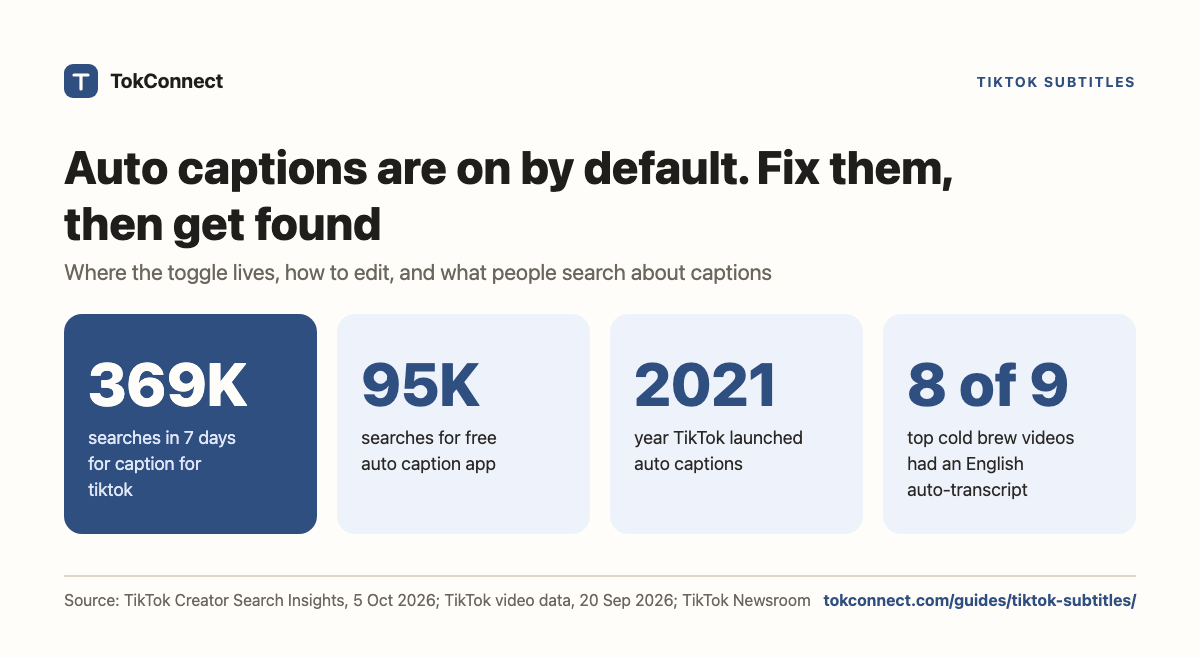
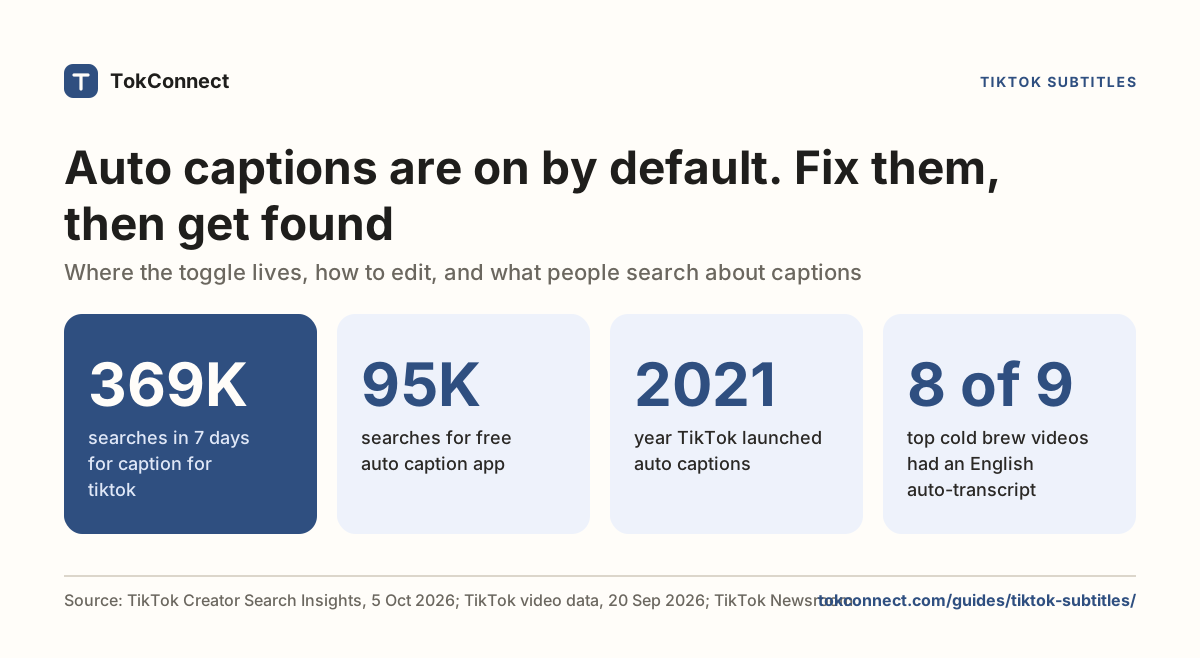
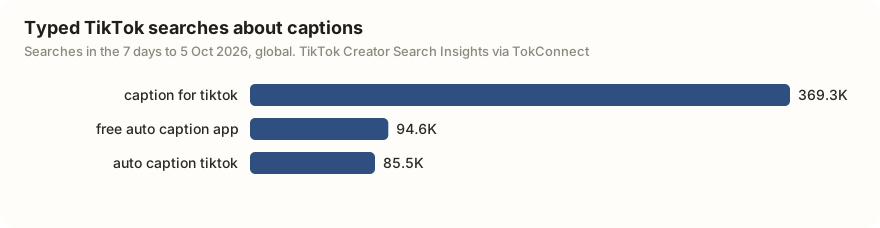
Auto captions have been on by default for eligible videos in supported languages since late 2023, and people want help with them: "caption for tiktok" was searched 369,336 times on TikTok in the 7 days to 5 October 2026.
Auto captions, the words TikTok types out from your speech by itself, sit at the bottom of the screen and you can edit them. Text you add, the stickers and overlays you place by hand, is separate, and you choose where it goes.
Both matter beyond silent viewing. TikTok's search reads the words in your video, including the ones you say out loud, so accurate captions are part of getting found. This page covers where the caption toggle lives, how to add and fix subtitles, how to switch them off as a viewer, how translation works, and why the words on screen and in your voice decide who sees the video.
What TikTok auto captions are, and where the toggle lives
Auto captions are TikTok's automatic speech-to-text. TikTok launched them in April 2021 as a switch creators turned on in the editor. Since late 2023 TikTok generates them by default on eligible videos in supported languages, so for most recent uploads the captions already exist whether you asked for them or not. You can edit them or turn them off on your own post, but there is no single switch that removes them from everything you make.
When you post, the toggle is in the edit screen. Shoot or upload your clip, tap through to the page with the caption box and the cover, and look for Captions in the side menu of editing tools. Tap it and TikTok listens to the audio and writes the subtitles. That is the same place you go to switch them off before posting, or to open them up and fix a word.
How to add captions and fix the auto text
Adding them is one tap. In the editor, open Captions, wait a second or two while TikTok processes the audio, and the text appears over the video with a timeline you can scrub. You can drag the caption block higher or lower so it does not cover your face or a price.
To add captions to a video you already have, upload the file into a new TikTok post and open Captions in the editor the same way; TikTok transcribes uploaded footage, not only clips filmed in the app. For a video that is already live, tap the three dots on it, choose Edit captions, make your changes and save. According to SendShort (2026), TikTok lets you edit captions after posting, so you do not have to delete and repost to fix a typo.
Editing matters because the machine mishears. Fix product names, numbers, brand spellings and anything said over music. Tap a caption line, correct the text, and save. Two minutes of cleanup turns a rough transcript into subtitles that read well and, as the next sections explain, describe your video accurately to TikTok's search.
Uncorrected captions do double damage. A viewer reads "cold brew" as "gold brew" and trusts you less, and TikTok's search may file the video under the wrong words, so the people looking for your topic never see it. If you say a keyword and the caption spells it wrong, fix that line before anything else.
Check which captions rank for my topic
Text overlays are not the same as captions
The text stickers you tap on, the big titles and the on-screen labels, are a different feature from captions. You add them from the Text tool, you choose the font and where they sit, and they are not tied to your speech. Captions track what you say; overlays say whatever you type. If you want a spoken voice instead, see TikTok text to speech.
| Auto captions | Text overlays | |
|---|---|---|
| Who writes the words | TikTok, from your speech | You, with the Text tool |
| Where they sit | Bottom of the screen; you can drag the block | Anywhere you place them |
| Tied to your voice | Yes | No |
| Fix after posting | Three dots, then Edit captions | Plan them before you post |
| Read by TikTok search | Yes | Yes |
| Viewer can hide them | Yes | No |
For being found, the useful part is that TikTok reads both. The platform pulls text from your written caption, your on-screen text and your subtitles, and matches it against what people search. A keyword that shows up in your title overlay and in your spoken captions is a stronger signal than the same word buried in hashtags. Our TikTok SEO guide lays out where each piece of text carries weight.
This is also the argument for saying your keywords out loud. If your topic is in the first line you speak, the auto captions write it down for you, and your hook and your subtitles line up on the exact phrase you want to rank for. The hooks guide shows how to open with the words people are typing.
Why do TikTok subtitles matter for reach?
Start with the plain reason: accessibility. Captions let deaf and hard-of-hearing viewers follow the video, and they let everyone else watch on a silent commute or in a quiet room. Some people scroll with the sound off, so subtitles can be the only version of your words a viewer reads.
The reason creators underrate is search. TikTok's speech-to-text draws the captions on screen and also feeds the transcript into how the video is understood and ranked. The words you say become searchable text. So a clear voice saying your topic, backed by accurate captions, is one of the cheapest ways to help the right people find the video. Our guide on how TikTok search works goes through the signals in order.
Captions do not beat a weak video. But between two similar clips, the one whose spoken words and subtitles clearly name the topic is the one TikTok can place in front of a search for it.
How do you turn captions off as a viewer?
If you are watching and the subtitles bother you, you can hide them three ways:
- Tap once on the caption text on screen.
- Open the share panel and tap the Captions button.
- In some versions, long-press the video and untick "Show captions".
This is your viewing preference; it does not change the creator's video, and it can reset per video or per session rather than staying off for good, since TikTok has no single account-wide "never show captions" switch.
Turning them off on your own post is different. Do it in the editor before posting by toggling Captions off, or on a live video tap the three dots, open Edit captions and remove them. Check your Accessibility settings too, under Settings and privacy, if you want captions shown by default when you watch.
Languages and auto-translation
Auto captions work in a set of supported languages, English, Spanish, Portuguese, German and others, and TikTok has expanded the list over time. On top of that, TikTok can translate captions so a viewer in another country reads your subtitles in their own language. TikTok's own video editor tools also let you generate subtitles in the original language or translate them into others when you localize a video.
A translated caption is a machine translation of a machine transcript, so it drifts further from what you meant than the original does. If a market matters to you, read the translated lines before you lean on them, the same way you would proofread the original.
See what ranking videos actually say
Because TikTok stores a video's captions as a subtitle file, you can read the exact words of the videos already ranking for your topic instead of guessing. For one video, paste its link into the free TikTok transcript generator: it reads the captions TikTok already made and lets you copy the text or download a .txt or .srt file, with no signup. It does not transcribe audio itself, so a video without TikTok captions returns nothing.
For many videos, an agent can do it in one question. TokConnect returns a video's existing captions as text, from a video link or id; the transcript generator page has the API route and the Python.
Pull the captions of the top 10 TikTok videos for cold brew, where TikTok has captions, and show what words they say.
Swap cold brew for your own topic. The answer is the real phrasing of the videos TikTok is already rewarding for your search, which tells you exactly which words to say out loud and put in your own captions.
How we got these numbers
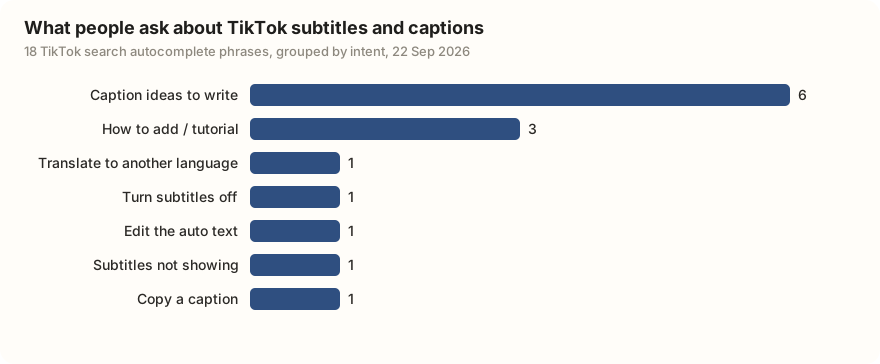
The caption search figures come from two search topic pulls ("tiktok captions" and "auto captions", 20 records each) on 5 October 2026. Searches are TikTok's 7-day global search popularity; videos are the videos TikTok matches to each search. Most records TikTok returns for caption phrases are topic groups, phrases TikTok generates that pool many related searches (19 of 20 for "tiktok captions"); we left those out and kept the 3 typed searches. The autocomplete chart groups 18 suggestions from two autocomplete pulls on 22 September 2026. The cold brew figure comes from the 20 September 2026 pull behind our transcript guide.
Feature history comes from TikTok's Newsroom and Social Media Today's 2023 report; TikTok's own pages blocked our fetches on 5 October 2026, and we found no later change to the default. Data: caption searches, autocomplete, cold brew videos.
Key statistics
"caption for tiktok" was searched 369,336 times on TikTok in the 7 days to 5 October 2026, with 957 videos matched to the search.
"free auto caption app" was searched 94,590 times on TikTok in the 7 days to 5 October 2026, and "auto caption tiktok" 85,491 times.
TikTok launched auto captions in April 2021 as an opt-in editor tool and announced in late 2023 that it would generate them by default on eligible videos.
All 5 statistics
Of 18 TikTok autocomplete phrases for "tiktok subtitles" and "tiktok captions" on 22 September 2026, 6 asked for caption ideas to write and 3 asked how to add subtitles.
8 of the 9 TikTok videos ranking for "how to make cold brew" on 20 September 2026 had an English auto-caption file made by TikTok's speech recognition.
Frequently asked questions
How do I add captions to a TikTok?
In the editor, open the Captions tool in the side menu after you shoot or upload your clip. TikTok listens to the audio and writes the subtitles, and you can drag the block up or down. To caption a video you already made, upload the file into a new post and use the same tool. For a video that is already live, tap the three dots and choose Edit captions.
How do I turn off captions on TikTok?
As a viewer, tap the caption text on screen, or open the share panel and tap the Captions button, to hide them. Some versions let you long-press the video and untick "Show captions". This changes only your own viewing, and it can reset per video, because TikTok has no single account-wide switch to hide captions everywhere. To remove them from your own post, toggle Captions off in the editor or use Edit captions on the live video.
Are TikTok auto captions accurate?
Usually good on a clear voice in a supported language, and rough everywhere else. Speech-to-text slips on product names, numbers, brand spellings, accents and anything said over loud music. Because nobody corrects auto captions unless you do, always read them back and fix the lines that matter before you rely on them. 8 of 9 videos ranking for "how to make cold brew" on 20 September 2026 had an uncorrected English auto-caption file.
Do captions help TikTok get more views?
They help in two ways. They make the video watchable for people scrolling with the sound off and for deaf and hard-of-hearing viewers, which widens who can enjoy it. And TikTok's search reads the words in your captions, on-screen text and speech, so accurate captions that name your topic help the video get found by people searching for it. Captions do not rescue a weak video, but between two similar ones the clearer-labelled one has the edge.
Can I add subtitles in another language?
Yes, within limits. Auto captions work in a set of supported languages, and TikTok can translate captions so viewers read them in their own language. TikTok's video editor tools also let you generate subtitles in the original language or translate them into others. A translated caption is a machine translation of a machine transcript, so proofread it before you lean on it for an important market.
How do I get the text of a TikTok's subtitles?
Paste the video's link into a transcript tool that reads TikTok's own caption file, such as the free TikTok transcript generator, which gives a .txt or .srt download. It only works when TikTok made captions for the video, so music-only clips and slideshows return nothing.
Sources and data
- Introducing auto captions (TikTok Newsroom, April 2021)
- New auto-translations and captions (TikTok Newsroom, November 2022)
- TikTok announces all videos will have default auto captions (Social Media Today, October 2023)
- How to add captions on TikTok, on and off (SendShort, 2026)
- How subtitles and captions help video ranking (SendShort, 2025)
- Accessibility (TikTok Support)