
- Tap +, switch the mode strip from Camera to Photo, upload up to 35 images (TikTok Help Center). Same on iPhone and Android.
- Photo mode makes a swipeable post; the Templates tab makes an auto-advancing video. They rank differently.
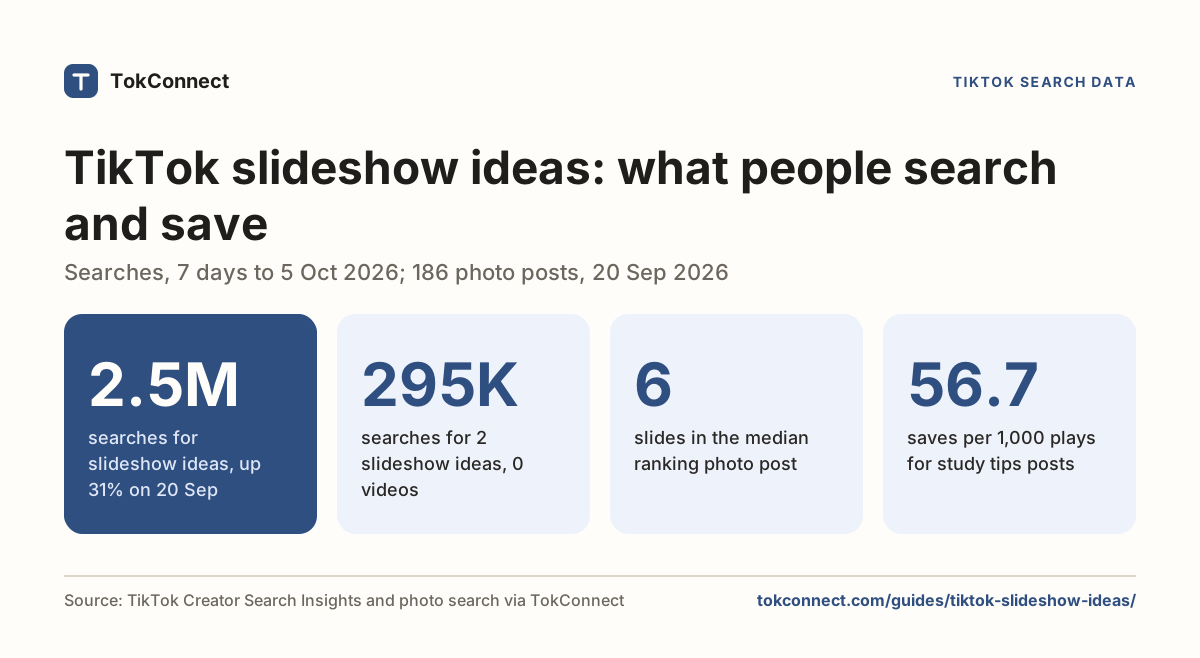
- The median ranking slideshow has six slides. A third are a single image. Nothing rewards going to 35.
- Slideshows were saved 2.4x more often per play than videos on one query and level on another, so the format is not automatically better; it is just far cheaper to make.
- TikTok tags each slide with the language of its on-image text, so it appears to read it: put the search phrase on slide one, in the caption and in the post's title field.
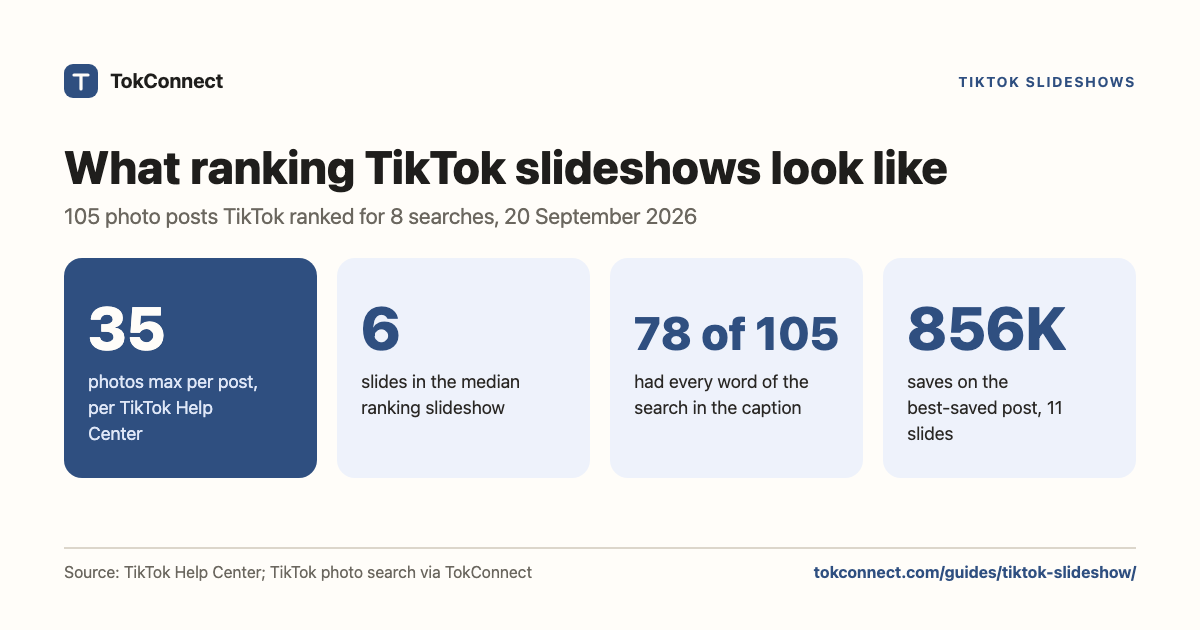
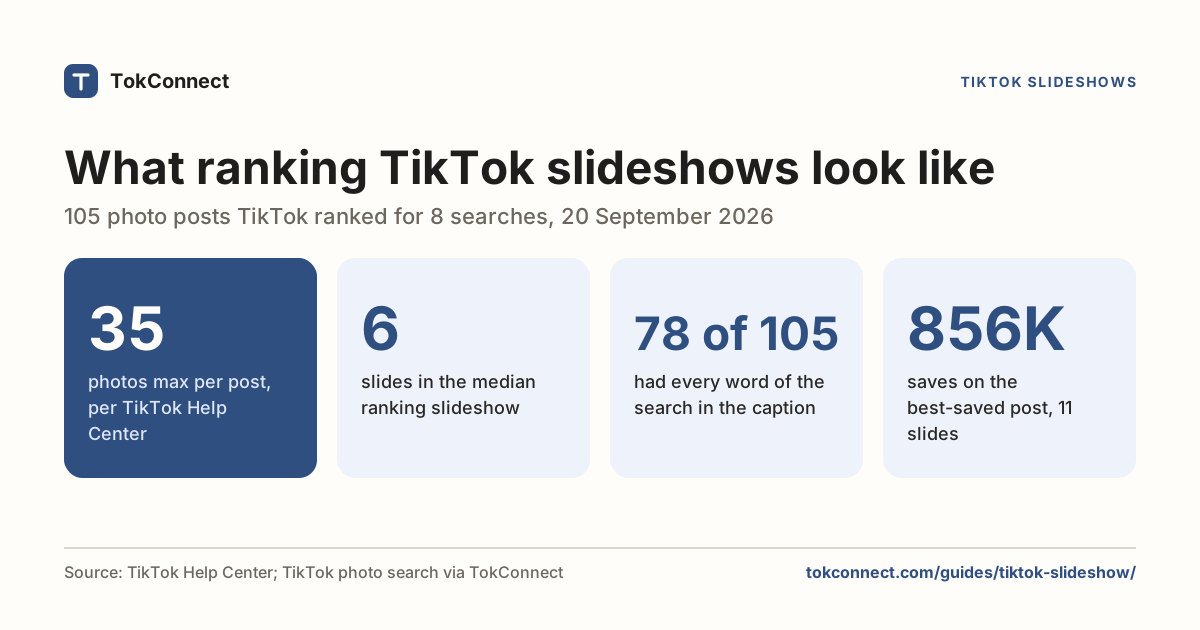
To make a TikTok slideshow, tap +, switch to Photo and upload up to 35 images, a limit TikTok's Help Center confirms. In the 105 photo posts TikTok ranked for eight everyday searches on 20 September 2026, the median slideshow had six slides, and nothing rewarded going near 35.
A slideshow is a photo post: TikTok stitches your images into one post with a sound behind it, and viewers swipe through at their own pace. The rest of this page is the part the other guides skip: what slideshows actually rank in TikTok search, with real play, like, comment and save counts for every post. Every number below is in a snapshot you can open.
How do you make a slideshow on TikTok?
The steps are identical on iPhone and Android. There is no separate slideshow button; it is a mode in the camera screen.
- Open TikTok and tap +.
- Above the red record button, swipe the mode strip from Camera to Photo.
- Tap Upload and select up to 35 images in the order you want them. Order matters; TikTok keeps the order you tap them in.
- Tap Add sound and pick a track. The sound plays for its full length while people swipe.
- Use the text tool to put a line on each slide, then tap Next.
- Write a caption, add hashtags, pick a cover, post.
TikTok's Help Center caps a photo post at 35 photos (checked 5 October 2026), and lets you add a filter, sound, text, stickers and crops before you post, or send the same photos to your Story instead. Shopify reports the same 4,000-character caption box as a video. The format arrived with photo mode in 2022, which is why the same thing gets called photo mode, a photo post, a carousel and a slideshow.
Swipe or auto-play
Those are two different products and people mix them up constantly. Photo mode makes a swipeable post: the viewer controls the pace, like an Instagram carousel. The Templates tab on the same screen makes a video out of your photos, with transitions that advance on their own. It is a video file when it posts, so it has a duration, a scrub bar and no swiping.
Pick swipe when the slides carry information people want to stop on, such as a recipe, a workout or a packing list. Pick a template when the photos are the point and you want a sound to carry the pace, such as a photo dump.
TikTok Studio at tiktok.com/tiktokstudio accepts image uploads, but guides disagree about whether you get a real swipeable photo post out of it, and some report the carousel format is phone only. If the post has to be swipeable, make it in the app. If you only need photos on screen, export a video from any editor and upload that.
Which slideshows rank in TikTok search?
TikTok's search results have a Photos tab, and it is a different ranking from the video tab. We asked TikTok for the photo results behind eight everyday queries and kept what came back: caption, slide count, and the post's play, like, comment and save counts. These are first-page results, which run to roughly fifteen posts per query, so they are what a searcher sees before scrolling.
Here is the top result by plays for each query.
| Query | Top photo post | Slides | Plays | Likes | Comments | Saves |
|---|---|---|---|---|---|---|
| meal prep ideas | @jalalsamfit, titled "8 Easy Delicious Meal Prep Ideas Part 4" | 9 | 18,762,517 | 914K | 2,239 | 624K |
| book recommendations | @isitreallylessi, "This book blew my mind" | 4 | 12,998,448 | 2.1M | 3,569 | 637K |
| outfit ideas | @xuongmay.thaituan, caption is hashtags only | 14 | 11,404,303 | 1.7M | 2,998 | 410K |
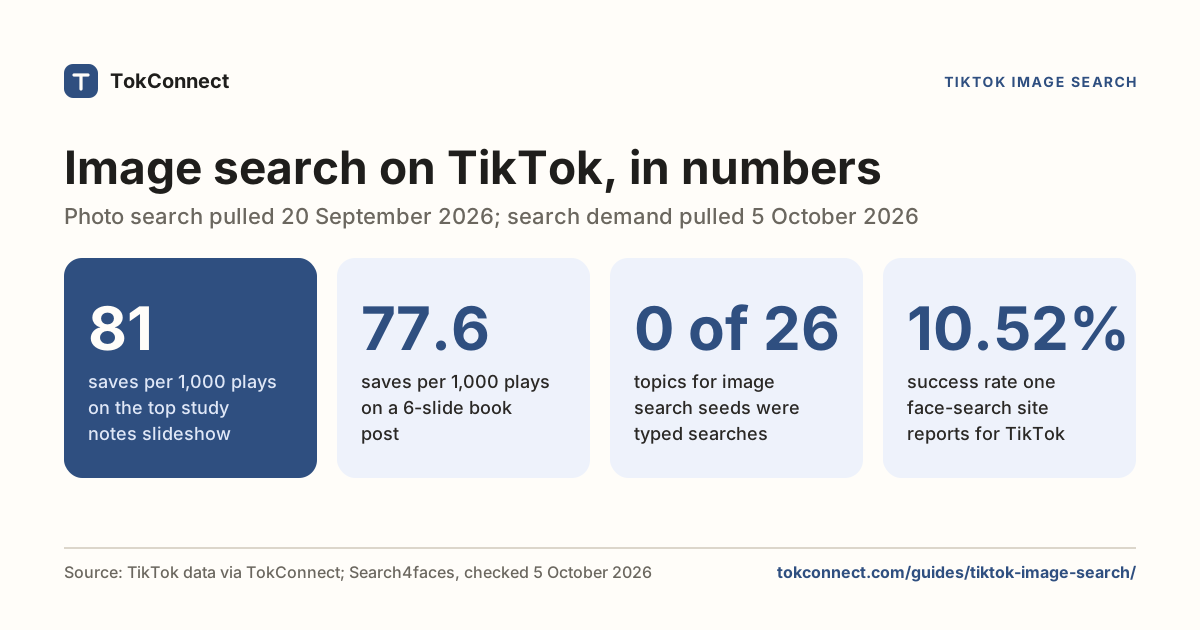
| study notes | @kiyolovesmiso, caption is hashtags only | 1 | 8,362,144 | 1.8M | 3,096 | 213K |
| gym workout plan | @fitness4116, "If you're thinking, I want to start going to the gym 4 times a week…" | 6 | 4,591,367 | 260K | 302 | 305K |
| travel itinerary | @voyra.trvl, "The perfect Rio itinerary" | 10 | 2,495,749 | 201K | 418 | 75K |
| room decor | @moonixa82, caption is hashtags only | 12 | 2,042,465 | 196K | 390 | 94K |
| small business tips | @brandstrategistjoey, "Here are some essentials for your entrepreneurial journey" | 9 | 515,408 | 29K | 238 | 17K |
Data: TikTok photo search. Open the snapshot.
Find the top-saved slideshows for your topic
The pattern behind the ranking slideshows
Across all 105 posts, the median slideshow has six slides. Roughly a third of the results are a single image, half sit between two and ten slides, and the rest run long. The longest in this pull was 20 slides. Nothing in the data rewards going to TikTok's 35-photo ceiling.
| Query | Posts | Median slides | Saves per 1,000 plays | What the winners do |
|---|---|---|---|---|
| book recommendations | 15 | 6 | 54.6 | One book per slide, cover photo plus a one-line verdict |
| gym workout plan | 14 | 1 | 52.7 | The whole split written on one screenshot-style image |
| room decor | 13 | 7 | 46.1 | Hashtag-only captions, rooms as pure inspiration |
| study notes | 10 | 3 | 44.7 | Photos of real handwritten pages, no graphics |
| meal prep ideas | 12 | 11 | 42.3 | One meal per slide, numbered, "save this" in the caption |
| travel itinerary | 14 | 7 | 36.1 | Day one to day seven, place name on each slide |
| outfit ideas | 16 | 3 | 32.3 | Full-length mirror shots, no text at all |
| small business tips | 11 | 7 | 27.6 | Listicle text on plain backgrounds, tip per slide |
Data: TikTok photo search 105 posts across eight queries. Open the snapshot.
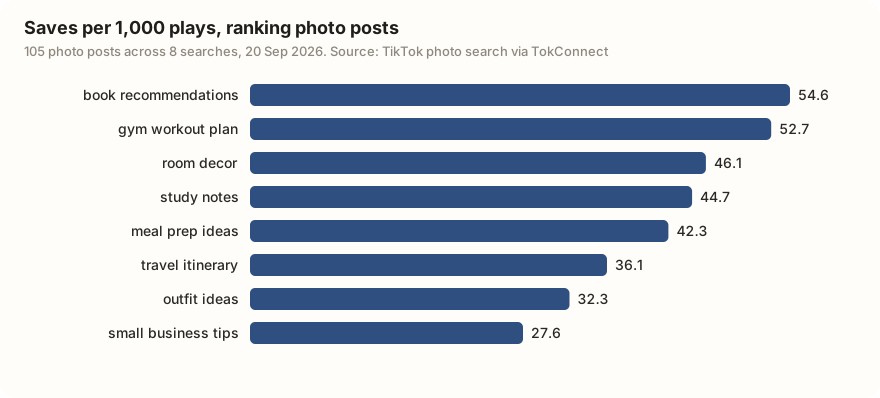
Three things show up everywhere. First, listicle wording. The captions and on-image titles that rank read like table of contents entries: "8 Easy Delicious Meal Prep Ideas Part 4", "Business Tips for Entrepreneurs & Business Owners", "HOW TO MAKE REVISION NOTES". They tell you the count and the subject before you swipe.
Second, text on the images themselves. TikTok's search data tags every slide with the language of its on-image text, which is TikTok saying it has read the words on that picture. On-image text is not decoration here; it is indexed content.
Third, the post title. A photo post carries a title field separate from the caption, and 69 of our 105 results had one set. That is a second keyword slot most creators never fill in.
Slideshow vs video, on the same query
The usual claim is that slideshows get more saves. We tested it by running two of the same queries against TikTok's video results and comparing engagement against plays, which is the only fair way to line up a post with 300K views and one with 13M.
| Query | Format | Posts | Median plays | Saves / 1K plays |
|---|---|---|---|---|
| meal prep ideas | Photos | 12 | 2.54M | 42.3 |
| Videos | 17 | 2.06M | 17.5 | |
| book recommendations | Photos | 15 | 325K | 54.6 |
| Videos | 17 | 609K | 52.0 |
Data: TikTok photo and video search. Snapshots: photos, videos.
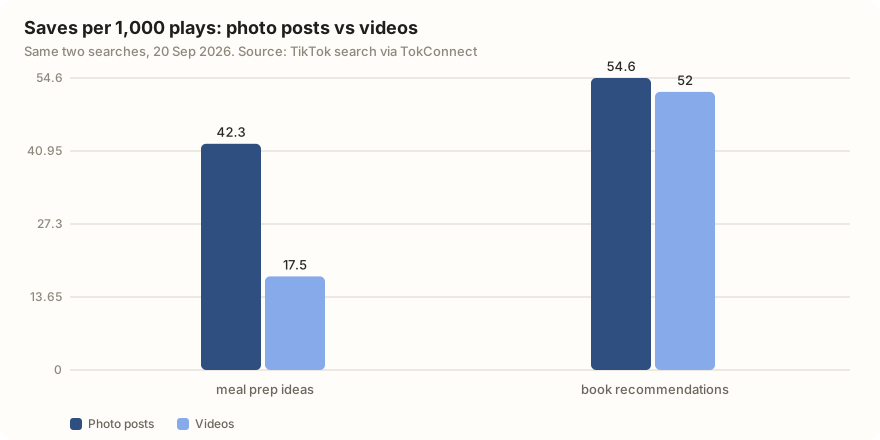
So the claim is half right. On meal prep, slideshows were saved 2.4 times as often per play as videos. On book recommendations the two formats were level. The format does not create saves on its own; the content does, and photo mode makes it cheap to build the kind of post people save, which is a list they want to come back to.
The other half of the table is more consistent. Slideshows got fewer comments per play in both queries (0.1 against 0.3 per 1,000 plays on meal prep, 0.3 against 0.7 on book recommendations). If a client brief asks for conversation, a video still wins. If it asks for saves and shares of something reference-shaped, a slideshow costs a fraction of the effort for the same result.
TikTok SEO for slideshows
Search reads a photo post through four surfaces. Use all four and you are ahead of most of the Photos tab.
1. Put the search phrase in the caption
Of the 105 ranking posts we pulled, 78 had every word of the query somewhere in the caption, counting words inside hashtags. That is not a coincidence, and it is the cheapest thing on this list. Write the phrase as a sentence first, then add hashtags. Twenty-eight of the posts had captions made of nothing but hashtags, and they still ranked, but they gave TikTok nothing to read except tag names.
2. Write the first slide like a headline
The first slide is the cover in search results and in the feed. It has to say the topic, not tease it. "5 day New York itinerary" gets the swipe; a pretty photo of a skyline does not, unless the query was about skylines.
3. Repeat the topic in on-image text
TikTok tags each slide with the language of its on-image text, so it appears to read it. Putting the phrase on slide one and the natural variants on later slides gives search the same signal that on-screen text gives a video. The TikTok SEO guide covers how those signals combine.
4. Pick the phrase from search data, not instinct
People type specific slideshow searches into TikTok, and some have no videos answering them. These are typed searches in the 7 days to 20 September 2026:
| Typed search | Searches, 7 days to 20 Sep 2026 | Videos matched |
|---|---|---|
| photo dumps live photos | 289,013 | 1,009 |
| post slideshow ideas | 274,362 | 704 |
| Pinned slideshow | 264,979 | 0 |
| photo dump edit | 238,671 | 1,425 |
| sza slideshow ideas | 226,532 | 308 |
Data: TikTok Creator Search Insights global. Snapshots: slideshow topics, autocomplete and photo-dump topics.
The same pulls also returned phrases like "shopping themed slideshow ideas" with figures in the millions. Those are TikTok's topic groups, a figure that pools many related searches, not one phrase people type, so we don't rank them against the searches above. Our keyword research guide walks through picking a phrase.
Find the top-saved TikTok slideshows for [topic]: slide count, plays, saves per 1,000 plays and caption pattern.
Want this for your own topic? Connect TokConnect to ChatGPT or Claude and run the prompt above.
When slideshows go wrong
"Why can't I make a slideshow?" Photo mode rolls out by region and app version, so the Photo option in the mode strip is the first thing to check. Update the app, then look again; if you are on a business account or an older build, the mode can be missing entirely. Logging out and back in clears it for some people.
"My slideshow isn't working." Almost always the images. Use JPG or PNG files sized 1080 by 1920 so they fill the screen; larger files gain nothing, since TikTok's developer docs cap posted photos at 1080p. Odd formats and very large files are the usual reason an upload fails. Re-save the images, upload fewer than ten to test, and avoid live photos, which TikTok converts and sometimes drops.
"How do I turn a slideshow into a video?" You cannot convert a posted photo post. Rebuild it: put the same images through the Templates tab, or export a video from any editor and upload it as a normal post. You lose swiping and gain a watch-time metric, which changes how the post is ranked.
"Can I download someone's slideshow?" Not reliably, and the image URLs TikTok serves are signed and expire within days. The numbers behind other people's photo posts are a different matter: captions, slide counts and engagement come straight out of search, which is where everything on this page came from.
This is the lowest-effort format on TikTok that still ranks, and the ceiling is high: the best-saved post in our pull collected 856,036 saves from 11 slides. For starting ideas, we sorted 15 niches by what actually gets saved in 40 slideshow ideas with real numbers, and the creators page shows how to run this research yourself.
How we got these numbers
On 20 September 2026 we used TokConnect, which reads TikTok's own data, to pull the first page of TikTok's Photos results for eight everyday searches: meal prep ideas, book recommendations, outfit ideas, study notes, gym workout plan, travel itinerary, room decor and small business tips. That gave 105 photo posts with their caption, slide count, plays, likes, comments and saves. For two of the searches we also pulled the video results, so the comparison uses the same query on both formats. Saves per 1,000 plays is our arithmetic: total saves divided by total plays for each group, times 1,000. Plays can include repeat views.
The search demand figures are TikTok's Creator Search Insights Search popularity: searches worldwide over the last 7 days, pulled the same day. We kept typed searches only. Records TikTok generates to pool many searches, the topic groups, are excluded from every count and ranking here. The 35-photo limit comes from TikTok's Making a post help page. Snapshots: photo results, video results, paging test, slideshow searches, autocomplete and photo-dump searches.
Key statistics
A TikTok photo post can hold up to 35 photos, according to TikTok's Help Center.
The median TikTok slideshow ranking for eight everyday searches on 20 September 2026 had 6 slides, across 105 photo posts.
78 of 105 TikTok photo posts ranking for eight searches on 20 September 2026 had every word of the search somewhere in the caption.
All 6 statistics
For "meal prep ideas" on 20 September 2026, ranking TikTok photo posts were saved 42.3 times per 1,000 plays, against 17.5 for ranking videos.
The best-saved TikTok photo post among 105 ranking slideshows on 20 September 2026 had 856,036 saves from 11 slides.
"Pinned slideshow" was searched 264,979 times on TikTok worldwide in the 7 days to 20 September 2026, and TikTok matched 0 videos to it.
Frequently asked questions
Is a TikTok carousel the same as a slideshow?
Yes. TikTok calls the format photo mode; creators call it a slideshow, a carousel or a photo post. All four names mean one post made of up to 35 images that viewers swipe through, with optional sound, and TikTok search treats them as one format. Instagram's carousel is the closest equivalent, which is where the name comes from.
Why can't I make a slideshow on TikTok?
Photo mode rolls out by region and app version. Update TikTok, then tap + and check the mode strip above the record button for a Photo option. If it is missing, try logging out and back in; on some business accounts and older builds the mode does not appear at all, and there is no setting that turns it on.
How do I turn my TikTok slideshow into a video?
You cannot convert one that is already posted. Rebuild it: run the same images through the Templates tab on the camera screen, which outputs a video with automatic transitions, or export a video from any editor and upload it as a normal post. You lose swiping, and TikTok starts ranking it on watch time instead.
How do I make a photo swipe on TikTok?
Swiping is what photo mode does by default. Tap +, switch from Camera to Photo, upload your images, and the finished post is swipeable. If your post plays by itself with transitions, you used a template instead, which posts as a video.
Do slideshows do better than videos on TikTok?
It depends on the topic. On meal prep ideas the photo results we pulled were saved 2.4 times as often per play as the video results; on book recommendations the two were level. Slideshows got fewer comments per play in both. They are cheaper to make, which is usually the real advantage.
Sources and data
- Making a post: how to post a photo (TikTok Help Center, checked 5 October 2026)
- TikTok Tutorial Series: Photos on TikTok (TikTok Newsroom)
- TikTok Slideshow: How To Make One Step by Step (Shopify)
- How to Make a Slideshow on TikTok: Your Photo Mode Guide (Metricool)
- How to make a TikTok slideshow in 2026 (Descript)
- Photo search results for eight queries, pulled 20 September 2026 (snapshot)