TikTok creator tools: know what to film before you film it.
Your views dipped and the caption box is blank. TokConnect shows you the beauty searches TikTok matched 0 videos to in the 7 days to 26 October, the first lines and sounds winning this month, and the Shop products paying creators your size.
Free, no card.
- "small lip lip combo"297,329searches
- "skincare routine men korean"295,488searches
- "korean skincare walmart"294,829searches
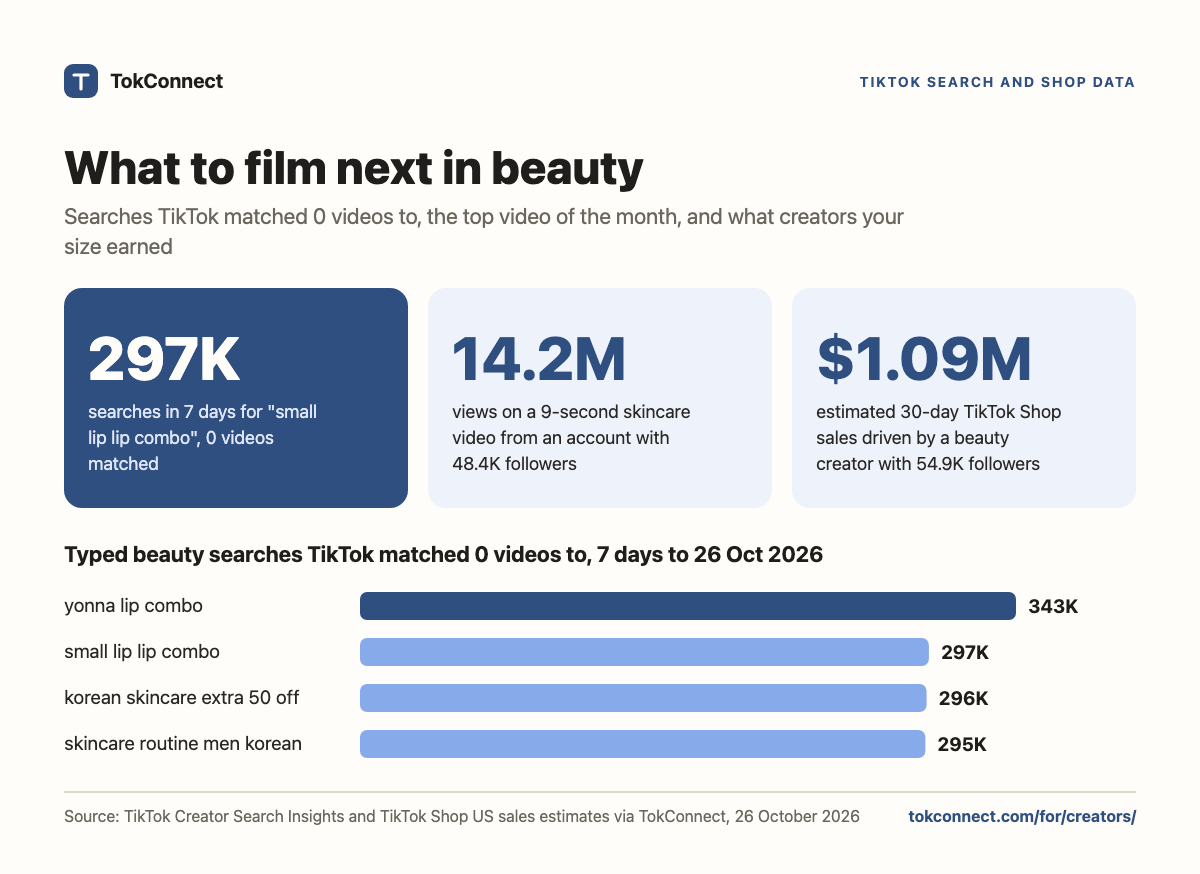
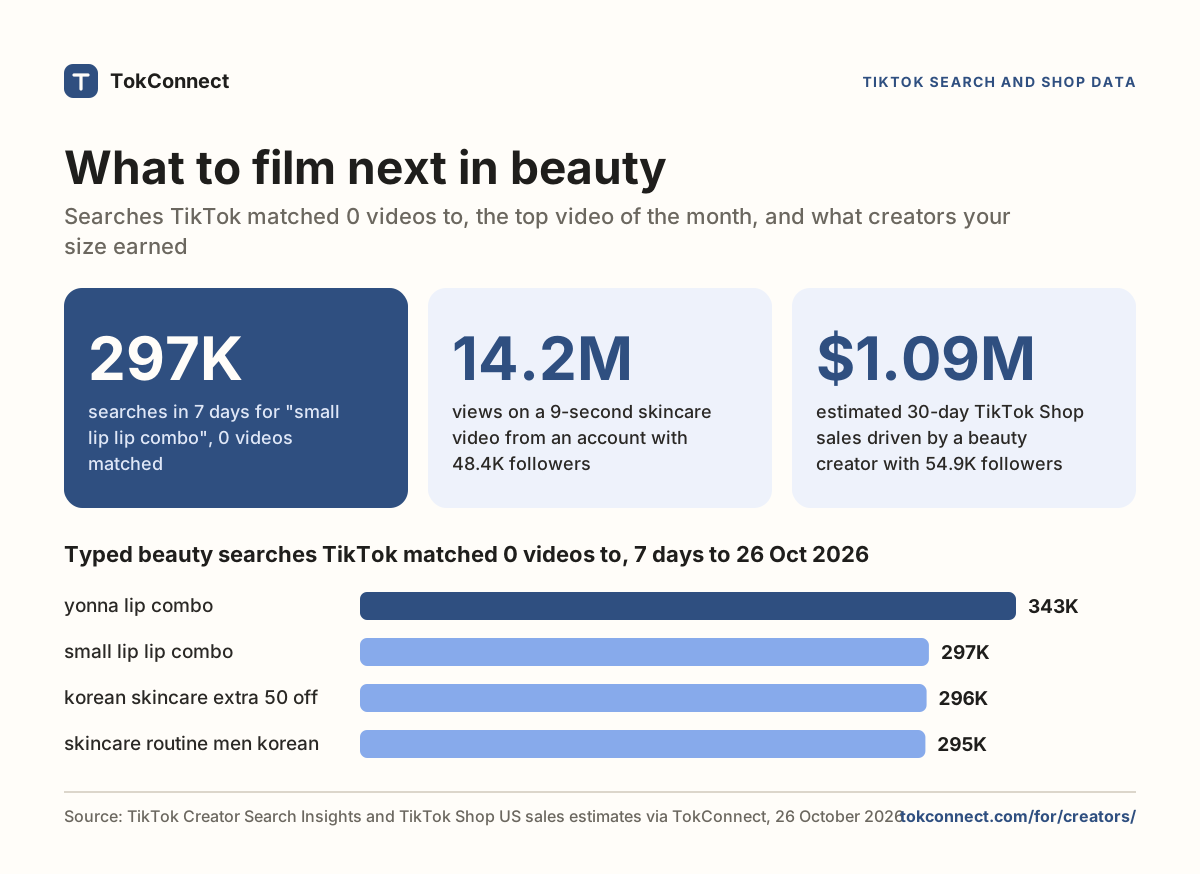
TokConnect shows TikTok creators what to post next: the searches in their niche that TikTok matched 0 videos to, the first lines and sounds behind the top videos, and the TikTok Shop products paying creators their size. In the 7 days to 26 October 2026, "small lip lip combo" drew 297,329 TikTok searches and TikTok matched 0 videos to it.
Everything on this page also works inside ChatGPT and Claude. Connect once and ask there.
Three things every creator says at 11pm
"I don't know what to post. Everything in beauty is already done."
Not everything.
TokConnect lists the searches in your niche that TikTok matched 0 videos to. In the 7 days to 26 October that was 12 typed beauty searches, each with 130,639 to 342,865 searches and not one video.
"My hooks used to work. Now I get 800 views."
Borrow what's winning now.
For any search, TokConnect shows the videos TikTok ranks for it, their first lines, their length and the sound underneath. Five of this month's top eight skincare videos came from accounts under 50,000 followers.
"Which products actually pay creators like me?"
The ones with a big pool and few hands in it.
TokConnect shows each product's estimated sales, commission rate and how many creators already post it. A serum paying about $239K in commission is crowded; a mud mask with 992 creators is not.
What people search that TikTok matched no video to
Twelve typed beauty searches had 0 videos in the 7 days to 26 October. "yonna lip combo" alone drew 342,865 searches. Film the one closest to what you already make.
Beauty searches with 0 videos
What it means
0 videos means TikTok's own search tool found no video for that exact phrase. The nearest videos still show up when someone searches, so saying the exact phrase out loud and putting it in the caption gives TikTok a match it does not have today.
Three of the twelve are lip combos. A "small lip lip combo" is a 30-second video you can film tomorrow. How content gaps work, or run it yourself with the content gap finder. The same method works outside beauty: swap in your own niche.
What's rising in the 7 days to 26 October
Four searches went from almost nothing to hundreds of thousands in seven days. Two of them still have no video at all.
"skincare routine men korean"
295,488 from 0 a week earlier
0 videos"korean skincare for dark skinned girls"
281,859 from 99 a week earlier
0 videos"ultra lip combo"
296,329 from 200 a week earlier
217 videos"hand skincare"
175,352 from 800 a week earlier
1,179 videosDaily readings, 20 to 26 October 2026. Rising plus few videos is the shortlist. Snapshot · Beauty trends this week · Content gaps this week
The hooks and sounds that already work
The most-viewed "skincare routine" video this month is 9 seconds long and comes from an account with 48,400 followers. Five of the top eight are from accounts smaller than 50,000.
Top "skincare routine" videos of the month
"I'm 42 years old, and both of my kids are influencers, and I want to be an influencer, too."
The sounds underneath
- 5 of 8 use the creator's own voice as an original sound.
- "Sakura-lined street" by KCNX sits under the 10.2M-view video.
- "Training Season" by Dua Lipa and "Quebec" by Drake carry two of the smaller hits.
Talk first, music second. The 9-second video that beat them all has 434,700 shares and no licensed track. More on hooks.
The products paying beauty creators, 30 days to 24 October
Commission times estimated sales is the pool creators share. The NAD+ serum's pool is about $239K, split between 2,052 creators who made a sale. The mud mask's pool is smaller, and only 992 creators post it.
Estimated commission pool, 30 days
$1.84Mestimated 30-day sales of the NAD+ serum, 80,048 units at $23.00
59.9%of the 3,424 creators who posted the serum made at least one sale
+379.1%30-day growth of the Gua Sha neck cream, now posted by 4,036 creators
+64%growth of the mud mask, with 992 creators and 44.3% of them selling
How to pick one
Big pool, many hands: the serum. Rising curve, fewer hands: the mud mask, up 64% with 992 creators. Request the sample for the second kind, film it against a search with 0 videos, and you are first twice.
Creators your size are the ones earning
The ten top-earning beauty affiliates with 10,000 to 100,000 followers drove an estimated $4.79M in 30 days. Seven of them have under 50,000 followers. The top one does lip combos.
Followers against 30-day sales driven
Read it like a creator
@mor*** has 54,900 followers, posts lip combos, and drove $1.09M from 52,450,000 views in 30 days. @sho*** has 15,200 followers and drove $693.9K. Follower count did not decide the order; the videos did.
Three of the twelve zero-video searches above are lip combos. The top earner among 10K-100K-follower beauty affiliates makes lip combos. That is a plan.
What TokConnect shows for each of them
Every product they sell, the videos that sold it, who follows them and how their sales moved day by day. Study the three above the line before your next brand pitch.
Ask it where you already plan your week
Connect TokConnect once and the same data answers inside ChatGPT, Claude or Cursor. One real question, and the shape of the answer.
Searches with 0 videos, 7 days to 26 October: "small lip lip combo" (297,329), "korean skincare walmart" (294,829), "skincare routine men korean" (295,488, up from 0 in seven days).
Products: the medicube NAD+ EGF Firming Serum pays 13% on an estimated $1.84M in 30 days; 59.9% of its 3,424 creators made a sale. Less crowded: the Zero Pore Blackhead Mud Mask, 13%, 992 creators, up 64%.
Creators your size: the top beauty affiliate with 54,900 followers drove $1.09M in 30 days with lip combos.
Numbers from this page's data.
How a creator uses TokConnect in one week
Monday: pick three gaps
Ask the research agent for your niche. Take the three searches with 0 videos closest to what you already film. This week in beauty that could be "small lip lip combo", "korean skincare walmart" and "hand skincare".
Tuesday: steal the shape, not the video
Watch the top five videos for the nearest search. Note the first line, the length and whether the sound is original. This month's winners talk first and run 9 to 44 seconds.
Wednesday: film and caption
Say the phrase in the first line and put it in the caption, word for word. TikTok SEO explains why the exact wording matters.
Friday: request the sample
From the product list, pick one with a rising curve and fewer creators. Film it against one of your gaps the following week.
Key statistics
"small lip lip combo" was searched 297,329 times on TikTok in the 7 days to 26 October 2026, and TikTok matched 0 videos to it.
12 of the 73 typed beauty searches TokConnect pulled on 26 October 2026 had 0 matching videos; the biggest, "yonna lip combo", had 342,865 searches in 7 days.
The most-viewed "skincare routine" video of the month to 26 October 2026 ran 9 seconds, came from an account with 48,400 followers and had 14,200,000 views and 434,700 shares.
All 5 statistics
The medicube NAD+ EGF Firming Serum made an estimated $1.84M on TikTok Shop US in the 30 days to 24 October 2026 at a 13% affiliate commission, about $239K shared by the 2,052 creators who sold it.
The ten top-earning beauty affiliates with 10,000 to 100,000 followers each drove an estimated $224.6K to $1.09M on TikTok Shop US in the 30 days to 24 October 2026; seven had under 50,000 followers.
What creators ask before they sign up
Creator Search Insights is free in my app. Why would I pay?
Use it. It shows one phrase at a time. TokConnect checks your whole niche at once, shows the videos TikTok ranks for each phrase with their first lines and sounds, and adds the TikTok Shop products and the creators earning on them, which Creator Search Insights does not have. Start free, no card. Our Creator Search Insights guide explains every tab of TikTok's own tool.
Do I need a big account for this to be worth it?
No. Search demand is the same number whatever your follower count, and a search with 0 videos is easier to win when nobody has covered it. The ten top-earning beauty affiliates with 10,000 to 100,000 followers drove an estimated $224.6K to $1.09M each in 30 days, and seven of them had under 50,000 followers.
Which tools help TikTok creators decide what to post?
TikTok gives you Creator Search Insights for search demand, TikTok Studio for your own analytics and CapCut for editing. TokConnect adds the part they leave out: a whole niche checked at once, the searches with 0 videos, the hooks and sounds behind the top videos, and the Shop products paying creators, in the app or inside ChatGPT and Claude. Free to start, no card. Paid plans from $34.99 a month, billed yearly.
What does "0 videos" actually mean?
TikTok's own search tool matched no video to that exact phrase in the week. People searching it still see the nearest videos, so saying the exact phrase and putting it in the caption gives TikTok a match it does not have today. Search the phrase in the app before you film to see what shows up today.
Could this get my account in trouble?
No. You never connect your TikTok login. TokConnect reads public data and nothing posts, follows or likes on your profile.
What does it cost for a creator?
Free includes 50 credits and every research tool, no card. Paid plans from $34.99 a month, billed yearly. See pricing.
How we got these numbers
We pulled four beauty keywords from TikTok's Creator Search Insights through TokConnect on 26 October 2026: skincare, makeup, lip combo and korean skincare, 80 rows in all. Search counts are TikTok's 7-day figure for the typed phrase, and "0 videos" is TikTok's own match count for that exact phrase. We set aside 7 rows that are topic labels TikTok generates itself, which pool many searches, and counted the 73 typed searches.
The videos are TikTok's most-liked results for "skincare routine" posted in the month to 26 October 2026, with the counts shown that day; the first line is from TikTok's own captions. We charted the eight English-language beauty videos and left out an Arabic video, a meme account and two posts with no beauty caption. Handles are masked.
Products and affiliates are TikTok Shop US sales estimates via TokConnect for the 30 days to 24 October 2026. Units track TikTok's public sold counter; revenue is units times the average selling price we observed, which can sit below the listed price, so treat it as an estimate. The commission pool is our calculation: estimated revenue times the listed rate. We left out four skincare products whose revenue per unit did not match their listed price: a medicube sunscreen stick, a tarte tinted serum and two medicube sets.
Data: searches · videos and the first line · products · affiliates. Guides: Creator Search Insights, TikTok video ideas, TikTok SEO, content gaps, the free video idea generator.