tokconnect
- Filters (the three-circle button in the camera's side toolbar) change colour and tone. Effects (next to the record button) add face changes, green screens, games and AI tricks, and only effects have a search bar.
- To use an effect from someone's video, tap the effect name above their username, then Use this effect. No name usually means a plain filter or an edit made in another app.
- You can remove or weaken a colour filter before posting, but not after. Once a video is live the filter is part of the file; the only fix is to delete and upload again.
- Since TikTok's announcement on 26 November 2024, under-18 accounts are blocked from effects that enlarge eyes, plump lips or smooth skin. TikTok has not published when the worldwide rollout finished.
- Effect House, TikTok's free desktop app for making effects, is still running in 2026. Its old Create with AI tool is gone, replaced by Ask AI.
To find TikTok filters, tap the + button to open the camera. Tap Filters in the camera's side toolbar for colour looks, or tap Effects, next to the record button, and type a name into the search bar at the top. To use an effect you saw in someone's video, tap the effect name shown above their username, then tap Use this effect.
A filter changes the colour and mood of the whole video. An effect adds something: a face change, a green screen, a game, an AI trick. Below: where each lives, how to search, save and remove them, TikTok's beauty filter limits for teens, and how to make your own. We also checked which filter searches people are making on TikTok this week.
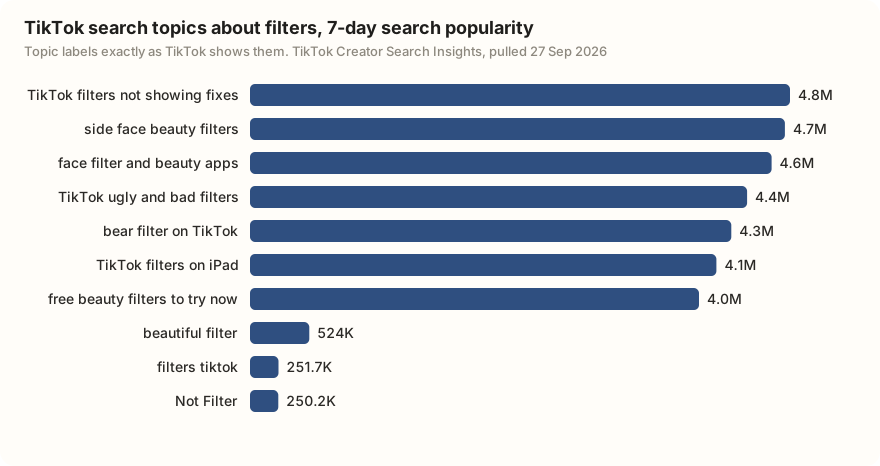
Beauty filters lead: four of the ten topics, about 14 million searches between them in a week. The biggest single topic is a fix, "TikTok filters not showing fixes". Read the top numbers with care. Six of the top seven started the week under 10,000 and ended it in the millions, with few or no videos made for them. That is the shape of a brand-new topic, not steady demand. "Free beauty filters to try now" is the steady one, between 3.2 and 5.0 million every day.
| TikTok topic label | Search popularity (7 days) | Videos TikTok lists | Day 1 of the week |
|---|---|---|---|
| TikTok filters not showing fixes | 4,769,314 | 0 | 9,895 |
| side face beauty filters | 4,723,927 | 0 | 9,699 |
| face filter and beauty apps | 4,606,581 | 164 | 9,302 |
| TikTok ugly and bad filters | 4,390,116 | 356 | 8,602 |
| bear filter on TikTok | 4,251,073 | 583 | 8,195 |
| TikTok filters on iPad | 4,119,211 | 280 | 7,700 |
| free beauty filters to try now | 3,965,889 | 0 | 3,458,837 |
| beautiful filter | 524,047 | 1,186 | 186,881 |
| filters tiktok | 251,675 | 1,147 | 7,602 |
| Not Filter | 250,224 | 136 | 167,449 |
Data: TikTok Creator Search Insights via TokConnect, pulled 27 September 2026 for four phrases ("filter", "effect", "beauty filter", "tiktok filter"), five topics each. Search popularity is the 7-day global figure TikTok shows on a topic page (what it means). Eight topics about household filters, software or Adobe After Effects are left out; the largest "effect" topic, "8k effect" (19.5 million), is a video-quality editing trick, not a camera effect. Snapshot.
TikTok filters vs effects: what is the difference
A filter is a colour grade. It makes the whole video warmer, cooler, softer or black and white, and adds nothing new. An effect is the bigger toolbox. It can change your face, swap your background for a photo, put a game on screen or turn a photo into a moving clip.
| Filters | Effects | |
|---|---|---|
| What it does | Changes colour and tone of the whole video | Adds AR objects, face changes, green screen, games, AI tricks |
| Where to find it | Filters button (three circles) in the camera's side toolbar | Effects button beside the record button |
| Search bar | No, you swipe through a short list | Yes, at the top of the Effects panel |
| Strength | Slider above the filter list | Depends on the effect |
| Before or after filming | Both | Depends on the effect; some work only before, some only after |
| Who makes them | TikTok | TikTok and outside creators using Effect House |
| Name shown on your video | No | Yes, above your username |
Sources: TikTok's Effects and filters help page (read through search results; TikTok blocks direct fetches), SocialzAI, updated 29 May 2026, High Social.
People mix up the two words, and so does TikTok's search. Three of the ten suggestions TikTok gives for "filter" contain the word "effect".
How to find and search filters on TikTok
- Tap + at the bottom of the screen to open the camera.
- For a colour look, tap Filters in the side toolbar. Swipe through the looks and drag the slider to set the strength.
- For an effect, tap Effects, to the left of the record button. A panel opens with tabs such as Trending, New, Beauty, Funny and Games.
- To search, tap the magnifying glass at the top of that panel and type a word ("green screen", "game", "beauty") or the exact effect name.
- Tap an effect to try it live, then record.
That search sits inside the camera, not in the main search bar (Social Champ, updated 5 January 2026). The main bar still helps when you only know what an effect does. Type "bear filter", watch the videos, and tap the effect name on one of them.
Guides disagree on one detail. SocialzAI (May 2026) and High Social put Filters on the right-hand toolbar; Filmora's 2026 guide says the left. None of the 2025 or 2026 guides we checked names an app version, and TikTok tests layouts by account. If Filters is missing, look for the three-circle icon. The first-week guide walks through every camera button.
Save an effect to Favorites
In the Effects panel, select the effect and tap the Favorites (bookmark) button at the top of the panel. TikTok's help page describes this route; SocialzAI calls it the bookmark icon. You can also tap an effect's name on any video and tap Save on the effect's page.
How to get a filter on TikTok from someone's video
- Pause the video with the effect you want.
- Look just above the creator's username for a small label with the effect's name.
- Tap it. The effect's page opens with other videos made with it.
- Tap Use this effect. The camera opens with it switched on.
No label usually means a plain colour filter (TikTok does not name those), an edit made in another app such as CapCut, or an effect that has been taken down. The two tutorials below were among the most played results for "how to find filters on tiktok" on 27 September 2026.
Videos from TikTok search results for "how to find filters on tiktok", pulled 27 September 2026. Snapshot.
Trending filters on TikTok right now
The Trending tab in the Effects panel shows what is popular. To see what people search for, we pulled TikTok's autocomplete for "filter" and "tiktok effect", ten suggestions each.
| What the suggestion is about | Suggestions | Examples |
|---|---|---|
| The bare phrase or general | 6 | filter effect; tiktok effects filter; tiktok effects for video |
| Finding, adding or fixing an effect | 5 | filters on tiktok; four Burmese questions on how to add, find or adjust an effect, or why one will not work |
| Photos and selfies | 4 | filters for selfies; Filter For Photos; tiktok effect photos |
| Games | 2 | filter games; tiktok effect game |
| Trending | 1 | filters trend tiktok |
| Face effects | 1 | Filter Face Effects |
| Video editing | 1 | tiktok effect video editing |
Data: TikTok search suggestions, pulled 27 September 2026, two phrases, ten suggestions each. Groups and translations are our own reading. Snapshot.
The tutorials near the top of search that day named a mosquito squish game, a spider-on-your-face prank and an AI effect called AI Table Combat. For what is rising across TikTok, see the daily trends page and the trend research guide. An agent connected to TikTok's search data can check any effect name before you film.
Search TikTok topics for "[effect or filter name]". Show the 7-day search popularity, the day-by-day numbers and how many videos exist for each topic. Tell me which ones have lots of searches but few videos, and pull the five most-played videos from this month that mention it, with plays and saves.
Works in Claude, ChatGPT, Cursor and Gemini once TokConnect is connected. Get a free key (50 credits, no card) or see the setup guides.
How to remove a filter on TikTok
Before you record. Open Filters and pick Normal or the No option at the start of the list. In Effects, clear the selected effect. Check the Retouch or Beauty button in the side toolbar too: users report it can be on by default, softening skin with no filter picked. Some effects add a sound too (Filmora, 2026).
Before you post, or from Drafts. On the editing screen, open Filters and pick Normal, or drag the slider down to reduce it. Most camera effects cannot be taken out here, because they were recorded into the clip.
After you post. You cannot. TikTok has no way to edit the filter on a posted video, and Filmora warns that apps claiming to strip filters from posted videos do not work. Your only option is to delete the post and upload the clip again without the filter, which starts it from zero views, likes and comments.
TikTok beauty filters and the limits for under-18s
If you are under 18, TikTok blocks effects that change how your face looks. TikTok announced this on 26 November 2024 at its European Safety Forum in Dublin (TikTok Newsroom; TechCrunch, 27 November 2024). The blocked kind make eyes bigger, plump lips, or smooth or change skin tone, like the Bold Glamour effect. Funny effects such as animal ears stay.
TikTok said the change would roll out worldwide "over the coming weeks and months" and that effects would explain how they change your appearance. Sources disagree on how far it has gone. Cloutfluence says the rollout began in late 2024, that the limit is active in September 2026 and that blocked effects do not appear on teen accounts. A Cybersmile piece from 24 May 2025 still called it a plan. TikTok has not published a date when the rollout finished.
Filming a skincare or beauty product for TikTok Shop? Do not use filters or video edits on it. TikTok Shop's beauty guidelines (dated 30 June 2026) say filters "can exaggerate results" and are not allowed when promoting skincare, even with a disclaimer (TikTok Shop Academy). Paid ads may not exaggerate a product's results or use before-and-after shots that give a false impression (TikTok Advertising Policies, updated April 2026). Film the product in plain light with Retouch off.
AI effects, labels and making your own
More and more effects use AI. AI Alive, launched on 13 May 2025, turns a still photo into a short moving clip from the Story camera (TechCrunch). Since September 2023 TikTok has put "AI" in the name of its AI effects and asked effect creators to do the same (TechCrunch). Clips made with TikTok's own AI effects are labelled for you.
The rule that catches people is the other one. Make a realistic video with AI in another app, and TikTok's rules say you must switch on the AI-generated label at upload; unlabelled realistic AI video can be removed. The TikTok AI guide covers the label and AI Alive in full.
To make your own effect, use Effect House, TikTok's free desktop app for Mac and Windows (effecthouse.tiktok.com). It launched in 2022 (Epidemic Sound) and is still running in 2026. You build the effect and submit it, and TikTok reviews it before it goes public, which SocialzAI puts at one to five business days.
The AI tools inside it have changed. Effect House's guides say the older "Create with AI" tool is no longer available. Creators are pointed to Ask AI, which links an AI coding agent to your project so you can describe an effect in plain words, and to an AI Editor. Effects used in enough videos can earn money through Effect Creator Rewards; the current thresholds are on TikTok's rewards FAQ.
Why can't I find a filter on TikTok?
- Your account is under 18. Appearance-changing effects are hidden.
- It is not in your region. Users report a "not available in your region" message on some effects.
- Your device cannot run it. Some effects say they do not work on your device. "TikTok filters on iPad" is one of the top topics above.
- It was taken down. Creators can pull effects and TikTok can remove them.
- It was never a TikTok effect. Six of the nine tutorial videos we pulled were tagged CapCut, a separate editing app.
- Your app is old. Update TikTok, then search the exact name shown on the video.
Once you have the effect, the video ideas guide helps with what to film.
Frequently asked questions
How do I find a filter on TikTok?
Tap + to open the camera. Tap Filters in the side toolbar for colour looks, or tap Effects, to the left of the record button, and use the search bar at the top of the panel. If you saw it on a video, tap the effect name above the creator's username and tap Use this effect.
What is the most popular TikTok filter?
It changes every week, and TikTok does not publish a ranking. The Trending tab in the Effects panel shows what is popular now. In TikTok's search data on 27 September 2026, beauty filter topics drew about 14 million searches in a week, and topics like "bear filter on TikTok" passed 4 million. Most of those topics were only days old.
How do I remove a filter from a TikTok?
Before posting, open Filters on the camera or editing screen and pick Normal, or drag the slider down. Switch off Retouch too if it is on. After a video is posted you cannot remove the filter; the only fix is to delete it and upload the clip again, which starts from zero views.
Why can't I find a filter on TikTok?
Common reasons: your account is under 18 and the effect changes your appearance; it is not available in your region; your device cannot run it; the creator or TikTok took it down; or it was made in another app such as CapCut. Update the app and search the exact name shown on the video.
What is the difference between a filter and an effect on TikTok?
A filter changes the colour and tone of the whole video, like a photo filter, and has a strength slider. An effect adds something new: face changes, green screen backgrounds, games, AR objects or AI tricks. Effects have their own search bar and show their name above your username when you post.
Can I make my own TikTok effect?
Yes, with Effect House, TikTok's free desktop app for Mac and Windows at effecthouse.tiktok.com. You build the effect, submit it, and TikTok reviews it before it goes public. In 2026 it includes Ask AI, which links an AI coding agent to your project so you can describe an effect in plain words.
Sources and data
- Effects and filters on TikTok (TikTok Help Center)
- Updates from our European Safety Forum (TikTok Newsroom, 26 November 2024)
- TikTok will restrict some beauty filters for people under 18 (TechCrunch, 27 November 2024)
- TikTok beauty filters for under-18s: what changed and why (Cloutfluence, 2026)
- TikTok to remove beauty filters for users under 18 (Cybersmile, 24 May 2025)
- TikTok Filters: how to find, use and create them (SocialzAI, updated 29 May 2026)
- How to search on TikTok (Social Champ, updated 5 January 2026)
- How to remove a filter on a TikTok video (Filmora, 2026)
- Guidelines for responsible beauty and skincare content (TikTok Shop Academy, 30 June 2026)
- Misleading and false content (TikTok Advertising Policies, April 2026)
- TikTok launches TikTok AI Alive (TechCrunch, 13 May 2025)
- TikTok debuts new tools to label AI content (TechCrunch, 19 September 2023)
- Effect House (TikTok)
- FAQ: Effect Creator Rewards (TikTok Effect House)
- TikTok Effect House: what you need to know (Epidemic Sound)