tokconnect
- Export TikTok videos at 1080 x 1920 pixels, 9:16, as an MP4 with H.264 at 30 frames per second.
- Keep text and faces out of the top 130, bottom 484, right 140 and left 44 pixels; the safe box left is 896 x 1306.
- Square videos fill about 56% of the screen and 16:9 videos about 32%, with black bars; TikTok does not crop them to fill.
- Guides put phone upload limits at about 72 MB on Android and 287.6 MB on iPhone; TikTok Studio on a computer takes files in the gigabytes.
- Profile pictures show as a 200 x 200 circle, photo posts take up to 35 images at 1080 x 1920, and In-Feed ads take up to 500 MB and 10 minutes.
The best TikTok video size is 1080 x 1920 pixels, which is a 9:16 aspect ratio, the tall shape of a phone screen. Export it as an MP4 at 30 frames per second and it fills the whole screen with nothing cut off.
The rest is detail: where TikTok's buttons cover your video, what happens to square and horizontal clips, file size limits, and the sizes for photo posts, profile pictures, covers and ads. Where guides disagree, the tables show both numbers and say which comes from TikTok.
TikTok safe zones: where the buttons cover your video
A safe zone is the part of the frame that nothing covers. TikTok puts its own buttons and text on top of every video, so a caption burned in at the bottom or a logo in the corner can disappear behind them.
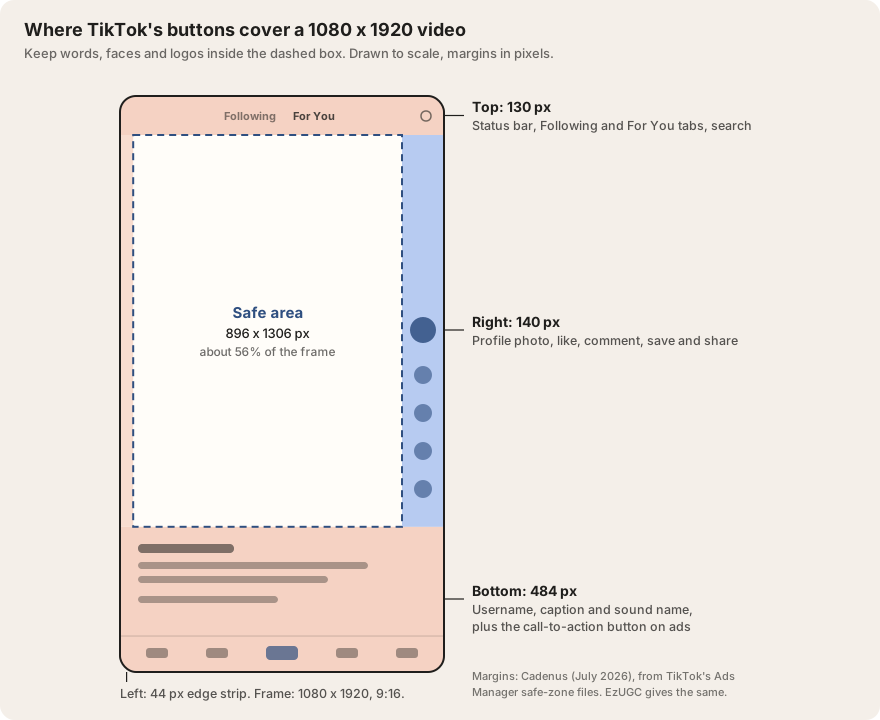
On a 1080 x 1920 video, keep text, faces and logos out of the top 130 pixels, the bottom 484 pixels, the right 140 pixels and the left 44 pixels. That leaves a box of 896 x 1306 pixels in the middle, a little over half the frame. The bottom is the big one: a quarter of the screen's height goes to your username, caption and sound name.
| Source | Top | Bottom | Left | Right |
|---|---|---|---|---|
| Cadenus (July 2026) and EzUGC (August 2026) | 130 px | 484 px | 44 px | 140 px |
| Recharm (August 2026) | 120 to 130 px | 300 to 320 px | 60 px | 120 px |
| PostFast (September 2026), from TikTok's 720 x 1280 ad template, scaled to 1080 x 1920 | 240 px | 660 px | 120 px | 120 px |
TikTok's own safe zones come as downloadable template files inside Ads Manager, listed on its In-Feed ad specs page (June 2026). TikTok's help pages do not print pixel numbers. Sources: Cadenus, EzUGC, Recharm, PostFast.
Cadenus and PostFast both say they measured TikTok's templates. TikTok says the zone changes with the video's shape and the caption's length, one reason the figures differ. Use the first row, which two guides agree on. For a caption of three or four lines, give the bottom more room, closer to PostFast's 660 pixels.
TikTok video size and dimensions: every spec in one table
Here is every size in one place. Each row is explained further down the page.
| What | Size | Shape | Files and limits |
|---|---|---|---|
| Video (normal post) | 1080 x 1920 px; at least 720 x 1280 | 9:16. 1:1 and 16:9 accepted, with black bars | MP4 or MOV (WebM on desktop), 23 to 60 fps, 10 minutes recorded in the app, up to 60 minutes uploaded |
| Photo mode (slideshow) | 1080 x 1920 px per image | 9:16 | JPG, PNG or WebP, up to 35 images |
| Profile picture | Upload 720 x 720 px; minimum 20 x 20; shown at 200 x 200 | 1:1, shown as a circle | JPG or PNG |
| Cover image | 1080 x 1920 px | 9:16, shown cropped on your profile grid | A frame from the video or an uploaded image |
| In-Feed ad (not Spark) | 1080 x 1920 recommended; at least 540 x 960 | 9:16 recommended; 1:1 (640 x 640) and 16:9 (960 x 540) accepted | MP4, MOV, MPEG, 3GP or AVI, up to 500 MB, up to 10 minutes |
Sources: TikTok In-Feed ad specs (June 2026); PostFast (September 2026); Renderforest (June 2026); Moda (August 2026); PostFast profile sizes (July 2026); Puritano (August 2026). All specs in one file: open the snapshot.
TikTok aspect ratio: how 9:16, 1:1 and 16:9 look
Aspect ratio is the shape of the video: width compared with height. TikTok's shape is 9:16, tall and narrow. It takes other shapes, but it does not stretch them to fill the screen. It shrinks them to fit the width and fills the gap with black.
| Shape | Export size | Share of the screen it fills | How it plays in the feed |
|---|---|---|---|
| 9:16 (vertical) | 1080 x 1920 | 100% | Full screen |
| 1:1 (square) | 1080 x 1080 | 56% | A square in the middle, black above and below |
| 16:9 (horizontal) | 1920 x 1080 | 32% | A thin strip in the middle; viewers can tap Full screen and turn the phone |
Share of screen is our arithmetic: a 1080-wide square is 1,080 of 1,920 pixels tall; a 1080-wide 16:9 strip is 607.5 of 1,920. How each shape plays: Moda (August 2026), Riverside (December 2025).
Horizontal videos get a Full screen button under them. Tap it, turn the phone, and the video plays sideways at full size. TikTok explains this in its Full Screen Mode guide for creators. Most people scroll past without tapping, so in the feed a horizontal video is still a strip a third of the screen tall.
TikTok did push horizontal video for a while. In January 2024 it told some creators that horizontal videos over one minute would get extra views in their first 72 hours (Tubefilter, 30 January 2024). TikTok has not said whether that boost still runs in 2026. Post horizontal when the footage needs it, like a podcast, a game or a long talk. Don't post horizontal hoping for a push.
TikTok does not crop a horizontal video to fill the screen. It shows the whole frame with black bars. Zoom it to full screen in TikTok's editor and you keep only the middle slice: from 1920 x 1080 footage that is about 608 x 1080 pixels, blown up to 1080 x 1920, so it looks soft, and anyone at the edges is cut out. Reframe to 9:16 in your editor instead, where you choose what stays. Filming in 4K helps: the middle slice of 3840 x 2160 is 1215 x 2160, sharper than TikTok needs.
TikTok file size, format, resolution and frame rate
The file size limit depends on how you upload. TikTok does not publish a limit for phone uploads on any page we could reach, so the phone numbers come from guides, and they do not agree.
| Where you upload | Limit most guides give | Other figure |
|---|---|---|
| TikTok app on iPhone | 287.6 MB (Puritano, Riverside) | 287 MB (VidCrush) |
| TikTok app on Android | 72 MB (Puritano, Riverside, VidCrush) | 287.6 MB (Screensnap) |
| Computer (TikTok Studio at tiktok.com) | 10 GB (TikTok Studio's upload guidance, as quoted by Renderforest; VidCrush) | 4 GB (Screensnap, PostFast) |
| Apps that post for you (TikTok's developer API) | 4 GB | None |
| In-Feed ad (TikTok Ads Manager) | 500 MB (TikTok) | None |
Sources: Puritano (30 August 2026), Riverside (14 December 2025), VidCrush (July 2026), Screensnap (July 2026), Renderforest (June 2026), PostFast (September 2026), TikTok's developer docs and ad specs.
The phone figures are the guides' own; TikTok's figures are the Studio guidance, the developer limit and the ad limit. If your file is over about 70 MB on Android, or about 280 MB on iPhone, upload it from a computer through TikTok Studio, which takes much bigger files.
Format. MP4 or MOV work everywhere. The desktop uploader also takes WebM, according to TikTok Studio's upload guidance as Renderforest quotes it. Use the H.264 video codec and AAC audio, the most common settings in any editor.
Resolution. Aim for 1080 x 1920. TikTok Studio asks for at least 720 x 1280. Anything smaller plays, but it looks blurry on a modern phone. TikTok re-encodes every upload on its side (VidCrush), so a file bigger than 1080 x 1920 mostly costs you upload time.
Frame rate. TikTok accepts 23 to 60 frames per second. Use 30 for most videos and 60 for fast sport or gaming footage. Keep the frame rate you filmed at, because converting 24 to 30 can make movement stutter.
How long a TikTok upload can be
You can record up to 10 minutes in the TikTok app and upload up to 60 minutes, though TikTok has not said the 60-minute limit reaches every account. Renderforest quotes TikTok Studio's upload guidance as 30 minutes, so the limit your upload screen shows can differ. Our guide on how long a TikTok should be covers the limits and what length ranks.
In practice nobody near the top of search uses the full hour. When we checked 100 videos that rank for ten everyday searches on 22 September 2026, the longest was 5 minutes 18 seconds (snapshot).
Photo mode, profile picture and cover image sizes
Photo mode. A photo post, the slideshow format, takes up to 35 images (TikTok Newsroom; AttentionClaw, August 2026). Make each image 1080 x 1920 so it fills the screen. JPG and PNG are safe; TikTok's developer tools also take WebP, up to 20 MB per image. Our slideshow guide covers how many images ranking posts use.
Profile picture. Upload a square image of at least 400 x 400, and 720 x 720 is better. TikTok shows it as a circle at about 200 x 200, and the minimum it accepts is 20 x 20 (PostFast, July 2026). The circle cuts off the corners, so keep your face or logo in the middle. You change it under Edit profile (TikTok Help Center).
Cover image. The cover is the still frame people see on your profile grid. Make it 1080 x 1920, either a frame from the video or an image you upload when you post. Your profile grid trims the top and bottom: Moda puts the crop at about 3:4, Screensnap at 1:1.6. Either way, keep cover text in the middle third of the height.
TikTok ad specs for In-Feed ads
In-Feed ads are the ads that appear between videos in the For You feed. TikTok publishes these specs itself, on its auction In-Feed ads page (updated June 2026), so this is the one section where no guide has to fill a gap.
| Spec | Non-Spark In-Feed ad |
|---|---|
| Shape and minimum size | 9:16 at 540 x 960 or more (recommended); 1:1 at 640 x 640; 16:9 at 960 x 540 |
| Length | Up to 10 minutes |
| File size | 500 MB or less |
| Files | .mp4, .mov, .mpeg, .3gp, .avi |
| Bitrate | 516 kbps or more |
| Ad caption | No character count on the In-Feed page; white text, no links, @ mentions or hashtags. TikTok's TopView page caps captions at 100 characters and 4 lines. Influencer Marketing Hub gives 1 to 100 characters. |
| Display name | Up to 20 characters (10 in Chinese, Japanese or Korean), one line |
| Profile photo | 98 x 98 px, JPG or PNG, under 50 KB, key detail in the centre 66 x 66 |
Sources: TikTok auction In-Feed ad specs and TopView specs (both June 2026); Influencer Marketing Hub (7 July 2026).
The 540 x 960 minimum is a floor, not a target: export ads at 1080 x 1920. With no caption limit on TikTok's In-Feed page, stay under 100 characters.
Spark Ads are different: you boost a video that is already posted, so the ad keeps that video's size, length and caption. TikTok sets no length limit for them. Our Spark Ads guide explains when that is the better choice.
Export presets for CapCut and Premiere Pro
Set the shape before you edit, not at the end. Changing a finished 16:9 edit to 9:16 moves every caption and cut.
CapCut
Set the project ratio to 9:16; the setting is labelled Ratio or Aspect ratio. When you export, pick 1080p, 30 frames per second (60 for fast footage), MP4 and H.264. For bit rate, choose a setting above the default if you can; guides suggest about 8 to 12 Mbps at 1080p (Puritano). CapCut moves these menus between versions, so look for the words, not the exact spot.
Premiere Pro
Make a sequence of 1080 x 1920 at your footage's frame rate. For an edit already cut in 16:9, Sequence > Auto Reframe Sequence with the target set to Vertical 9:16 builds a vertical copy that follows the subject. To export, open the Export tab (or File > Export > Media), choose H.264, start from the "Match Source - Adaptive High Bitrate" preset, and check the frame size reads 1080 x 1920 (Wes Jones).
Before you export, turn on a safe-zone overlay if your editor has one, or draw guide boxes 130 px from the top, 484 px from the bottom, 140 px from the right and 44 px from the left. Then check each caption against them. New to posting? How to use TikTok covers the rest of the upload screen.
The length of your export is the other decision, and it depends on your topic. An AI agent connected to TikTok search can check what the top videos for your topic run to before you cut.
Search TikTok for [my topic] and tell me how long the top 20 videos are, with the median, so I know how long to cut my export.
Works in Claude, ChatGPT, Cursor and Gemini once TokConnect is connected. Get a free key (50 credits, no card) or see the setup guides.
You get a list of the top videos with each one's length, views and saves, and the middle length across all 20. Cut your edit to that length, export at 1080 x 1920, and check the captions against the safe zone before you post.
Frequently asked questions
What size is a TikTok video?
1080 x 1920 pixels, a 9:16 vertical shape that fills a phone screen. TikTok Studio asks for at least 720 x 1280, and In-Feed ads accept 540 x 960 as a minimum, but 1080 x 1920 is the size to export. Save it as an MP4 or MOV with H.264 video at 30 frames per second.
What is TikTok's aspect ratio?
9:16, meaning the video is 9 units wide for every 16 tall. TikTok also accepts 1:1 square and 16:9 horizontal videos, but it shows them smaller with black bars: a square fills about 56% of the screen and a 16:9 video about 32%.
Can I post horizontal videos on TikTok?
Yes. A 16:9 video plays as a strip across the middle of the screen, and viewers get a Full screen button that lets them turn the phone and watch it sideways. In January 2024 TikTok told some creators it would boost horizontal videos over one minute; it has not said whether that still runs in 2026. See the aspect ratio section for why letting TikTok crop a 16:9 file looks blurry.
What is the TikTok profile picture size?
Upload a square of at least 400 x 400 pixels; 720 x 720 is better. TikTok shows it as a circle at about 200 x 200 and accepts images as small as 20 x 20, according to PostFast (July 2026). Keep your face or logo in the middle, because the circle cuts off the corners.
What is the max file size for TikTok?
TikTok has not published a phone limit on any page we could reach. Guides give 287.6 MB for iPhone and 72 MB for Android. On a computer, TikTok Studio's guidance is quoted at 10 GB, while other guides say 4 GB, the same as TikTok's developer API. In-Feed ads take up to 500 MB, which TikTok states itself.
What are TikTok's safe zones?
The parts of the frame that TikTok's buttons and text do not cover. On a 1080 x 1920 video, keep important things out of the top 130 pixels, the bottom 484, the right 140 and the left 44 (Cadenus, July 2026, from TikTok's Ads Manager templates). That leaves an 896 x 1306 box. Long captions push the bottom zone higher.
Sources and data
- Auction In-Feed ad specifications (TikTok Ads Help Center, updated June 2026)
- TopView ad specifications (TikTok Ads Help Center, updated June 2026)
- Content Posting API media transfer guide (TikTok for Developers)
- Full Screen Mode Guide (TikTok Creator Academy)
- Adding a profile photo or video (TikTok Help Center)
- TikTok Tutorial Series: Photos on TikTok (TikTok Newsroom)
- TikTok safe zone: the exact 2026 template in pixels (Cadenus, 28 July 2026)
- TikTok Safe Zone Guide 2026 (EzUGC, updated 1 August 2026)
- TikTok Video Ad Specs: The 2026 Safe Zone Guide (Recharm, updated 24 August 2026)
- TikTok Video Size and Aspect Ratio (PostFast, updated 25 September 2026)
- TikTok Profile Picture Size (PostFast, updated 20 July 2026)
- TikTok Video Specs and Dimensions (Renderforest, updated 21 June 2026)
- TikTok Video Specs for 2026 (Puritano, 30 August 2026)
- TikTok Video Size Limit 2026 (VidCrush, updated July 2026)
- TikTok Video Size and Dimensions 2026 (Screensnap, updated 13 July 2026)
- TikTok Video Size Guide (Riverside, updated 14 December 2025)
- TikTok Sizes: All Video and Image Dimensions for 2026 (Moda, 28 August 2026)
- TikTok Slideshow Limits 2026 (AttentionClaw, updated 13 August 2026)
- TikTok Video Ad Specs and Best Practices for 2026 (Influencer Marketing Hub, updated 7 July 2026)
- TikTok tells creators it'll boost their horizontal videos (Tubefilter, 30 January 2024)
- Premiere Pro export settings for TikTok (Wes Jones)
- TikTok video specs, sources and derived numbers for this page (snapshot, 27 September 2026)
- Video lengths, views and saves for ten searches, 22 September 2026 (snapshot)