tokconnect
- A TikTok Ads Manager campaign needs a budget over $50 a day and each ad group over $20 a day. Some guides say $500; TikTok's own budget page says $50.
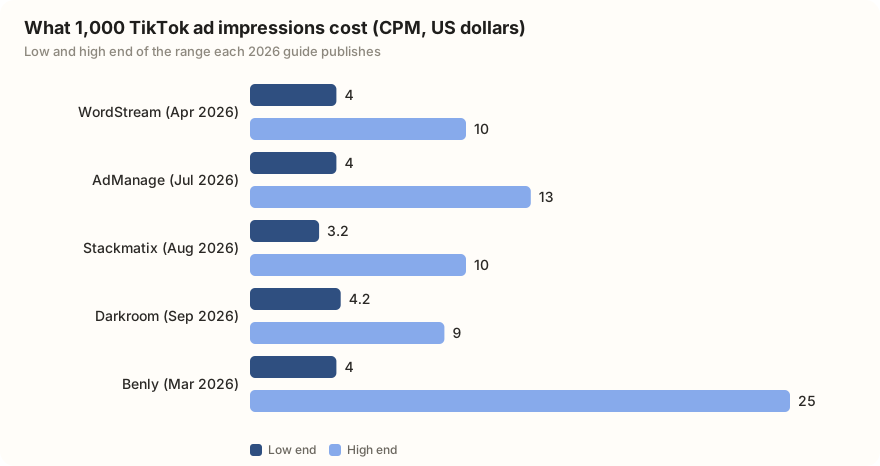
- 2026 guides put TikTok CPMs at about $3 to $13 per 1,000 impressions and clicks at about $0.20 to $1.50. TikTok publishes no average, so treat your first week as the real price.
- Don't pause or heavily edit a new campaign for about 7 days or 25 results. TikTok says that restarts the learning phase.
- Search ads come two ways: Automatic Search Placement, on by default, and a Search Ads Campaign where you pick up to 1,000 keywords per ad group.
- Most big TikTok search numbers are topic labels that group many searches. In our pull, 'skincare products and brands' had 4.8 million searches in a week; the single search 'skincares' had 62,418.
TikTok Ads Manager is TikTok's website for running paid ads, at ads.tiktok.com. You sign up with your business details and a payment method, then build each ad in three layers: a campaign, an ad group and the ad itself. The smallest budget TikTok accepts is just over $50 a day for a campaign and just over $20 a day for each ad group.
What that money buys varies. 2026 guides put the cost of 1,000 ad impressions (CPM) at about $3 to $13 for most accounts, and the cost per click (CPC) at about $0.20 to $1.50. TikTok publishes neither figure. Below: costs, setup, specs, Spark Ads, the Pixel, search ads, and real TikTok search numbers for three small businesses.
How much do TikTok ads cost?
Two numbers are fixed by TikTok: the minimum budgets. Everything else is an auction, so your price depends on your country, your audience, your goal, the time of year and how good the video is. Stackmatix (August 2026) says costs rise 20% to 40% in the last three months of the year.
| Rule or range | Amount | Where it comes from |
|---|---|---|
| Campaign budget, daily or total | More than $50 | TikTok |
| Ad group budget, daily | More than $20 | TikTok |
| Ad group budget, lifetime | $20 × days scheduled | TikTok |
| Cost per 1,000 impressions (CPM) | $3.20 to $13, up to $25 in costly industries | Five 2026 guides |
| Cost per click (CPC) | $0.17 to $1.50, up to $3 | Five 2026 guides |
| Promote, in the app | About $3 a day | 2025 and 2026 guides; TikTok has not published this |
Minimums from TikTok's About Budget (updated July 2026) and Lifetime Budgets pages. Ranges from AdManage (17 July 2026, which also quotes WordStream's April 2026 figures), Stackmatix (4 August 2026), Darkroom (25 September 2026) and Benly (updated March 2026). Checked 27 September 2026. Every figure with its source.
So what does $50 buy? At a $4 CPM, about 12,500 impressions. At $13, about 3,800. Running every day for a month at the minimum costs about $1,500, which is why many small businesses start with Promote instead (compared further down).
You will see "$500 minimum" in some guides, including Darkroom and Stackmatix. TikTok's own budget pages say the campaign floor is $50, daily or total, and AdManage calls the $500 figure a myth. Go by TikTok's page.
How to set up a TikTok Ads Manager account
- Go to ads.tiktok.com and sign up with an email address or phone number.
- Enter your legal business name, country, industry, time zone and currency. Use the name on your business papers: TikTok's setup page warns that a mismatch can stop approval. Guides such as TikAdTools (September 2026) say country and currency cannot be changed later.
- Add a billing address, tax details where your country needs them, and a payment method.
- Choose how to pay. With manual payment you top up a balance first and ads stop when it runs out. With automatic payment TikTok charges your card each time you reach a billing threshold or bill date. Manual is the safer choice for a first test.
- Wait for review. TikTok says most accounts are reviewed within 24 hours, and no ads run before approval.
Business verification comes later. TikTok's verification page (updated September 2026) says you must upload a business registration document once your total spend reaches a threshold for your market, and review takes up to two business days. TikTok has not published the threshold for any country; it appears in the notification.
Campaign, ad group, ad: how Ads Manager is organised
Every ad sits inside three layers.
| Layer | What you choose here |
|---|---|
| Campaign | The goal (TikTok calls it the objective) and an optional overall budget |
| Ad group | Who sees it, where it shows, the budget, schedule and bidding |
| Ad | The video or images, the text, the button and the link |
TikTok's objectives page groups the goals in three stages. Awareness: Reach. Consideration: Traffic, Video views, Community interaction (followers and profile visits) and Branded Mission. Conversion: App promotion, Lead generation and Sales. Sales replaced the older Website conversions and Product sales goals. Guides disagree on small details: MegaDigital (March 2026) calls it Product Sales and says a Brand consideration goal is in test for some accounts. Your Ads Manager shows the list that applies to you.
For a shop, pick Sales. For a local service that takes bookings, Lead generation or Traffic.
Smart+: the automated option
Smart+ is TikTok's AI-run campaign type. In the upgraded version, which TikTok's Smart+ page (updated August 2026) describes, manual and Smart+ are one setup screen. You choose full, partial or no automation for budget, audience, placements and creative. It covers Traffic, Sales, Lead generation and App promotion, and TikTok notes it "may not be available to you yet".
TikTok's learning phase page says delivery is shaky until about 25 results or 7 days, and lists pausing and big edits as things that restart it. Its budget page adds: raise a budget by no more than 40% at a time while learning, 30% after, and no more often than every two days. The common mistake is turning a campaign off on day two because early results look expensive. The second is an ad that looks like an ad. Guides such as AdManage advise shooting vertical and full screen, so the ad looks like the videos around it.
TikTok ad specs
These are the rules for a normal in-feed video ad, the kind that appears between videos in the For You feed. Our TikTok video size guide covers regular posts.
| Spec | Rule |
|---|---|
| Shape | Vertical 9:16 recommended (at least 540×960). Square 1:1 and horizontal 16:9 are accepted. |
| Length | Up to 10 minutes. Guides suggest 15 to 30 seconds. |
| File | .mp4, .mov, .mpeg, .3gp or .avi, up to 500 MB |
| Ad text | Up to 100 characters (guides; TikTok's page gives no number). No links, @ mentions or hashtags. |
| Name shown | Up to 20 characters |
| Spark Ads | No length limit; up to 4 lines of caption shown |
TikTok's In-Feed Ads specs (updated June 2026), checked against AdManage (1 July 2026) and TikAdSuite (14 May 2026). Checked 27 September 2026.
Spark Ads: paying to boost a post that already exists
A Spark Ad runs an existing TikTok post as an ad, from your account or a creator's. TikTok's Spark Ads page says the views, likes, comments, shares and follows it earns go to the original post. A normal ad keeps them on the ad.
To use someone else's post, the creator opens the video, taps the three dots, then Ad settings, turns on Ad authorization, picks how long, and sends you the code. You paste it into Ads Manager. Guides from Insense and Genviral (2026) give 7, 30, 60 or 365 days. TikTok says only that the length can be customised. The ad stops when the code runs out. Our Spark Ads guide covers picking the post to boost.
TikTok Pixel and Events API, in plain words
The TikTok Pixel is a small piece of code on your website. When someone who saw your ad visits, adds to cart or buys, it tells TikTok. That lets Ads Manager show which ads made sales and aim new ads at people likely to buy.
The Events API sends the same information from your website's server instead of the visitor's browser, so fewer events get lost to ad blockers and privacy settings. Shopify and Google Tag Manager can set up both without code. If you want Sales or Lead generation on your own website, install the Pixel before you spend anything.
TikTok search ads: bidding on what people type
TikTok ads can also appear in search results. There are two ways in.
Automatic Search Placement, once called the Search Ads Toggle, is on by default in new campaigns. It shows your in-feed ad on the search results page when TikTok judges a search relevant, and you can add negative keywords to block searches you don't want, per TikTok's placement page (updated September 2026).
A Search Ads Campaign targets keywords you choose. It works with Traffic, Sales, Lead generation and App promotion. TikTok's keywords page allows up to 1,000 keywords per ad group and suggests starting with at least 20. There are three match types. Broad shows the ad on any related search. Phrase needs the meaning of your keyword in the search. Exact needs a close match, though TikTok still counts synonyms and reordered words. Ads Manager's Keyword Planner shows search volume in 12 countries, including the US and UK.
Searches you could target: three small businesses
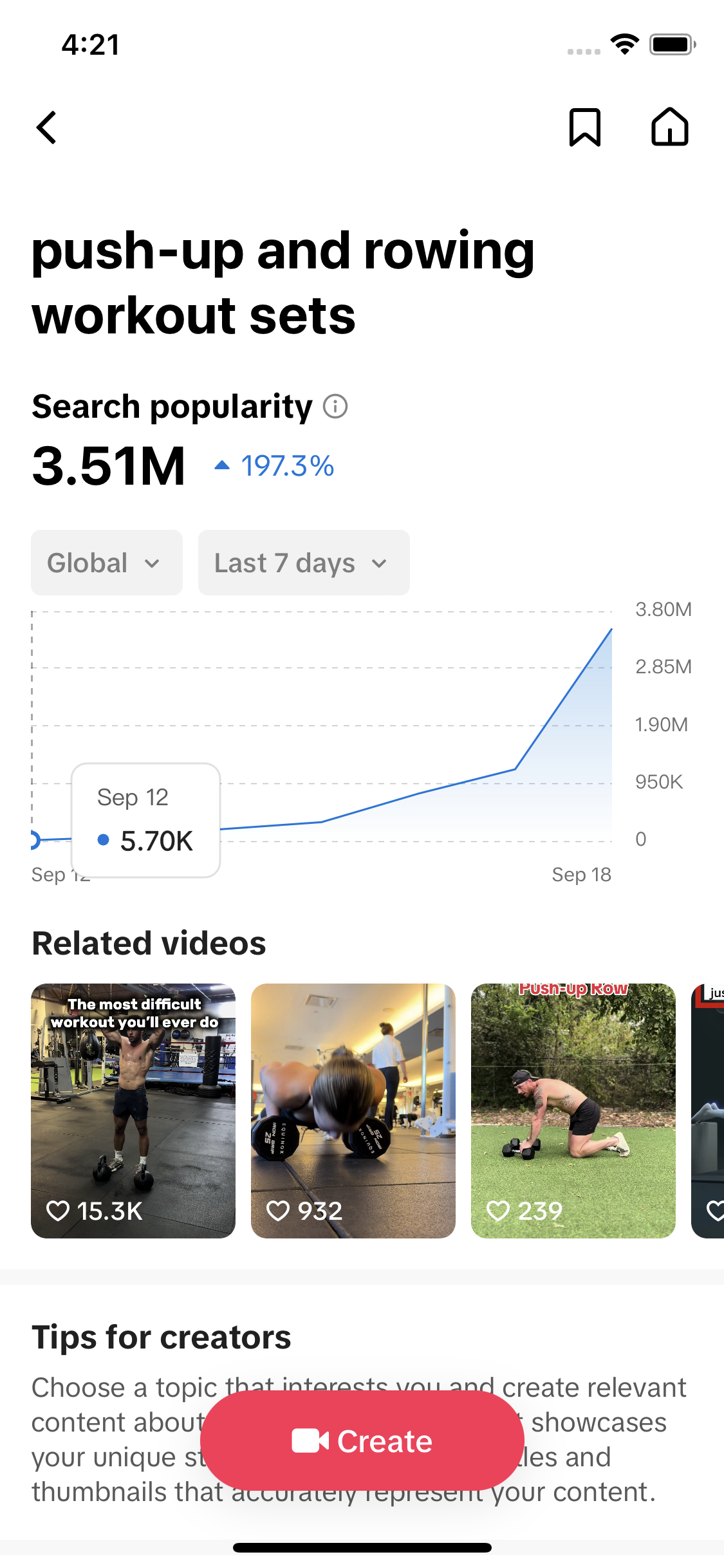
We checked what people search on TikTok for a bakery, a skincare brand and a home cleaning service. The numbers are TikTok's "search popularity": searches in the last 7 days, worldwide. Videos is how many videos TikTok lists for each one.
| Niche | Search or topic | 7-day searches | Videos |
|---|---|---|---|
| Bakery | best over-the-top bakery finds (a TikTok topic label) | 44,691,527 | 0 |
| Bakery | bakery names and locations (topic label) | 4,802,519 | 499 |
| Bakery | bakery and cake shop trends (topic label) | 4,787,278 | 217 |
| Bakery | cake orders and custom cakes (topic label) | 4,390,782 | 558 |
| Bakery | custom cakes and bento cakes (topic label) | 4,291,686 | 567 |
| Bakery | local bakery shops and bakeries (topic label) | 3,803,780 | 692 |
| Skincare | skincare products and brands (topic label) | 4,784,963 | 1,045 |
| Skincare | anti acne skincare products (topic label) | 4,730,772 | 864 |
| Skincare | at home skincare routines (topic label) | 4,700,309 | 1,132 |
| Skincare | skincare for dark spots (topic label) | 4,062,580 | 23,389 |
| Skincare | skincares (a single search) | 62,418 | 246,714 |
| Home cleaning | home cleaning and tidying tips (topic label) | 4,085,091 | 527 |
| Home cleaning | cleaning services and deep cleaning (topic label) | 3,632,636 | 549 |
| Home cleaning | cleaning service and house cleaning (topic label) | 2,752,175 | 613 |
| Home cleaning | home cleaning and deep cleaning (topic label) | 2,210,236 | 971 |
| Home cleaning | Cleaning Service (a single search) | 297,570 | 12,994 |
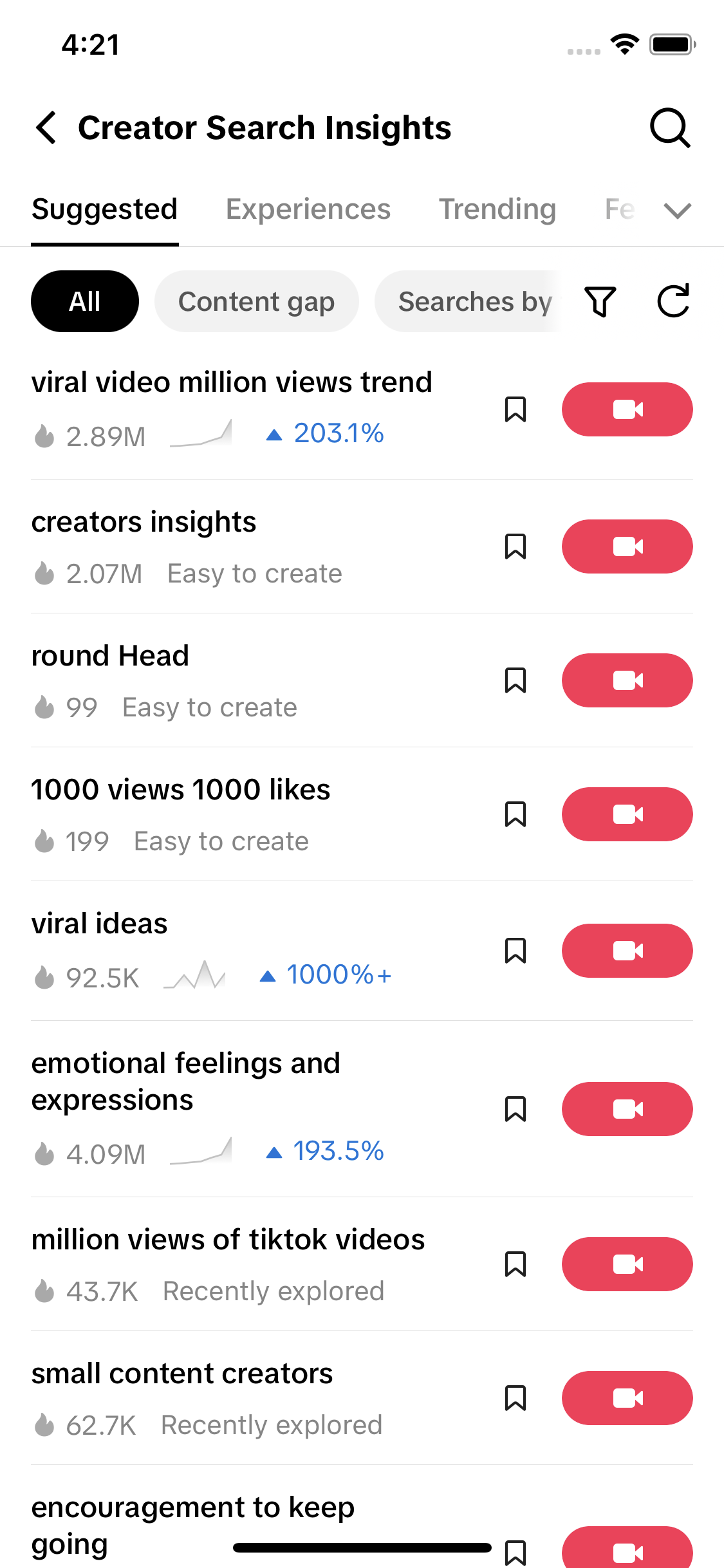
Data: TikTok Creator Search Insights via TokConnect, pulled 27 September 2026, from six seeds (bakery, custom cakes, skincare, skincare products, home cleaning, cleaning service). Global, last 7 days. 16 of 48 topics shown. All 48 topics; autocomplete phrases.
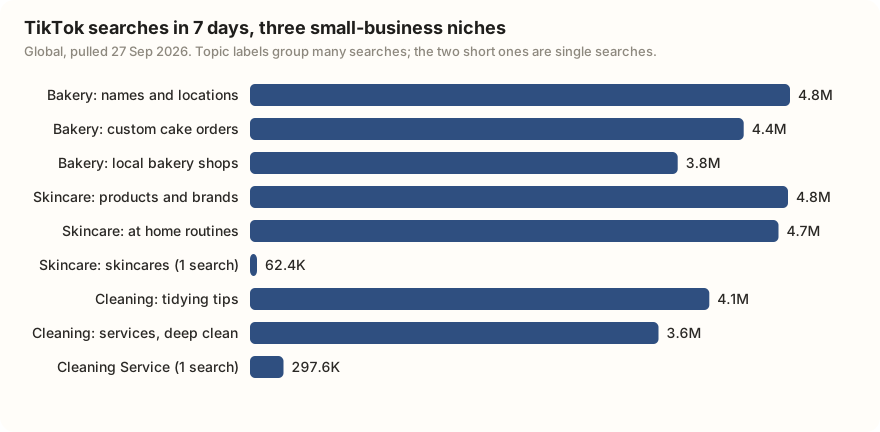
Most of these rows are topic labels. TikTok writes a phrase such as "cake orders and custom cakes" and adds up many related searches under it. 44 of the 48 topics we got sat between 2 and 5 million, and the biggest, "best over-the-top bakery finds" at 44.7 million with no videos, is plainly a label. It reads as TikTok's summary, not something people type, so bidding on it word for word makes little sense. Read labels as the size of the interest.
The single searches are closer to keywords. "Cleaning Service" had about 300,000 searches in a week and "skincares" about 62,000. The skincare label was about 77 times bigger than the single search.
For the words themselves, use autocomplete. TikTok suggested "bakery cake shop", "Bakery business", "Home cleaning services", "home cleaning products", "skincare recommendations" and "skincare for men". These are phrases people type and a good start on your 20 keywords. The suggestions also included Burmese and Indonesian phrases, because they are worldwide. Check each one in Keyword Planner for your own country before you bid.
Our reading, not TikTok's rule: 13 of the 48 topics had no videos at all. A search with demand and few organic videos is one where a relevant ad has less to compete with in the results.
With TokConnect connected to your AI agent, you can run the same check for your business before you open Ads Manager.
I run a [type of business] in [country]. Pull TikTok autocomplete suggestions for these seeds: [seed 1], [seed 2], [seed 3]. Then search Creator Search Insights topics for each seed and give me each topic's 7-day searches and video count. Mark which rows are TikTok topic labels and which are phrases people type. Finish with 25 keywords for a TikTok Search Ads Campaign, each with a suggested match type, plus 10 negative keywords to exclude.
Works in Claude, ChatGPT, Cursor and Gemini once TokConnect is connected. Get a free key (50 credits, no card) or see the setup guides.
TikTok Promote vs Ads Manager
Promote is the boost button inside the TikTok app. Ads Manager is the full ad website. TikTok's Promote page (updated July 2026) says you can link the two for more features.
| Promote | Ads Manager | |
|---|---|---|
| Where | In the TikTok app, on your own posts | ads.tiktok.com, separate account |
| Least you can spend | About $3 a day (guides; TikTok has not published this) | Over $50 a day per campaign, over $20 per ad group |
| Who | Anyone 18 or over; 1,000 followers to promote a LIVE | A business that passes review |
| Audience | Automatic, or age, gender, interests and location | Also website visitors, customer lists, lookalikes and exclusions |
| Search ads | No keyword choice | Keyword targeting and Keyword Planner |
| Tracking sales | Basic results screen | Pixel, Events API and full reports |
| Other people's posts | No | Yes, with a Spark Ads code |
Sources: TikTok's About Promote and About Budget pages, AdRate (16 July 2026) and Stackmatix (August 2026). Checked 27 September 2026.
Promote suits one good video and a small budget. Stackmatix puts Promote's CPM at $8 to $15, above Ads Manager, so it is the easy way in rather than the cheap one. Move to Ads Manager when you want to track sales, bid on searches or boost a creator's post. Our Promote guide covers what a boost does and does not do, and the keyword research guide goes deeper on picking search terms.
Frequently asked questions
How much do TikTok ads cost per day?
In TikTok Ads Manager, a campaign budget must be more than $50 a day and each ad group more than $20 a day. Promote, the boost button in the app, starts at about $3 a day according to 2025 and 2026 guides, though TikTok has not published that minimum. What the money buys varies: 2026 guides put 1,000 impressions at about $3 to $13 and a click at about $0.20 to $1.50.
Is TikTok Ads Manager free to use?
Opening an account and building campaigns costs nothing. You pay only for ads that run, either from a balance you top up first (manual payment) or by card each time you reach a billing threshold (automatic payment). The catch is the minimum budget: more than $50 a day per campaign once an ad is live.
What is the difference between TikTok Promote and Ads Manager?
Promote boosts one of your own posts from inside the app, from about $3 a day, with simple targeting. Ads Manager is a separate website with a $50 daily campaign minimum, and it adds keyword search ads, customer and website-visitor audiences, the TikTok Pixel for tracking sales, and Spark Ads on other creators' posts. See our Promote guide.
How do I get a TikTok Spark Ads code?
The creator opens the video, taps the three dots, then Ad settings, turns on Ad authorization, picks a duration and taps to generate and copy the code. 2026 guides list 7, 30, 60 or 365 days. The advertiser pastes the code into Ads Manager. Likes, comments and follows from the ad stay on the original post.
Do I need the TikTok Pixel?
Yes, if you want TikTok ads to bring sales or sign-ups on your own website. The Pixel is code on your site that tells TikTok when someone who saw your ad visits, adds to cart or buys, so Ads Manager can report sales and find more buyers. The Events API sends the same data from your server. Shopify and Google Tag Manager can set both up without code.
How do TikTok search ads work?
Your ad shows on TikTok's search results page. Automatic Search Placement, on by default in new campaigns, does this using your normal ad settings. A Search Ads Campaign lets you choose keywords with broad, phrase or exact match, up to 1,000 per ad group, and block searches with negative keywords. Keyword Planner in Ads Manager shows search volume in 12 countries.
Sources and data
- Set up a TikTok Ads Manager account (TikTok, last updated June 2026)
- TikTok Ads Manager: The 2026 Complete Practical Guide (TikAdTools, updated 21 September 2026)
- How to verify your business on TikTok (TikTok, last updated September 2026)
- Documents for Business Verification (TikTok)
- About Manual Payment (TikTok)
- Automatic Payment (TikTok)
- TikTok Ads Billing and Payment Methods: A Setup Guide (TikAdSuite, 2026)
- TikTok Ads Minimum Daily Budget in 2026 (Stackmatix)
- Choose the Right Objective (TikTok, last updated April 2025)
- TikTok Advertising Objectives: A Complete Guide 2026 (MegaDigital, 9 March 2026)
- About daily budgets (TikTok)
- About Lifetime Budgets (TikTok, last updated July 2026)
- Budget and Bidding FAQs (TikTok)
- TikTok Ads Cost 2026 (AdManage, 17 July 2026)
- About Budget (TikTok, last updated July 2026)
- Learning phase (TikTok, last updated June 2026)
- How Much Do TikTok Ads Cost in 2026? (WordStream, April 2026)
- TikTok Ads Cost 2026: CPC, CPM and Min Budget Explained (Stackmatix, 4 August 2026)
- TikTok Ads Cost 2026: CPM, CPC and CPA Benchmarks (Benly, updated 24 March 2026)
- How Much Do TikTok Ads Cost? 2026 Pricing and Budgets (Darkroom, 25 September 2026)
- TikTok Auction In-Feed Ads (TikTok, last updated June 2026)
- TikTok Ad Specs 2026 (AdManage, 1 July 2026)
- TikTok Ad Specs 2026 (TikAdSuite, 14 May 2026)
- About Spark Ads (TikTok, last updated June 2026)
- TikTok Spark Ads Guide 2026 (Insense)
- How to Get Spark Code on TikTok (Genviral, 2026)
- About TikTok Pixel (TikTok, last updated June 2026)
- About Events API (TikTok)
- Get Started with Events API (TikTok)
- TikTok Server-Side Tracking on Shopify (WeltPixel, 2026)
- Automatic Search Placement (TikTok, last updated September 2026)
- About Search Ads Campaign (TikTok, last updated July 2025)
- Search Ads Campaign Objectives (TikTok)
- About Search Ads keywords (TikTok, last updated July 2025)
- About keyword match types (TikTok, last updated July 2025)
- About the Keyword Planner tool (TikTok, last updated March 2026)
- TikTok Search Ads 2026 (Benly, updated 24 March 2026)
- Smart+ Upgraded Experience (TikTok, last updated August 2026)
- About Smart+ Web Campaigns (TikTok, last updated March 2026)
- TikTok Smart+ 2026 Guide (Segwise, updated 3 September 2026)
- About Promote (TikTok, last updated July 2026)
- About Promote integration with TikTok Ads Manager (TikTok)
- TikTok Promote vs Ads Manager (AdRate, 16 July 2026)
- Rules, costs and specs with sources (snapshot)