 tokconnect
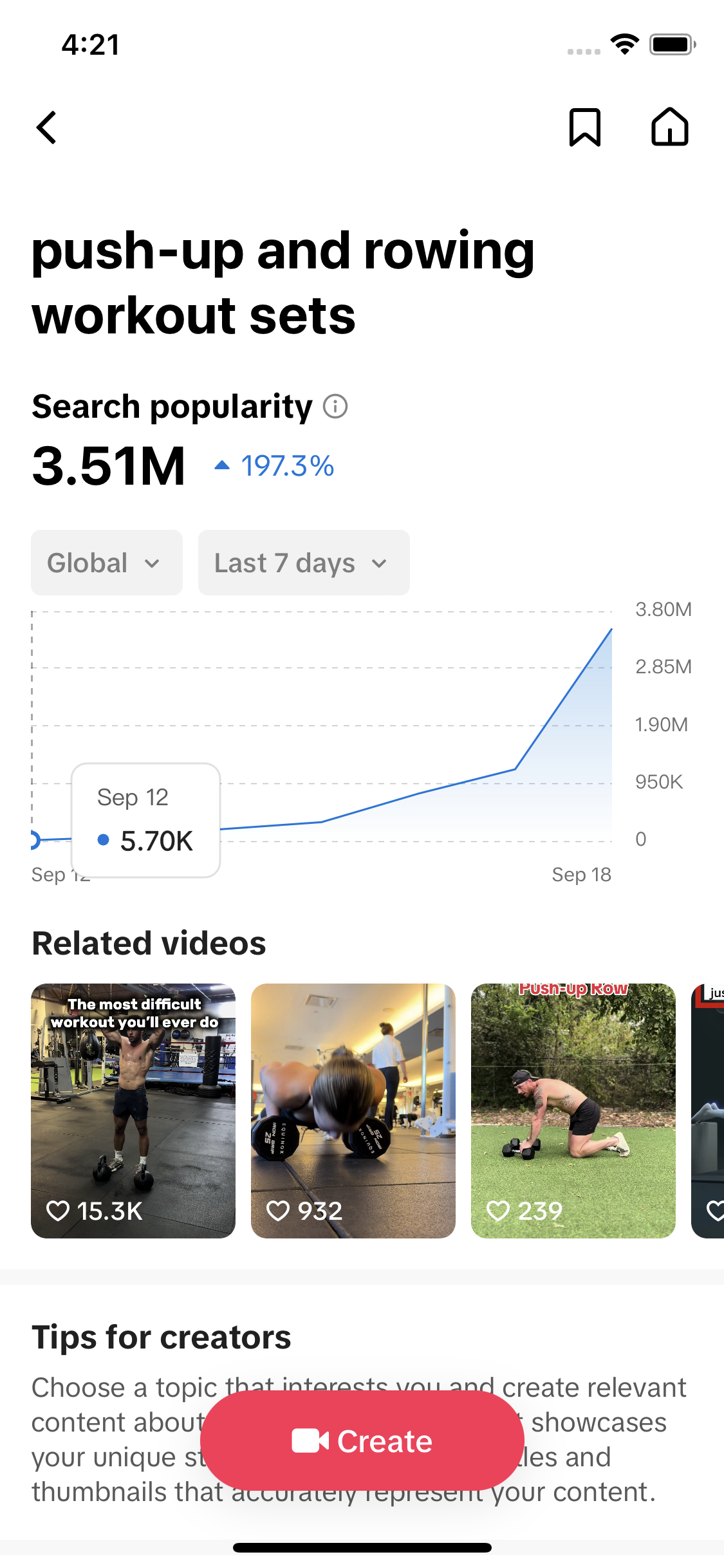
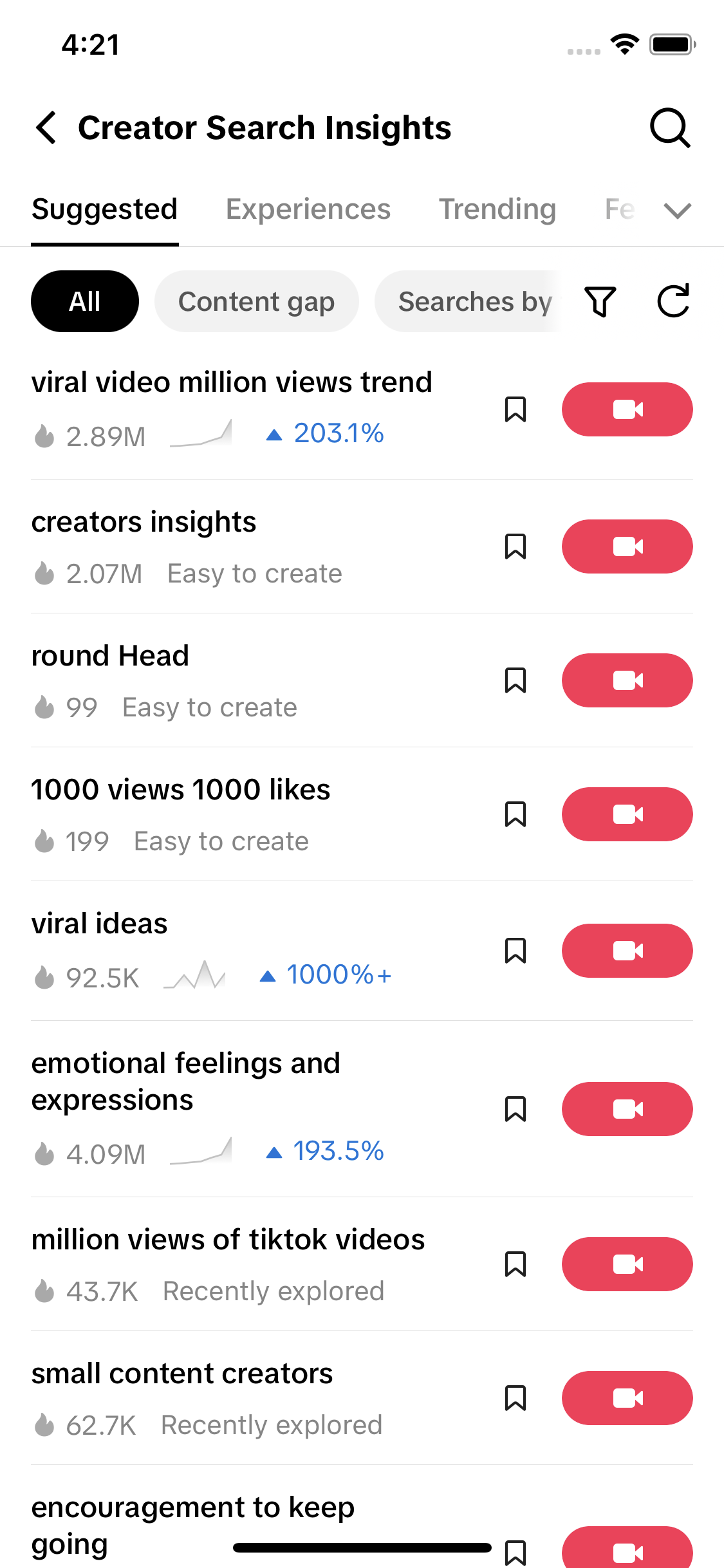
- The tracker at the top reads TikTok's own search counts every morning and ranks real searches by how far the latest reading sits above the week's average.
- A trend is early when the seven-day curve climbs several readings in a row and searches far outnumber videos; the Gap badge marks at least 100,000 searches with one video or fewer per 500 searches.
- TikTok topic labels are groupings TikTok writes itself, so read their huge numbers as the size of a topic, not as a phrase people type.
- Creative Center, Creator Search Insights and Google Trends are free; paid trackers such as Exolyt and TickerTrends add history and dashboards, and TrendTok puts sounds and hashtags on your phone.
This TikTok trend tracker lists the searches rising fastest on TikTok, using TikTok's own search counts, and refreshes every morning. It is free, needs no login, and flags searches that have lots of demand and few videos, which is where a new video has the best chance.
TikTok search data from 27 September 2026
TikTok topic labels are groupings TikTok writes itself, from its Trending tab or above 5 million searches. Each one folds many different searches together, so read the number as the size of a topic, not as people typing those exact words.
Top 10 rising searches from the saved 27 September 2026 snapshot. The live list, tabs and filters load from today's data.
| Search | Searches (7 days) | vs the week | Last 7 days | Videos |
|---|---|---|---|---|
| read and readEducation | 244,726 | +1,086% | 1,089 | |
| kindlecaseScience and Technology | 297,070 | +73% | 727 | |
| fall amazon must haves GapFashion | 270,618 | +61% | 374 | |
| Kpop dance trendDance | 284,614 | +56% | 1,074 | |
| kpop girl dancesDance | 192,657 | +28% | 1,136 | |
| booktok ideasCulture | 236,481 | +28% | 1,165 | |
| Dances to do easyDance | 242,024 | +23% | 964 | |
| MovieLoverEntertainment | 414,892 | +7% | 1,087 | |
| nyfw outfits GapFashion | 4,852,655 | +3% | 910 | |
| cute kpop dancesDance | 125,037 | +2% | 1,015 |
Data: TikTok Creator Search Insights and TikTok search via TokConnect, pulled every morning. Today's raw data. The table shown without JavaScript is the 27 September 2026 snapshot.
How to read it. "Searches (7 days)" is TikTok's search popularity figure for the topic, the same number Creator Search Insights shows. "vs the week" compares the latest daily reading with the average of the six before it, so +50% means the latest day is running half again above the week. The line is the last seven readings, and "Videos" is how many videos TikTok matches to the search. Tap any search to open it on TikTok.
The Gap badge marks a search with at least 100,000 searches and no more than one video for every 500 searches. In the 27 September snapshot, "fall amazon must haves" had 270,618 searches and 374 videos, so it gets the badge. "read and read" had 244,726 searches and 1,089 videos, so it does not.
How this TikTok trend tracker works
Every morning we pull TikTok's search data from two places: Creator Search Insights, the search tool TikTok gives creators, and TikTok search itself. The pull covers 68 everyday seed searches across products, beauty, books, dance, food, fitness, money, sport, travel and gaming, plus TikTok's own Trending tab. On 27 September that came to 548 topics.
Most of those topics are noise, so an organic filter throws them out. A topic stays only if it has a seven-day curve with no empty days, at least one matching video, 20,000 or more searches, and a first reading that is not tiny next to its latest one. That last rule removes topics TikTok generated overnight, which jump from nothing to millions. Only 39 of the 548 survived on 27 September.
Momentum is the "vs the week" column: the latest reading divided by the average of the six readings before it. We use the week, not yesterday, because single days jump around. "read and read" averaged about 20,600 over six readings and then hit 244,726, which is +1,086%. Anything above 5 million searches, or anything from the Trending tab, goes under TikTok topic labels. Those are phrases TikTok writes to group many searches, such as "cristiano ronaldo merchandise and media", so treat them as the size of a topic, not words people type.
What it cannot see: searches outside the seed list, sounds, and whether the videos on a search are any good. The numbers are global and cover one week, so the tracker cannot tell a yearly event like Halloween from a new trend. For the daily write-up of the same data, read what's trending on TikTok today. For the week's pattern, read the weekly TikTok search report.
How to track TikTok trends yourself
You can run the same checks by hand in about 20 minutes a week. Do it on the same day each week, because the comparison with last week is what turns scrolling into tracking.
- Creator Search Insights, 5 minutes. Open it in the TikTok app (search "creator search insights") or at tiktok.com/csi on a computer, with your TikTok login. Type your three main topics and write down the search popularity number for each. Then check the Trending tab for anything in your category. The Creator Search Insights guide walks through every screen.
- The search bar, 3 minutes. Type each topic into TikTok search and note the suggestions that drop down. A suggestion you did not see last week is a new search people are typing. Before you type, the search page often shows a short list of suggested searches too; note any that fit your niche.
- Creative Center, 4 minutes. Open TikTok Creative Center, pick your country and look at trending hashtags and songs for the last 7 days. No login is needed to browse. It tells you which formats and sounds are in use, not what people search for.
- Save sounds as you scroll. When a sound keeps turning up, tap the spinning record and choose Add to Favorites, so it waits for you in the Favorites tab when you make your video. How to find trending sounds on TikTok shows how to tell a sound is still rising.
- A spreadsheet, 3 minutes. One row per topic per week: date, topic, search number, video count and a short note. After three weeks you can see which topics climb and which were a blip. Without the sheet you are relying on memory, and memory makes everything look like a trend.
- Decide, 2 minutes. Pick one topic that is rising and still has few videos, and plan that video this week.
The longer version of this routine, with the seven places trends show up in the order they appear, is in TikTok trend research.
How to tell a TikTok trend is still early
A trend is early when searches are climbing and videos have not caught up. Three checks tell you, and the tracker above shows the first two.
The curve is rising, not just high
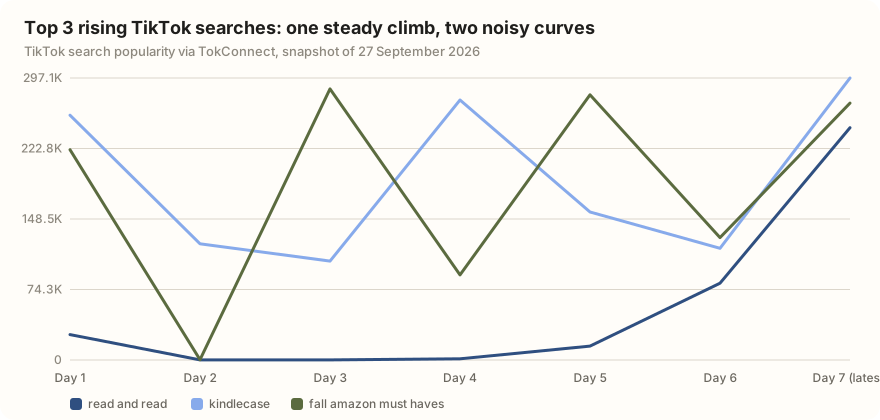
Look at the shape of the last seven readings, not the size. A steady climb over several days is what you want. In the chart below, "read and read" rose four readings in a row, from 99 to 1,299, 14,595, 80,875 and then 244,726. "kindlecase" and "fall amazon must haves" also sit near the top of the rising list, but their curves bounce up and down every other day. That looks more like something people search all the time than something taking off.
Few videos for the number of searches
Divide searches by videos. "nyfw outfits" had 4,852,655 searches and 910 videos, more than 5,000 searches for every video. "Line dances" had 385,838 searches and 4,011 videos, fewer than 100 per video. The first still has room. The second is already crowded. The Gap badge does this sum for you.
Searches growing faster than videos
This one needs a second look. Note the search number and the video count today, then again in three or four days. If searches grew by half and videos by a tenth, you are early. If videos are growing faster than searches, other creators have found it and the window is closing. The tracker shows one day, so keep both numbers in your spreadsheet.
Posting on a trend after it peaks means the searches are already falling and your video joins everything made the week before. If a search shows a falling "vs the week" figure and no Gap badge, skip it or find a narrower angle inside it, such as one product, one place or one question the big videos do not answer.
TikTok trend tracker options compared
Checked 28 September 2026. We make TokConnect, one of the tools in this table, and the tracker on this page runs on its data. Every other price and feature comes from the vendor's own site or App Store listing on that date.
| Tracker | What it tracks | Price | Best for |
|---|---|---|---|
| TikTok Creative Center | Trending hashtags, songs, creators and videos by country over 7, 30 or 120 days; posts and views, no search counts | Free, no login to browse | Formats and sounds in use in your country |
| Creator Search Insights | TikTok search popularity per topic, a 7 to 180-day chart, content gap flag, Trending tab | Free, in the TikTok app and at tiktok.com/csi (login) | Checking real search demand for one topic |
| Google Trends | Relative interest on Google and YouTube search, back to 2004; no TikTok data | Free | Seeing whether a TikTok trend has reached Google, and long history |
| TickerTrends | 20,000+ TikTok topics and hashtags (views and posting activity) and creator growth, mapped to 300+ public companies, updated daily | Core $998 a year ($83.17 a month billed yearly), 7-day trial | Investors and analysts linking trends to brands |
| Exolyt | TikTok only: tracked hashtags and accounts over time, hottest hashtags by industry, trending sounds, social listening | Basic free (1 hashtag, 7 days of history); Essentials €250 a month; Advanced €600 a month | Agencies tracking many hashtags and accounts for months |
| TrendTok Analytics & Tracker | iPhone app: trending sounds, songs and hashtags by niche and location, with AI predictions | Free download; in-app purchases $2.99 to $49.99 | Creators who want a trend feed on their phone |
| TokConnect (ours) | TikTok search counts, 7 to 180-day curves and content gaps, pulled into your AI agent; the data behind this tracker | Free plan with 50 credits; paid from $49 a month | Rising searches for your own niche, inside ChatGPT, Claude or Cursor |
Checked 28 September 2026 on each vendor's own pricing page, feature page or App Store listing. All facts with links.
Where the others are better: TickerTrends and Exolyt keep months of history and dashboards for hundreds of hashtags, which an agent does not. Creative Center and TrendTok cover sounds and songs, which our daily list leaves out. Google Trends has two decades of history. This tracker shows something narrower: TikTok's own search count, the number of people typing a phrase into TikTok this week. People search before they post, so it tends to move first, and Google Trends for TikTok explains where the two kinds of trend discovery agree and where they do not.
Get rising searches for your own niche
The tracker covers everyday topics. For your niche, an AI agent connected to TikTok's search data can run the same filter on your own seed words and hand back a table like the one above.
Pull TikTok search topics for these seeds in my niche: [seed 1], [seed 2], [seed 3]. For each topic get the 7-day search count, the last seven daily readings and the number of matching videos. Drop topics with no videos or with empty days, and list TikTok-written topic labels separately. Rank the rest by the latest reading against the average of the previous six, flag any with at least 100,000 searches and one video or fewer per 500 searches, and suggest one video angle for the top three.
Works in Claude, ChatGPT, Cursor and Gemini once TokConnect is connected. Get a free key (50 credits, no card) or see the setup guides.
Frequently asked questions
Is there a free TikTok trend tracker?
Yes. The tracker on this page is free, needs no login and refreshes every morning from TikTok's own search counts. TikTok's Creative Center (trending hashtags, songs and videos by country) and Creator Search Insights (search counts for any topic, in the app and at tiktok.com/csi) are free too. Paid tools such as Exolyt and TickerTrends add months of history and dashboards.
How do I track TikTok trends?
Pick one day a week. Check your three main topics in Creator Search Insights and write down the search numbers, note new suggestions in the TikTok search bar, scan Creative Center's trending hashtags and songs for your country, and log it all in a spreadsheet. After three weeks you can see what is climbing. The trend research guide has the full routine.
How do you know if a TikTok trend is growing?
Look at the last seven readings, not the size. A trend is growing when the curve rises several days in a row and the latest reading sits well above the week's average, which is the "vs the week" column above. Then check the videos: if searches grow faster than the number of videos, you are still early.
How often is this tracker updated?
Every morning. The date at the top of the tracker is the date of the pull, and the list is replaced each day at the same URL. The trending today page writes up the same data daily, and the weekly report comes out every Monday.
What is the best app to track TikTok trends?
It depends on what you track. TrendTok is an iPhone app for trending sounds, songs and hashtags by niche. Creative Center is free on the web for hashtags and songs by country. For search demand, the number of people typing a phrase, Creator Search Insights inside the TikTok app is the source, and this tracker lists the risers from it every day.
Can I track TikTok trends for my country?
This tracker shows global numbers. For one country, open a topic in Creator Search Insights and change the country filter, or use Creative Center, which ranks hashtags and songs per country. An AI agent connected to TikTok's search data can also pull search counts filtered by country.