tokconnectStart free
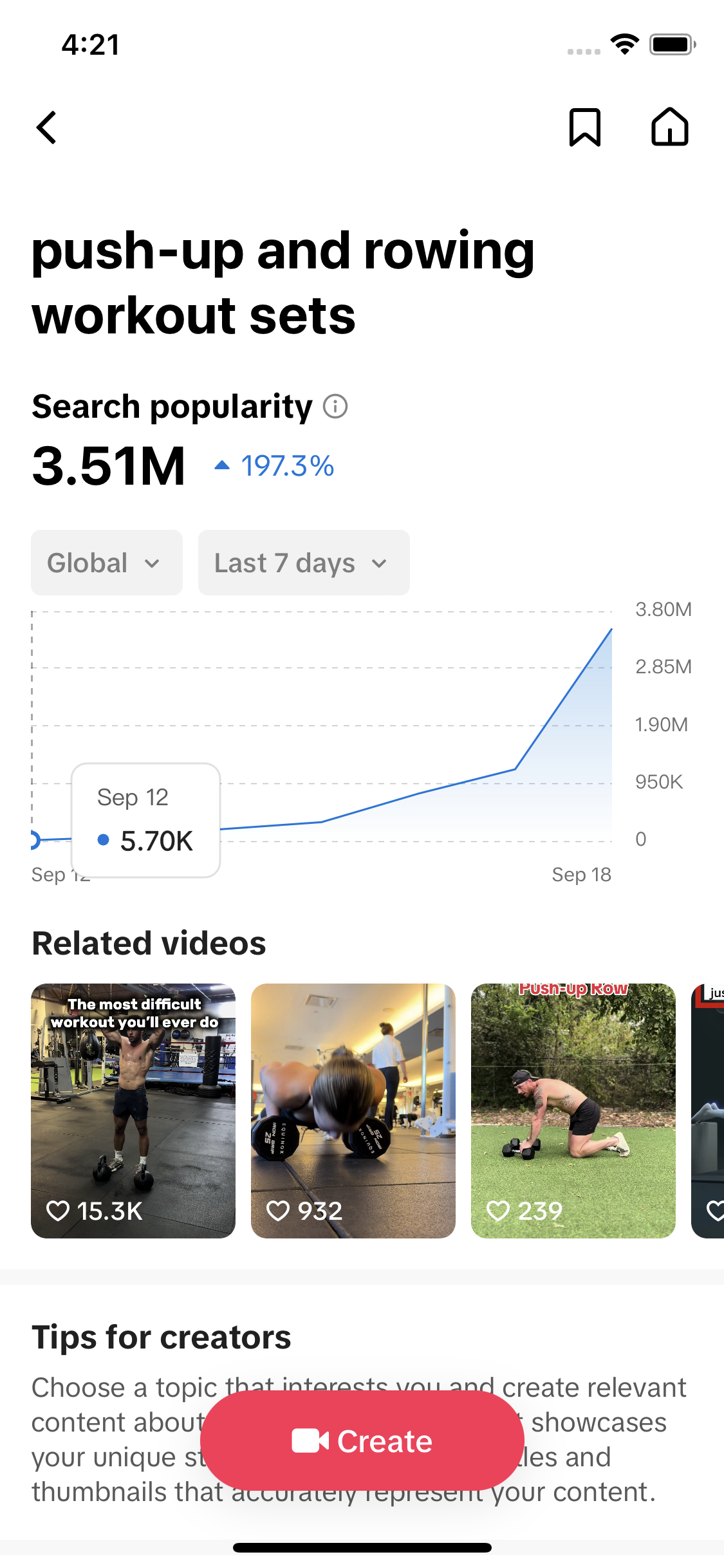
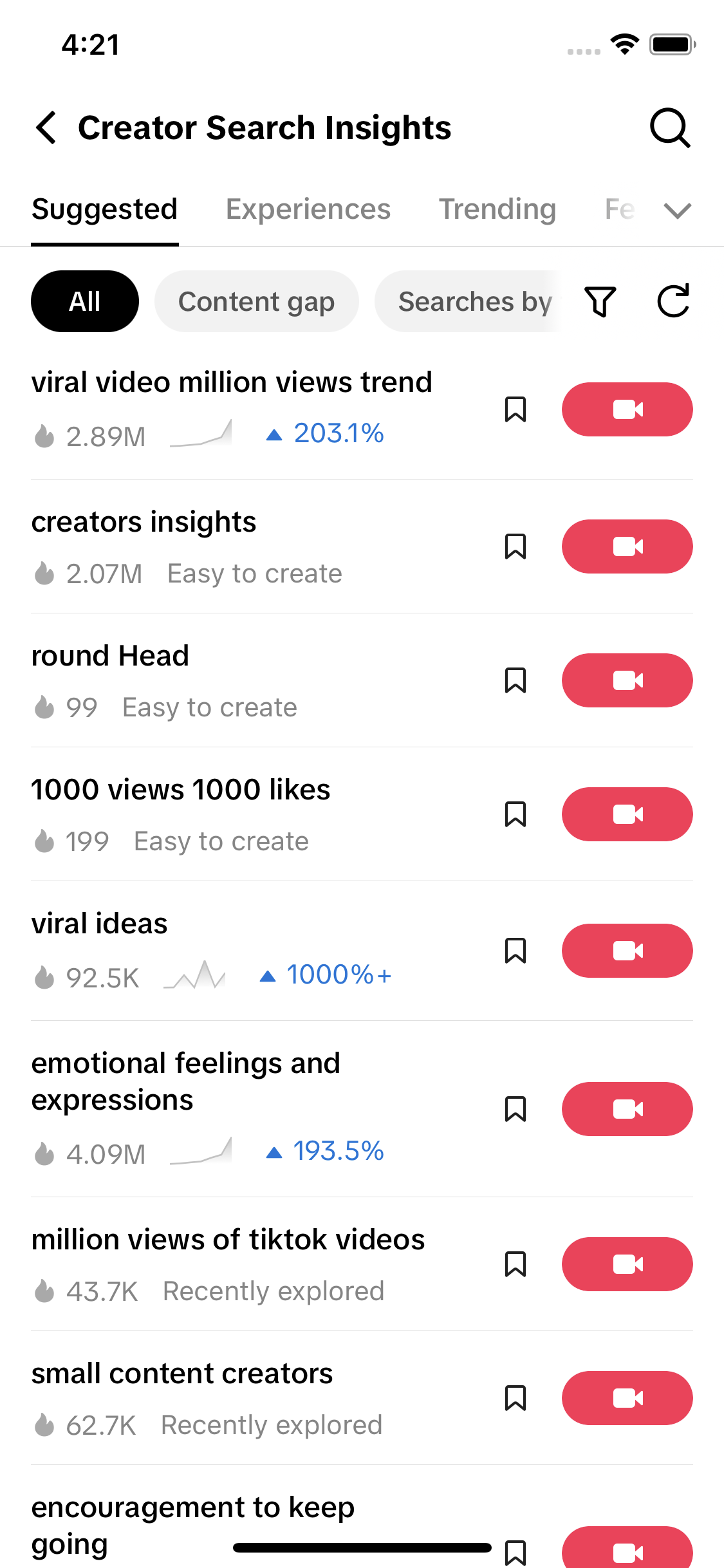
- "Creator insights" on TikTok means three tools: Creator Search Insights (what people search), TikTok Studio analytics (how your videos did) and the trend insights panel (topics near your niche).
- Only Creator Search Insights shows demand across all of TikTok. Its search popularity figure is searches in the last 7 days, global by default.
- Seed it with specific phrases. "crochet" returned 19 TikTok-generated labels out of 20; "granny square" returned 19 real searches, six with zero matched videos.
- "granny square scarf" had 206,396 searches in 7 days and no matched videos on 30 September 2026. The best video in its results was a 157-second tutorial.
- Check Studio analytics a week after posting: a growing Search share on the video means the topic worked.
"TikTok creator insights" is not one tool. It is three: Creator Search Insights, which shows what people search for on TikTok; TikTok Studio analytics, which shows how your own videos did; and the trend insights panel that TikTok added to creator analytics in 2025, which suggests topics near your niche. On 30 September 2026, the first of these showed 206,396 searches in seven days for "granny square scarf" and zero videos matched to it.
If you came for Creator Search Insights itself, the full walkthrough is on our Creator Search Insights guide. This page sorts out which insights tool answers which question, then shows what the search data looks like for one real niche, crochet, and how to turn it into a video.
The three TikTok creator insights tools, side by side
All three live inside TikTok and all three are free. They answer different questions, and mixing them up is why so many guides on "creator insights" seem to describe different screens.
| Tool | Where it lives | Question it answers | What you see | Whose data |
|---|---|---|---|---|
| Creator Search Insights | App: search creator search insights, tap View. Desktop: tiktok.com/csi (login) | What are people searching for? | Topics, 7-day search popularity, content gaps, the audience behind each topic | All of TikTok |
| TikTok Studio analytics | Profile → menu → TikTok Studio → Analytics. Desktop: tiktok.com/tiktokstudio | How did my videos do? | Views, watch time, traffic sources, the search terms that found you, follower demographics | Your account only |
| Trend insights and Inspiration | Inside Studio: the trend insights panel in Analytics, and the Inspiration section | What is trending near my niche? | Trending topics, search terms, related videos and demographics picked from what you already post, with a Create button | Topics close to your content |
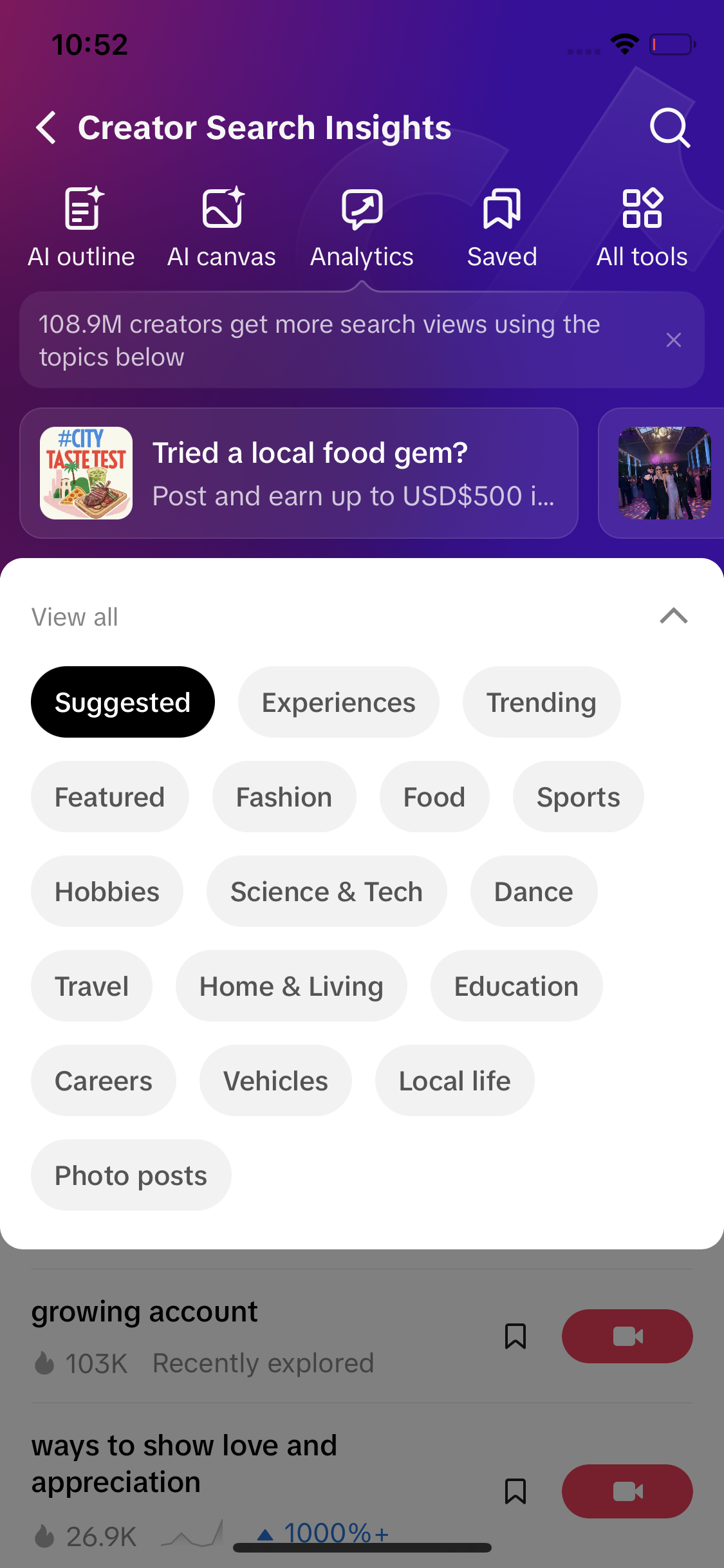
Creator Search Insights is the one with real numbers about demand. TikTok launched it in March 2024 and added the desktop version in mid-2025. Its topic pages show search popularity: searches over the last seven days, worldwide unless you pick a country (more on the number). The phone version adds AI outline and canvas tools.
TikTok Studio analytics is about you. It tells you whether a video found its audience and where the views came from, including a Search share and the terms people typed. The TikTok analytics guide explains every number on that screen.
Trend insights is the newest. Social Media Today reported it in September 2025 from screens an app researcher shared: a panel in creator analytics with trending concepts based on your posts, related search terms, related videos and demographic data, plus a Create button. TikTok never announced it with a date, so some accounts have it and some don't. Studio's older Inspiration section sits next to it, with trending posts you can filter by topic and location and a Recommended feed of posts similar to yours.
Which insights tool to open for your question
- "What should my next video be about?" Creator Search Insights. Search your niche and pick a topic with steady searches and few videos.
- "Why did that video flop, or take off?" Studio analytics. Open the video, check retention and traffic sources.
- "Is search actually sending me viewers?" Studio analytics, Search share on each video. A share that grows over a few weeks means your topic choices are working.
- "I'm out of ideas today." The trend insights panel or Inspiration. They are quick, but they only show what is near what you already make.
- "Who searches for this?" The audience panel on a Creator Search Insights topic. Your follower demographics in Studio describe a different group. The audience insights guide compares the two.
The sensible order is search data first, then analytics a week after you post. Trend insights fills the gaps between.
What are people searching for in [your niche] on TikTok this week, and which of those topics have no videos yet?
What Creator Search Insights shows for a real niche
We searched three crochet phrases on 30 September 2026. The broad seed crochet returned 20 topics, and 19 of them were TikTok's own generated labels: tidy phrases like "crochet as a hobby" at 4,238,575 searches, all rising along the same hockey-stick curve. Amigurumi was similar, with 16 of 20. The specific seed granny square returned 19 topics that look like real typed searches, and six of them had zero matched videos.
| Topic | 7-day searches | Matched videos | Popularity |
|---|---|---|---|
| spiral granny square | 291,812 | 116 | 74 |
| solid granny square | 288,071 | 172 | 74 |
| continuous granny square | 262,173 | 410 | 74 |
| granny square scarf | 206,396 | 0 | 72 |
| Granny squares | 178,682 | 999 | 71 |
| sun and moon granny square | 161,383 | 0 | 71 |
| closed granny square | 157,684 | 0 | 71 |
| skull granny square | 122,263 | 0 | 70 |
| how to end a granny square | 80,259 | 0 | 68 |
| rose granny square | 70,921 | 0 | 67 |
Data: TikTok Creator Search Insights via TokConnect, pulled 30 September 2026. Searches are TikTok's 7-day search popularity, global. Open the snapshot.
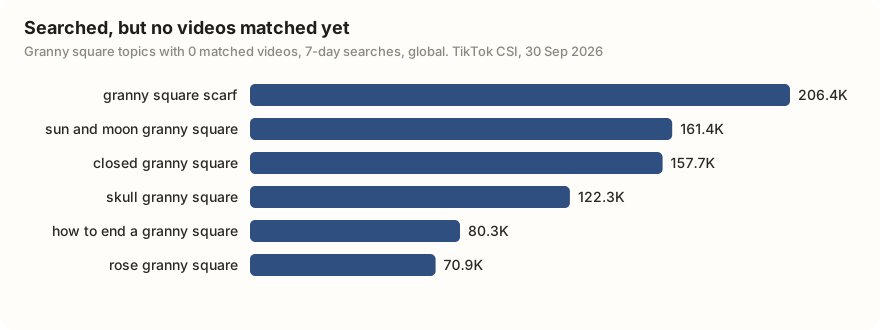
A zero in the videos column is a content gap. It doesn't mean nobody has ever filmed a granny square scarf. It means TikTok hasn't filed any video under that topic yet, so a clear answer to the exact search has little competition.
TikTok's generated topics have round, category-style names, sit between about 1.5M and 5M searches, and share an identical curve with their siblings. Anything at 5M or more is almost always one. The 30-day history gives them away: "crochet as a hobby" had readings on only 3 of the last 31 days (data). Read them as "this category is busy", and seed with specific words (a stitch, a project, a brand) to reach real searches.
Inside one topic: "granny square scarf"
Open a topic and Creator Search Insights gives you its numbers, its audience and a chart. This is what the "granny square scarf" page held on 30 September 2026.
| Field | Value | What it tells you |
|---|---|---|
| Search popularity | 206,396 | Searches in the last 7 days, global |
| Popularity score | 72 / 100 | TikTok's index of how hot the topic is against everything else |
| Matched videos | 0 | A content gap |
| Category | DIY › Weaving and Knitting Tutorials | Where TikTok files the topic |
| Top countries | US, Canada, Iraq, Algeria, Philippines | Where searches come from, in order |
| Searcher gender | 76% female, 2% male, 22% unknown | Shares of all searchers; "unknown" means TikTok could not classify them |
| Searcher age | 44% 18–24, 36% 25–34, 5% 35+ | Younger than most people expect for crochet |
| Searcher location | 58% US, 13% Canada | Write for a North American autumn |
Data: TikTok Creator Search Insights via TokConnect (topic detail and 7-day audience), pulled 30 September 2026. Audience shares are rounded. Open the snapshot.
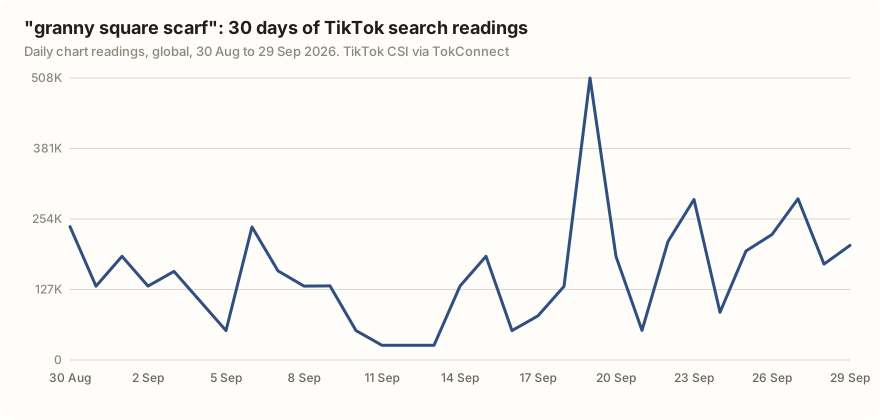
The chart is choppy, and that is a good sign. It dips to 26,524 on 11 to 13 September and peaks at 507,987 on 19 September, but it has readings every day and the level is climbing. The average reading over the last seven days was 209,594, against 144,603 in the first week of the window, a rise of 45%. That is a seasonal search building up, not a one-day spike.
Show me the 30-day TikTok search trend and the audience for "granny square scarf", then tell me what video I should make for it.
From insight to video: what to post for this search
We searched TikTok for "granny square scarf" the same day to see what a searcher finds now. Six videos came back. The newest was posted on 10 January 2026, so nothing in the results was made for this autumn.
The strongest one was a hooded scarf tutorial: 98,921 views and 1,533 saves, four times the views of the next best post. It ran 157 seconds and listed the square sizes in the caption. The other five were shorter posts of 13 to 37 seconds, mostly finished-scarf reveals (data). So, for this search:
- Make the tutorial, not the reveal. Searchers want to make the scarf. Show the whole process, even if it runs over two minutes.
- Say the phrase early. Put "granny square scarf" in the on-screen text in the first second, in the caption and in your first spoken line. That is how TikTok matches a video to a topic.
- Put the specs in the caption. Yarn weight, hook size, square count and size. That is what gets saved, and saves bring people back.
- Cover the next question too. "How to end a granny square" and "closed granny square" had zero matched videos as well. A three-part series answers them in order.
- Post now. 71% of the searchers are in the US and Canada, and the searches were still rising in late September.
A week after posting, go back to Studio analytics and open the video's traffic sources. If Search is a large and growing share, the topic did its job.
How to see your own creator insights in TikTok Studio
In the app, open your profile, tap the three-line menu in the top right, then TikTok Studio and Analytics. Business accounts see Business Suite in the same spot. On a computer, log in and open tiktok.com/tiktokstudio, then Analytics or Inspiration in the left menu.
Three places are worth a look every week:
- Overview, for your totals and, on newer versions, the search terms that brought viewers in. Those terms are free keyword research from your own audience.
- Content → a video → traffic sources, for the Search share on each post.
- The trend insights panel, if your account has it, for topics next to your niche. Check any it suggests in Creator Search Insights before you film, to see the real search numbers behind it.
The TikTok Studio guide covers the rest of Studio. If Creator Search Insights won't open for you at all, the not-showing guide lists every fix.
Getting creator insights outside TikTok
None of these tools lets you take the data with you. Creator Search Insights has no export, no history view and no API, in the app or at tiktok.com/csi, and it shows one search at a time. Studio shows only your own account.
Once you research several niches or plan a month of posts, that gets slow. TokConnect gives you the same Creator Search Insights numbers by asking in plain words, in the web app or inside ChatGPT or Claude: the topics, their 7-day searches, the 30-day chart, the audience and the videos already ranking. Everything on this page came from fewer than ten of those lookups. The desktop guide compares the routes.
Compare TikTok searches for [three topics you could film next] and tell me which one to make first, with the reason.
On 30 September 2026 we pulled TikTok Creator Search Insights through TokConnect: search_topics for three seeds (crochet, granny square, amigurumi; 20 topics each), then topic detail, a 30-day search chart and the 7-day audience for "granny square scarf", a 30-day chart for one generated label, and a TikTok video search for "granny square scarf". Searches are TikTok's 7-day global search popularity, not monthly figures, and matched-video counts change as TikTok files new posts. The trend insights panel is personal to each account, so we describe it from published reports rather than our own data.
Frequently asked questions
What do creator insights do on TikTok?
They tell you what to make and how it did. Creator Search Insights shows what people search for on TikTok, with 7-day search counts and content gaps. TikTok Studio analytics shows how your own videos performed and where the views came from. The trend insights panel in analytics suggests topics close to what you already post.
How do I see my creator insights on TikTok?
For your own numbers, open your profile, tap the three-line menu, then TikTok Studio and Analytics (Business Suite on business accounts), or go to tiktok.com/tiktokstudio on a computer. For search data, type creator search insights in the TikTok search bar and tap View, or log in at tiktok.com/csi on desktop.
Is TikTok creator insights free?
Yes. Creator Search Insights, TikTok Studio analytics and the trend insights panel all come with a TikTok account at no cost. Creator Search Insights is limited to adult accounts in supported regions, and trend insights has not reached every account.
Why can't I see insights on TikTok?
For Studio analytics you need at least one public video, and the Followers tab stays empty until you pass 100 followers. For Creator Search Insights, update the app, search the exact phrase, and check that your account is 18+ in a supported region. The not-showing guide covers every fix.
What is the difference between Creator Search Insights and TikTok analytics?
Creator Search Insights looks outward: what everyone on TikTok is searching for, before you post. Analytics looks inward: how your own videos did after you posted. Use the first to pick a topic and the second, a week later, to see if Search sent you viewers.
What are TikTok search insights?
It is another name people use for Creator Search Insights, TikTok's tool for search demand. It shows topics, how many searches each got in the last 7 days, who searched, and which topics have few or no videos. The Creator Search Insights guide walks through it.
Sources and data
- Get inspired with Creator Search Insights (TikTok Newsroom, March 2024)
- Creator Search Insights (TikTok Help Center)
- Understanding your analytics (TikTok Help Center)
- TikTok adds trending content tips in analytics (Social Media Today, 21 September 2025)
- TikTok rolls out AI trend insights in creator tools (Metricool, 1 October 2025)
- How to use TikTok's Creator Insights for content inspiration (Metricool, 15 November 2024)
- How to use TikTok Studio (Buffer, 1 July 2024)
- Crochet topic searches pulled 30 September 2026 (snapshot)
- "granny square scarf" topic, chart and audience, pulled 30 September 2026 (snapshot)
- Videos for "granny square scarf", pulled 30 September 2026 (snapshot)