 tokconnect
- Profile view history lists accounts that visited your profile in the last 30 days, but only if they also have the setting on. Turn it on under Settings and privacy, Privacy, Profile views.
- Post view history is a separate switch under Privacy, Post views. Tap the view count on one of your videos to see who watched in the last 7 days.
- Both settings need you to be 16 or older with fewer than 5,000 followers. Above 5,000 followers they disappear from the menu.
- Turning either setting on means other people can see your visits too. Turn both off to browse without leaving a trace, and you lose your own lists.
- Analytics count profile views and video views but never name anyone, and apps that promise a full viewer list are fake and often steal logins.
You can see who viewed your TikTok profile, but only through a setting called Profile view history, and only when the visitor has it switched on too. It shows visits from the last 30 days, and it works only for accounts run by people aged 16 or over with fewer than 5,000 followers. A second setting, Post view history, does the same for your videos over a 7-day window.
Outside those two settings, nobody can see who viewed a TikTok. Your analytics count TikTok profile views and video views as numbers, with no names attached. Any app or website that promises a list of your viewers is lying, and most of them want your password.
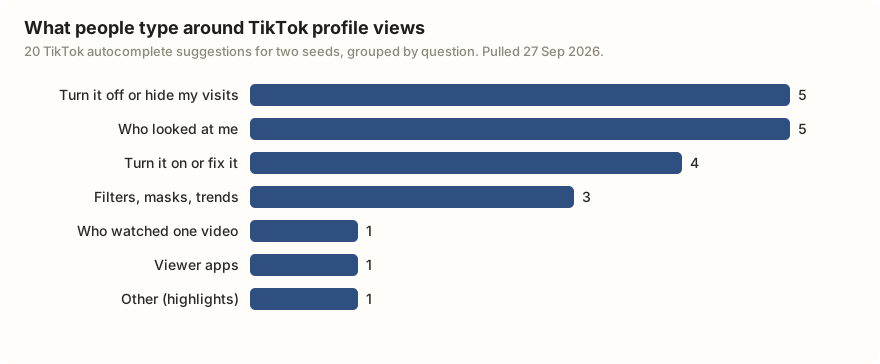
Most people who type this want to know two things: who has been looking, and whether others can see them looking. We pulled TikTok's own search suggestions for two phrases on 27 September 2026. Of the 20 suggestions, 5 ask how to turn the feature off or hide, and 5 ask who looked. All three suggestions in other languages (Burmese, Amharic and Sinhala) are about switching it off. So this page covers both sides.
How to see who viewed your TikTok profile
Profile view history starts switched off. To turn it on in the phone app:
- Tap Profile at the bottom right.
- Tap the menu (three lines) at the top right, then Settings and privacy.
- Tap Privacy, then Profile views.
- Turn on Profile view history.
To see the list, go back to your profile and tap the icon at the top right. Reader's Digest (September 2025) and SociallyIn (updated April 2026) describe it as footprints; UpNumbers (April 2026) calls it an eye. Same button. SociallyIn also lists a second route: Inbox → Activities, where profile views appear with your other notifications.
The list shows accounts that visited your profile in the last 30 days. Older visits drop off. TikTok does not send a notification for each visit, so you have to open the list to check.
The rules that decide who shows up
Both people must have it on. If you turn it on, you can see visitors who also have it on, and they can see when you visit them. If either person has it off, the visit is not recorded in the other's list, as Multilogin's July 2026 guide puts it. There is no one-way version.
You must be 16 or older. Every source we checked, from TechCrunch's 2022 launch report to Descript's July 2026 guide, gives the same age minimum.
You must have fewer than 5,000 followers. Once you pass 5,000, the setting disappears from your account. Multilogin and UpNumbers both say the feature becomes unavailable at that point. TikTok has not published whether an account over 5,000 still shows up in smaller accounts' lists when it visits them.
It is meant to be available everywhere. TikTok told TechCrunch in April 2022 that the feature was live worldwide after a regional start. None of the 2025 and 2026 guides we read mention a country limit. TikTok has not published a current list of countries, and SociallyIn notes you need an up-to-date app. If the setting is missing, update the app first.
How to see who viewed your TikTok videos
Post view history is the video version, and it has its own switch. In the same menu, go to Settings and privacy → Privacy → Post views and turn it on. Then open one of your videos from your profile and tap the view count in the bottom left corner. You get a list of accounts that watched it.
The eligibility rules match profile views: 16 or older, fewer than 5,000 followers. Reader's Digest (September 2025) and Descript (July 2026) both give those limits. The list is short by design, and sources describe it in slightly different ways:
- Time window. Reader's Digest and Descript say the list covers people who watched in the past 7 days. TechCrunch's 2022 report on the first test said the data was only there for 7 days after the video was posted. Either way, you cannot look up a video's viewers from last month.
- Who appears. TikTok's help page says that with it on, people you follow who also have it on can see that you viewed their posts. Reader's Digest says the list covers your followers plus some non-followers who liked or commented.
No source describes a full list of everyone who watched. Expect it to be much shorter than the view count. The missing viewers are people outside the groups above, people with the setting off, and anyone who watched outside the window.
TikTok profile views vs post views vs analytics
Three different things get called "views" in the app. Only two of them name anyone.
| Profile view history | Post view history | Analytics (TikTok Studio) | |
|---|---|---|---|
| What you see | Names of accounts that opened your profile | Names of accounts that watched a video | Totals only: profile views, post views, likes, comments, shares |
| Who must opt in | You and the visitor | You and the viewer | Nobody; it is always on |
| Window | Last 30 days | 7 days | 7, 28 or 60 days, or a custom range |
| Age minimum | 16 | 16 | None beyond having an account |
| Follower limit | Under 5,000 | Under 5,000 | None |
| Where to find it | Settings and privacy → Privacy → Profile views | Settings and privacy → Privacy → Post views | Profile menu → TikTok Studio → Analytics |
| Others see you? | Yes, when you visit them | Yes, when you watch them | No |
Sources: TikTok Help Center pages on profile view history, post view history and analytics (TikTok blocks automated reading, so we checked each rule against Reader's Digest, 23 September 2025, Descript, 29 July 2026 and Multilogin, 9 July 2026). The post view window is 7 days in every source, measured from the view in 2025 and 2026 guides and from posting in TechCrunch's 2022 report.
When you cannot see who viewed your TikTok
If your list is empty or the setting is missing, one of these is usually the reason:
- You have 5,000 followers or more. The setting disappears from the menu.
- Your account says you are under 16. The setting does not appear.
- The visitor has it off. The setting starts switched off, so anyone who never turned it on leaves no trace.
- The visit is too old. Profile visits leave after 30 days, video views after 7.
- Your app is out of date. Update it and check the Privacy menu again.
Stories are the one place where you always get names. Open your Story while it is live and swipe up to see who watched. The Stories guide covers how that list works and when it disappears.
Everything else, including likes, comments, shares and new followers, shows you who engaged, not who watched. Someone can watch every video you post and never appear anywhere.
"Who viewed my TikTok" apps and websites
Search app stores or Google for "who viewed my TikTok" and you get tools promising a full visitor list, often including people who have the setting off. They cannot deliver it. TikTok shows visitor lists only inside its own app, and only to the account owner, as its help page and TechCrunch's launch report describe it. An outside tool has nothing real to show you.
These tools make money by taking your login, your card details or your time. PCWorld reported in March 2026 on a Facebook version, a "see who viewed your profile" post that sent people to a fake login page to steal their passwords. Bitdefender's TikTok scams guide (updated March 2026) says fake follower tools are built to steal TikTok logins, and Malwarebytes described fake TikTok login and verification pages in August 2026. If you already entered your password somewhere like this, change it in the TikTok app and turn on two-step verification.
You do not need an "anonymous viewer" site either. Turn your own Profile view history off and your visits are not recorded.
How to turn off profile views and post views
If you want to look around without leaving a trace, turn both settings off. They are separate switches, so turning one off does not turn off the other.
- Go to Profile → menu → Settings and privacy → Privacy.
- Tap Profile views and turn off Profile view history.
- Go back, tap Post views and turn off Post view history.
With both off, your visits and views no longer appear in other people's lists, and you lose your own lists too. That is the trade. There is no way to see others while hiding yourself, and no way to hide from one person while staying visible to the rest.
A visit you made while the setting was on may already be in someone's list. TikTok has not published whether switching off removes visits that were already recorded, so assume they stay until the 30 days run out.
If you have 5,000 followers or more, the settings are not in your menu at all. To control who sees you, use the other privacy tools: a private account limits your videos to followers you approve, and blocking stops one person seeing your profile. The guide to using TikTok walks through the privacy menu.
What "views" in your analytics mean
The numbers in TikTok Studio are counts, not lists. Profile views is how many times your profile was opened in the period you pick. Post views (or video views) is how many times your videos were watched. Both are totals, and neither tells you who. One person opening your profile three times can show up as three.
To find them, open your profile menu, tap TikTok Studio, then Analytics, and look at the Overview tab. You can choose 7, 28 or 60 days. The analytics guide explains every number on that screen and what a normal figure looks like, and the TikTok Studio guide shows where each tool lives.
For growing an account, the totals beat a name list. Many profile views but few new follows means people liked the video but not your profile. The followers guide covers what to fix.
Frequently asked questions
How to see who viewed your TikTok profile?
Turn on Profile view history under Profile → menu → Settings and privacy → Privacy → Profile views. Then tap the footprints (or eye) icon at the top of your profile. You see accounts that visited in the last 30 days, but only those who also have the setting on. You need to be 16 or older with fewer than 5,000 followers.
Can you see who viewed your TikTok video?
Sometimes. Turn on Post view history under Settings and privacy → Privacy → Post views, open one of your videos and tap the view count in the bottom left. The list covers about 7 days and only people who qualify, such as followers with the setting on, so it is much shorter than the view count.
Can someone see that I viewed their TikTok if my profile views are off?
No. With Profile view history off, your visits are not recorded in anyone's list. The same goes for videos when Post view history is off. The catch is that you also cannot see who visited you. A visit you made while the setting was on may already be in their list; TikTok has not published whether switching off removes it.
Why are my TikTok profile views not showing?
The usual reasons: the people visiting have the setting off, you have 5,000 or more followers, your account is registered as under 16, the visits are older than 30 days, or your app needs an update. Check Settings and privacy → Privacy after updating; if Profile views is missing there, your account is not eligible.
Can you see who viewed your TikTok if you have over 5,000 followers?
No. Once you pass 5,000 followers, Profile view history and Post view history disappear from your settings. You still get total profile views and video views in TikTok Studio analytics, and Story viewer lists still work, but no list of profile visitors.
Do who viewed my TikTok apps work?
No. TikTok shows visitor lists only inside its own app to the account owner, so outside apps have nothing real to show. Many ask for your TikTok login and steal it. If you typed your password into one, change it in the TikTok app and turn on two-step verification.
Sources and data
- Profile view history (TikTok Help Center)
- Post view history (TikTok Help Center)
- Understanding your analytics (TikTok Help Center)
- How to see who viewed your TikTok video: the real answer (Descript, 29 July 2026)
- TikTok profile viewer: how profile views work (Multilogin, updated 9 July 2026)
- How to see profile views on TikTok (UpNumbers, 13 April 2026)
- How to see profile views on TikTok (SociallyIn, updated 2 April 2026)
- Can you see who views your TikToks and your profile? (Reader's Digest, 23 September 2025)
- Profile view history rollout (TechCrunch, 28 April 2022)
- TikTok is testing a feature that lets you see which followers viewed your posts (TechCrunch, 16 June 2022)
- The 'see who viewed your profile' Facebook scam is back (PCWorld, 17 March 2026)
- Top 10 TikTok scams to avoid and how to stay safe (Bitdefender, updated 10 March 2026)
- TikTok phishing: how to spot fake login and verification pages (Malwarebytes, 25 August 2026)
- Autocomplete for two profile-view phrases pulled 27 September 2026 (snapshot)