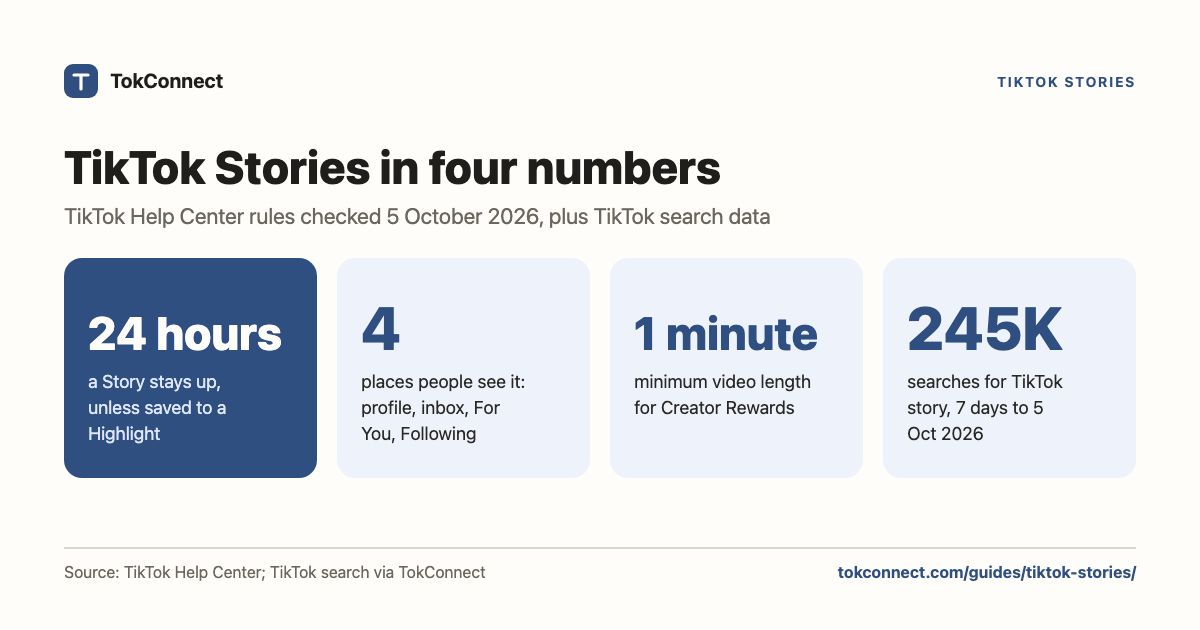

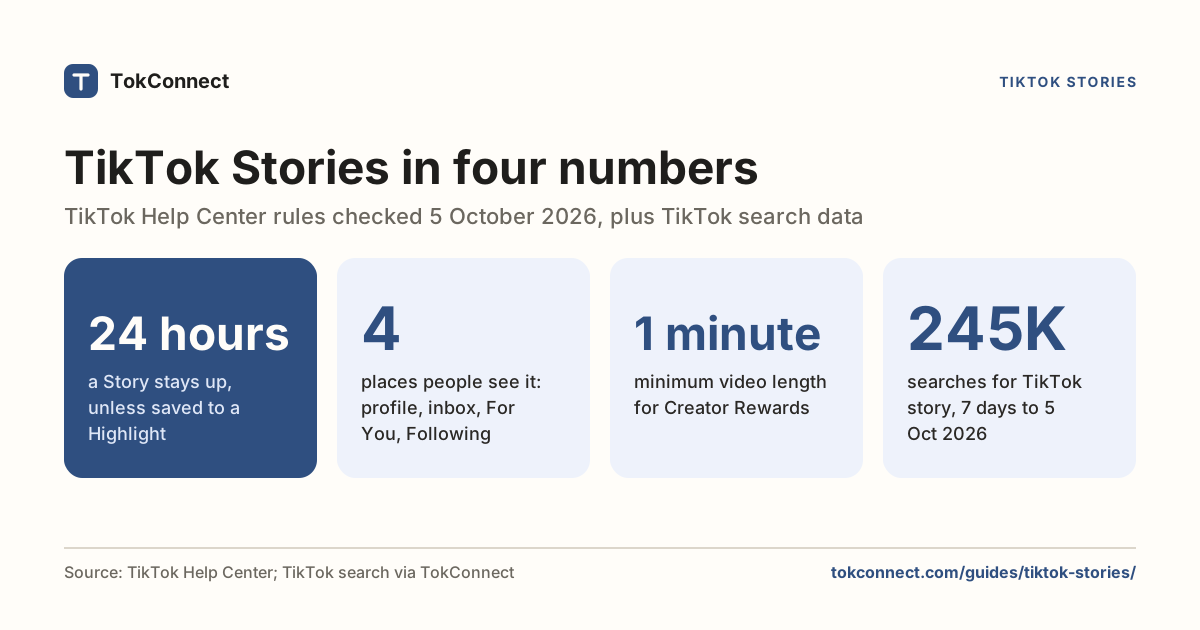
- A TikTok Story is a photo, video or text card that stays up for 24 hours; save it to a Highlight to keep it on your profile (TikTok Help Center).
- People see Stories from your profile, their inbox, and the For You and Following feeds. Swipe up on your Story to see the total views and who watched.
- Viewers can't hide: TikTok says you see who viewed your Story even if their account is private or their profile view history is off.
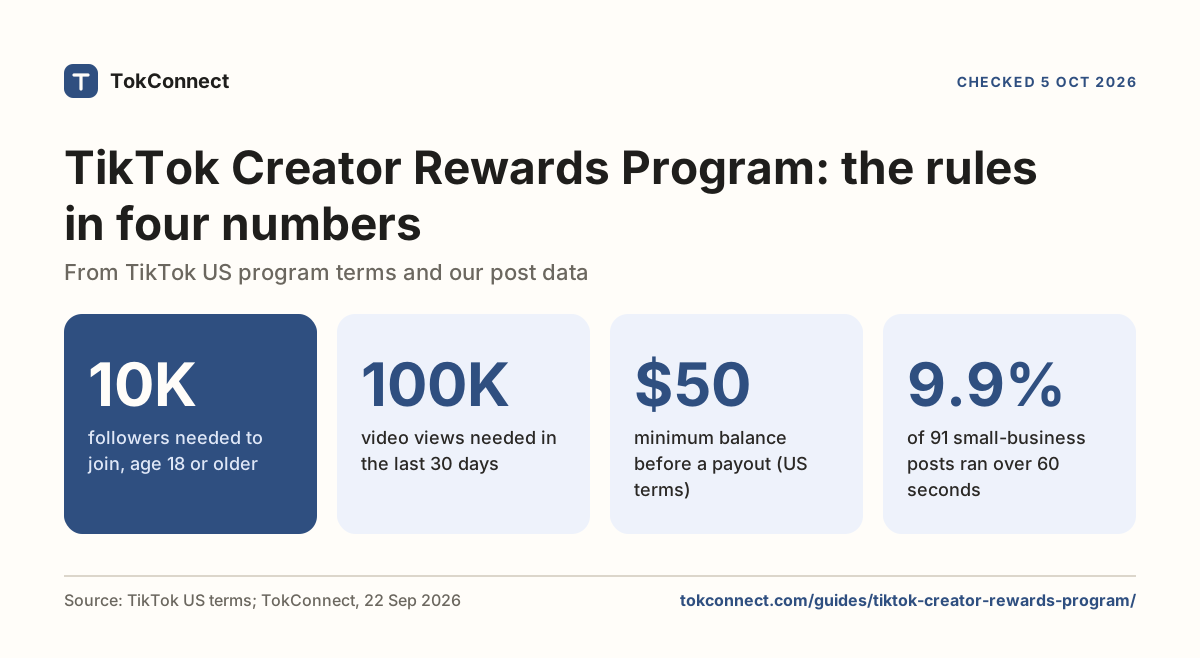
- Creator Rewards pays only on videos over one minute, and 2026 guides put a Story clip at 15 seconds at most, so a Story cannot earn under the published rules.
- "TikTok story" was searched 245,375 times in the 7 days to 5 October 2026, and 3 of 20 autocomplete suggestions ask why a Story is not showing.
A TikTok Story is a photo or short video that stays visible for 24 hours, and TikTok's Help Center says you can keep chosen Stories on your profile past that by saving them to a Highlight. People see your Story from your profile, their inbox, and the For You and Following feeds, and you can swipe up on it to see exactly who watched.
TikTok Stories are worth posting if you want the people who already follow you to see something quick and unpolished. They are not a second chance for a video that flopped, and under the rules TikTok has published they cannot earn money in the Creator Rewards Program, which pays only on videos over one minute.
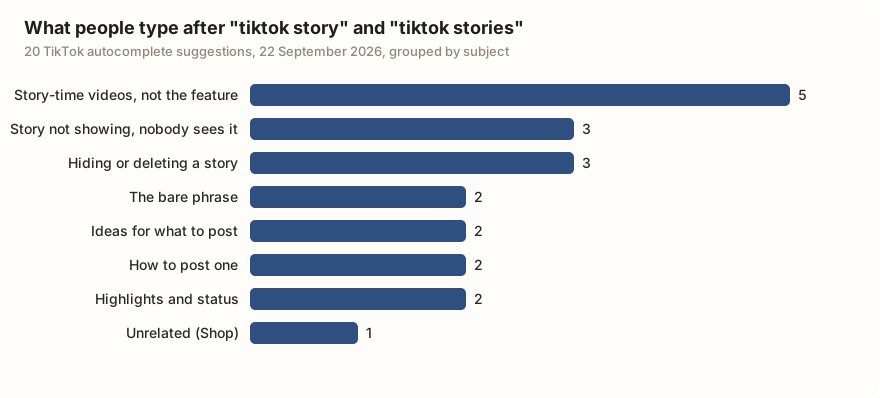
Start with what people actually ask. We pulled TikTok's ten autocomplete suggestions for "tiktok story" and ten for "tiktok stories" on 22 September 2026. Fifteen of the twenty are about the feature itself. The largest worry is a Story that does not show up or that nobody sees: three suggestions, all typed in Burmese or Bengali. Five are people looking for videos that tell a story, which is a different thing altogether.
| What the suggestion is about | Suggestions | Examples |
|---|---|---|
| Story-time videos, not the feature | 5 | tiktok stories drama; tiktok stories full story; tiktok stories in real life |
| A Story not showing, or nobody sees it | 3 | Three questions in Burmese and Bengali: how to make a Story show, what to do when it does not, why nobody sees it |
| Hiding or deleting a Story | 3 | Three questions in Burmese: how to delete a Story, how to hide it from certain people |
| The bare phrase | 2 | tiktok story; tiktok stories |
| Ideas for what to post | 2 | Tiktok story ideas; tiktok stories ideas |
| How to post one | 2 | tiktok stories tutorial; a Burmese question on how to post a Story |
| Highlights and status | 2 | tiktok story highlights; tiktok stories status |
| Unrelated | 1 | tiktok store online shop |
Data: TikTok search suggestions two phrases, ten suggestions each. Snapshot. Seven suggestions are in Burmese or Bengali; the groups follow our own reading of them, which the snapshot notes.
What is a TikTok Story, and where does it show up?
A Story is a post with a clock on it. You record or upload a photo, a video or a text card, and it stays visible for 24 hours, per TikTok's Help Center, checked 5 October 2026. TikTok's page lets you pick "a video time limit" when recording but does not print the maximum; 2026 guides put a Story clip at up to 15 seconds (Flow Orah, 4 July 2026; SocialBee, 12 June 2026).
While the Story is live, a blue ring sits around your profile picture, and anyone who taps the ring watches it. The ring also shows next to your videos in the For You and Following feeds and in the inbox, so a viewer does not have to visit your profile to find it (Shopify, 3 April 2026).
After 24 hours the Story leaves your profile, but it is not gone. TikTok keeps it in your Story archive, and its Help Center now describes Highlights: tap Create Story Highlights on your profile, pick Stories from the archive, add a cover and a name, and they stay on your profile. A Highlight keeps the original Story's visibility setting. SocialBee's update log and Metricool's 2026 timeline date the archive to November 2025 and Highlights to 2026, and report that Stories can be watched on tiktok.com since July 2026; TikTok's help page gives no dates.
How do you post a Story on TikTok?
From the camera
- Tap + at the bottom of the screen.
- Tap Story below the record button, then choose Photo, Text or a video time limit.
- Record, type, or tap Upload to add a photo or a clip from your phone.
- Add text, stickers, a sound, a mention or a poll if you want them.
- Tap Your Story. It is live at once.
Steps from TikTok's Help Center. Tapping your own profile picture at the top of the Following feed, the inbox or your profile opens the same Story camera. When you post a photo post, TikTok also offers a Your Story button instead of posting to the feed.
From a video you already posted
Open the video, tap the three dots or the share arrow, scroll the bottom row of options to the right and tap Add to Story. It works on your own videos and on other people's (TikTok's own answer page). If the button is not there, the problems section below covers the usual reasons. Since March 2026 you can also post a Story that only your paying subscribers see (SocialBee's update log).
Who can see your Story, and the viewer list
Who sees a Story follows your account setting. On a public account anyone can watch it, including people who do not follow you. On a private account only approved followers see it (SocialBee, June 2026). Replies to a Story land in your direct messages, not in a public comment section, so your message settings decide who can reply (TikTok Help Center).
You can see who watched. Open your Story and swipe up: TikTok's Help Center says you see the total views and the accounts that watched. Since December 2025 the same screen shows how many viewers follow you and how many do not (SocialBee's update log). Viewers can't hide: TikTok says people can see you viewed their Story even if your account is private or your profile view history is off. TikTok's pages don't say whether the viewer list survives once a Story moves to a Highlight, so take a screenshot if you want to keep it.
Do Stories count in analytics and for Creator Rewards?
A Story has its own view count and its own viewer list, and that is where its numbers live. TikTok has not published a page that says how Story views relate to the video figures in TikTok Studio, and a Story made from one of your videos shows its own count rather than adding to that video's plays. The analytics guide covers every number that does appear in TikTok Studio.
The Creator Rewards Program pays for qualified views: unique For You feed views, not counting views under 5 seconds. Eligible videos start collecting once they reach 1,000 qualified views, and TikTok's extra reward asks for videos over a minute long (TikTok Help Center). A Story clip is reported at 15 seconds at most, so under TikTok's published rules a Story cannot earn, whatever it does for your reach. TikTok has not published a line that names Stories; the exclusion follows from the one-minute rule. The Creator Rewards guide has the thresholds and pay rates.
TikTok Story vs post vs Photo mode
| Story | Video post | Photo mode post | |
|---|---|---|---|
| How long it stays up | 24 hours, then your Story archive; Highlights keep chosen ones on your profile | Until you delete it | Until you delete it |
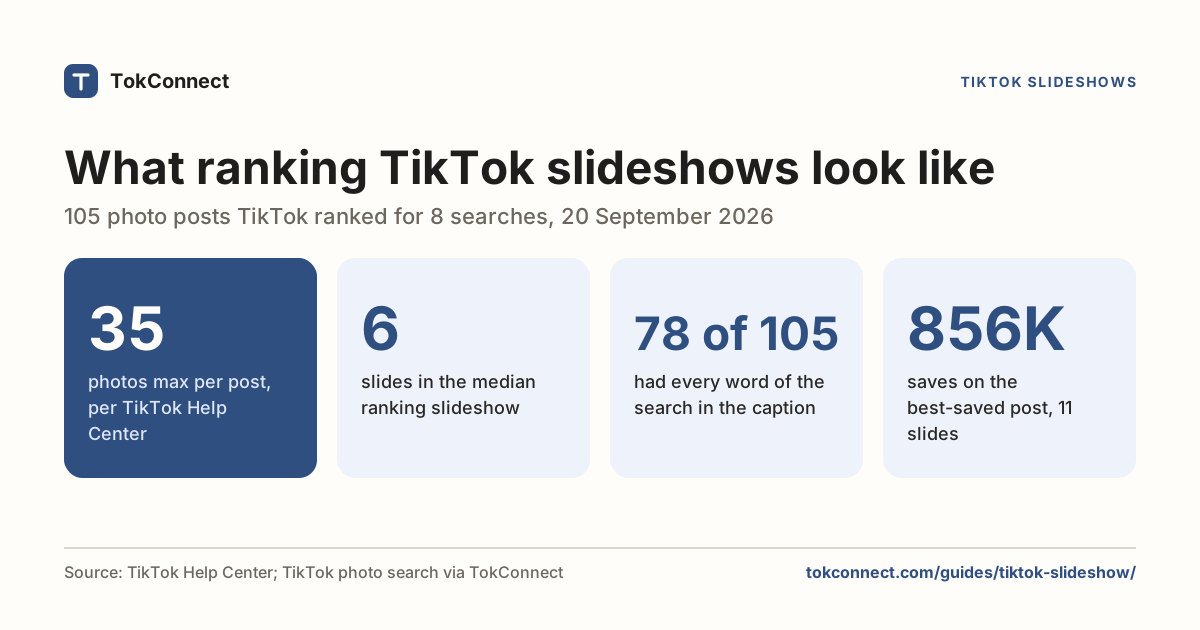
| Length | Up to 15 seconds per clip (guides; TikTok doesn't print it) | Up to 10 minutes from the camera; longer uploads on most accounts | Up to 35 photos, one caption |
| Where people find it | Blue ring on your profile picture: profile, inbox, For You and Following feeds | For You feed, Following feed, search, your profile | Same as a video post |
| Replies | Go to your direct messages | Public comments | Public comments |
| Numbers you get | View count and a named viewer list, while it is live | Plays, watch time, retention, traffic sources in TikTok Studio | Same as a video post |
| Creator Rewards | No: clips are under one minute | Yes, if over one minute and the account qualifies | No: TikTok counts a photo post as under 60 seconds |
| Good for | Quick updates for people who already follow you | Reach, search, anything you want found next month | Text-heavy posts people read at their own pace |
Story and video length from Flow Orah (4 July 2026); photo limit from TikTok's Making a post page; Creator Rewards rules from TikTok's Help Center. The slideshow guide shows what 105 ranking photo posts have in common.
See which format wins for my niche
Do TikTok Stories get views? What creators report
TikTok's Help Center confirms the 24-hour life, the viewer list and Highlights, but it does not publish reach figures for Stories, and our own data covers videos and photo posts, not Stories, because a Story expires before search can index it. So this section is reports from creators, labelled as reports; we could not re-open the Reddit threads on 5 October 2026, so treat their details as unverified. Test any of it on your own account before you build a routine on it.
Report: Stories as a reach hack. The most repeated advice is to add each video to your Story after posting it, so followers who missed it in the feed get a second nudge. A thread on r/n8n from September 2025, "How to automate posts on TikTok Stories every 2 hours", took it further: the poster wanted a Story on a timer all day because they believed Stories were being pushed to the For You feed. Nothing TikTok has published supports that belief, and posting on a timer runs into TikTok's rules on spam. Treat it as a sign of what people are trying, not as a plan.
Report: the missing button as a warning light. A July 2026 thread on r/TikTokLounge, "I think I found a fix for the shadow ban / no 'add to story' button", ties a vanished Add to Story button to a restricted account and trades fixes for it. TikTok has said nothing that links the button to account standing, and the button moved in a 2026 update, which explains most of the disappearances. The views guide separates the fixes with evidence behind them from the folklore.
A Story of your video reaches people who already follow you or who have just watched it. Its views sit in the Story's own count, and it does not give the video a second run through the For You feed. Post the video, then use the Story for the part that does not belong in a post: the outtake, the question for your followers, the reminder. Judge the video on its own numbers.
To decide whether Stories deserve your time, look at what already ranks for your topic. If the top results are videos over a minute, that is where the search traffic and the Creator Rewards money are, and Stories are a side dish. TokConnect, connected to ChatGPT or Claude, can pull that list for you.
Show me which formats rank for [your topic] on TikTok so I know whether to spend time on Stories or posts. List the top 20 results, whether each is a video or a photo post, its length, and its plays, likes and saves.
Check which formats rank for your topic
How many people search for TikTok Stories?
"TikTok story" is a typed search with steady demand. It was searched 245,375 times worldwide in the 7 days to 5 October 2026, and TikTok matched 3,628 videos to it. The daily readings jump around, from 30,696 to 284,971 within the week, which is normal for a how-to phrase that spikes when the app changes a button.
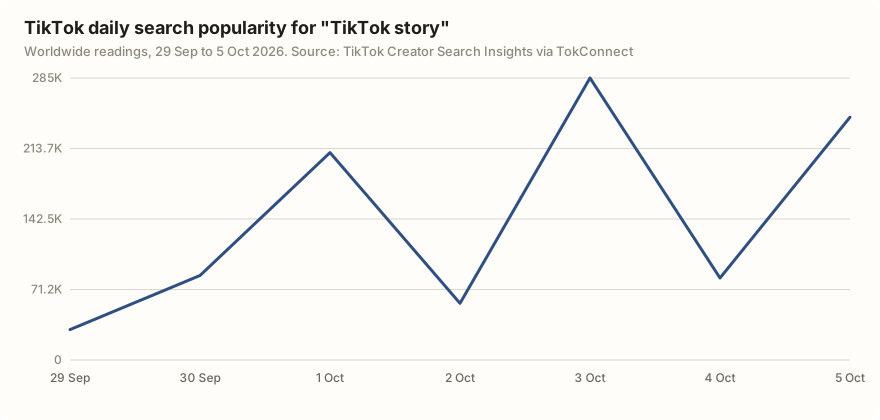
The same search returned 13 records with figures in the millions, such as "TikTok story posting and settings". Those are TikTok's topic groups, which pool many related searches, so they are not counted here. If you make videos about TikTok features, a clear answer to why a Story isn't showing fits what people type; our Creator Search Insights guide shows how to check demand for your own topic.
TikTok Story not showing, and other common problems
No Story button, or no Add to Story
Update the app first. In 2026 TikTok moved Add to Story to the far right of the share row, so scroll that row before you decide it is gone; pressing and holding a video also opens a menu with it (TikTok's own answer page). If Story is missing from the camera modes too, the feature may not be on for your account yet: which accounts get it varies by account type, age and region, and TikTok rolls changes out in stages (SocialBee, June 2026). Reinstalling clears a stuck version. After that, waiting is the only fix.
Your Story is not showing to other people
Check three things. First, that it posted: open your own profile and look for the blue ring. Second, your account setting: on a private account only approved followers see the Story, and a follower you have not approved sees nothing. Third, the clock: a Story is visible for 24 hours from the moment you post it, and a friend who opens the app on day two will not find it.
You cannot see who viewed your Story
Open the Story and swipe up to see the viewer list. TikTok's help pages describe that list only for live Stories, so check it within the 24 hours. Some viewers may be missing because of their own privacy settings or because the list lags behind the count (Tik.ninja, updated 1 July 2026). Third-party "story viewer" sites cannot see anything TikTok does not show you, and handing them your login breaks TikTok's rules.
How we got these numbers
The rules come from TikTok's Help Center pages on TikTok Stories, watching Stories, making a post and how Creator Rewards work, read in full on 5 October 2026. Where TikTok's pages are silent, such as the maximum Story clip length and the dates features arrived, we cite the 2026 guides that report them and say so.
The search numbers come from TokConnect, which reads TikTok's own data. We ran one Creator Search Insights search for "tiktok story". It returned 15 records: 2 typed searches and 13 topic groups that TikTok generates to pool many searches, which we excluded. "Searches" is the Search popularity figure TikTok shows on a topic page: searches worldwide over the last 7 days; the chart shows the daily readings behind it. The autocomplete suggestions are from 22 September 2026. Snapshots: search topics and TikTok's rules, autocomplete.
Key statistics
TikTok Stories stay visible for 24 hours and can be kept on a profile longer by saving them to a Highlight, according to TikTok's Help Center.
TikTok Stories can be watched from four places: a creator's profile, the inbox, the For You feed and the Following feed.
TikTok shows a Story's poster who viewed it even if the viewer's account is private or their profile view history is off.
All 6 statistics
TikTok's Creator Rewards Program pays only on videos over one minute, from 1,000 qualified For You views, and does not count views under 5 seconds.
"TikTok story" was searched 245,375 times on TikTok worldwide in the 7 days to 5 October 2026, with 3,628 videos matched to it.
3 of 20 TikTok autocomplete suggestions for "tiktok story" and "tiktok stories" on 22 September 2026 asked why a Story was not showing or nobody saw it.
Frequently asked questions
How do you post a story on TikTok?
Tap the + button, tap Story below the record button, then choose Photo, Text or a video time limit. Record, type, or tap Upload to add a photo or clip, add a filter, sound, text or stickers, then tap Your Story. You can also tap your profile photo at the top of the Following feed, the inbox or your profile. Steps from TikTok's Help Center.
How long do TikTok stories last?
A Story stays visible for 24 hours from the moment you post it, per TikTok's Help Center. Expired Stories go to your Story archive, and you can save chosen ones to a Highlight so they stay on your profile; a Highlight keeps the original Story's visibility. 2026 guides put each clip at up to 15 seconds; TikTok's page doesn't state the maximum.
Can you see who viewed your TikTok story?
Yes. Open your Story and swipe up to see the total views and the accounts that watched, per TikTok's Help Center. TikTok says viewers show up even if their account is private or their profile view history is off. Nobody else can see your viewer list, and third-party story viewer sites cannot show you anything the app does not.
Do TikTok stories get more views?
Nobody outside TikTok has measured it, and TikTok has not published Story reach figures. Creators report using Stories to nudge followers who missed a video, and some have tried posting Stories on a timer for reach, but nothing TikTok has published says Stories are pushed to the For You feed. A Story mostly reaches people who already follow you, and its views do not add to a video's play count.
Why don't I have the story option on TikTok?
Update the app first. In 2026 TikTok moved Add to Story to the far right of the share row, so scroll that row before deciding it is gone, or press and hold the video to open a menu with it. If Story is missing from the camera modes as well, the feature may not be switched on for your account yet, because availability varies by account type, age and region, and TikTok rolls changes out in stages. Reinstalling clears a stuck version; after that, waiting is the only fix.
Do stories count for the Creator Rewards Program?
No, under the rules TikTok has published. Creator Rewards pays on videos over one minute that reach 1,000 qualified For You views, and views under 5 seconds don't count (TikTok Help Center). 2026 guides put a Story clip at 15 seconds at most, so it cannot meet the one-minute rule. TikTok has not published a page that names Stories directly.
Sources and data
- Making a post (TikTok Help Center, checked 5 October 2026)
- Creator Rewards Program (TikTok Creator Academy)
- TikTok Stories (TikTok Help Center, checked 5 October 2026)
- Watching Stories on TikTok (TikTok Help Center, checked 5 October 2026)
- How rewards work (TikTok Help Center, checked 5 October 2026)
- How do you post a TikTok video on your Story (TikTok)
- Add to Story on TikTok not showing 2026 (TikTok)
- What are TikTok Stories? How businesses can use them strategically (SocialBee, 12 June 2026)
- 2026 TikTok updates, news, and features (SocialBee, updated 3 September 2026)
- TikTok Stories: what they are and how to use them (Shopify, 3 April 2026)
- Can You See Who Viewed Your TikTok Story? (Tik.ninja, 11 May 2026, updated 1 July 2026)
- How to Post Story on TikTok (Coinis)
- TikTok Video Length 2026: Maximum Duration for Every Format (Flow Orah, 4 July 2026)
- 2026 TikTok News: The Definitive Timeline for Creators (Metricool, updated 10 September 2026)
- TikTok Content Volume Up Nearly 80% In Early 2026 As Per-Post Performance Declined (Netinfluencer, 16 June 2026)
- How to make a TikTok slideshow (Descript, updated 29 July 2026)
- TikTok autocomplete suggestions for two Story phrases, 22 September 2026 (snapshot)
- Typed searches for TikTok story and TikTok's Story rules, 5 October 2026 (snapshot)