tokconnect
- To duet, open the video, tap Share, tap Duet, pick a layout (left and right, top and bottom, react or green screen) and record while the original plays.
- To stitch, tap Share, then Stitch, pick up to five seconds of the original, then record your part. TikTok has not published a limit for your part.
- One privacy setting decides who can duet or stitch you: Reuse of content in the newest app layout, or separate Duet and Stitch entries in older ones. You can also switch it off for a single video.
- The option goes missing when the creator turned it off, the account is private, the creator is under 16, or you have a business account and the video uses a chart song.
- Duets and stitches credit the original with an automatic tag, but they do not count toward Creator Rewards, and TikTok has not published how much traffic they send back.
A Duet puts your video next to someone else's so both play at the same time. A Stitch plays up to five seconds of someone else's video and then cuts to yours. To make either one, open the video, tap the Share arrow and tap Duet or Stitch.
That is how to duet on TikTok, and stitching starts the same way. Below are the steps for each, the settings that allow or block them, why the button sometimes is not there, and when each one is worth making. Where 2025 and 2026 guides disagree, we say so.
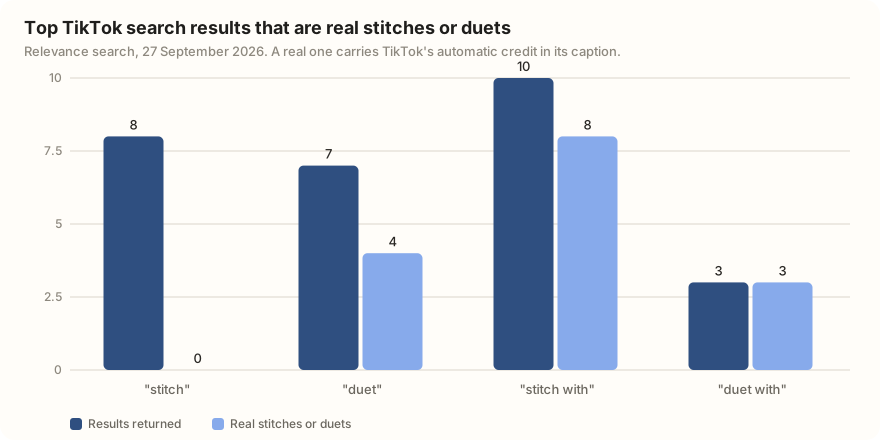
On 27 September 2026 we ran four TikTok searches and checked each result's caption. TikTok adds a credit line to every real duet or stitch ("#duet with @name" or "#stitch with @name"), so the caption shows what each video is. None of the eight top results for "stitch" was a stitch. All eight were about Disney's Stitch character.
Duet vs Stitch: the difference
Both let you build on another person's video, and both credit that person. The difference is what the viewer sees and how much of the original you get.
| Duet | Stitch | |
|---|---|---|
| What it shows | Your video and the original at the same time, in a layout you pick | A clip of the original first, then your video |
| How much of the original | All of it, playing alongside you | Up to 5 seconds, which you choose |
| Max length | As long as the original; TikTok has not published a separate cap | 5-second clip plus your part; TikTok has not published a cap for your part |
| Best for | Reactions, sing-alongs, side-by-side tutorials, "try this with me" | Answering a question, adding context, "here's what happened next" |
| Can be turned off | Yes, by the creator, per video or for the whole account | Yes, same setting in the newest app layout |
| Credit | "#duet with @name" added to your caption | "#stitch with @name" added to your caption |
Sources: TikTok Help Center: Stitch, Neal Schaffer (8 September 2026), Mega Digital (29 May 2026). The credit lines appear in all 13 real duets and stitches in our search snapshot.
How to duet on TikTok, step by step
- Open the video you want to duet.
- Tap the Share arrow on the right. Tap Duet. You may need to swipe the bottom row to find it.
- Tap Layout on the right side of the camera and pick one (see below).
- Add any effects or filters now, before you record.
- Tap the record button. The original plays while you film, so be ready before you start.
- Tap the check mark, add text or sounds, write a caption and post.
You film live next to the original. Guides say you cannot drop in footage recorded earlier (Neal Schaffer, September 2026). Duets are made in the phone app; SocialCal (May 2026) says making them on a computer is limited. TikTok's own steps are in its Help Center.
The four duet layouts
| Layout | What it looks like | Good for |
|---|---|---|
| Left and right | Two videos side by side | Reactions, singing together, direct replies |
| Top and bottom | One video stacked above the other | Comedy, faces, videos with text on screen |
| React | The original fills the screen, you sit in a small window | Commentary where the original is the star |
| Green screen | The original plays behind you like a backdrop | Explaining, tutorials, pointing at details |
Layout names from PostLink (updated 28 August 2026) and SocialCal (May 2026); TikTok announced extra layouts in its Newsroom. Some app versions call React "picture in picture".
How to stitch on TikTok, step by step
- Open the video you want to stitch.
- Tap the Share arrow and tap Stitch.
- Drag the handles to pick up to five seconds of the original. Tap Next.
- Record your part. Answer, react or continue the story.
- Add text, effects and a caption, then post.
The five-second cap on the borrowed clip is in TikTok's Help Center and every 2026 guide we checked. Your part is less clear. EntreResource (March 2026) says it can run 3 to 15 seconds. Seven of the eight real stitches in our search ran 15 seconds or less, but one posted in September 2026 runs 26 seconds in total. So the 15-second limit does not apply to everyone, and TikTok has not published one.
Pick the five seconds that make your part make sense. The best clip is usually the question or the claim, cut just before the answer.
Settings that allow or block Duet and Stitch
You decide who can duet or stitch your videos. There are two levels.
For your whole account. Go to Profile, the menu, Settings and privacy, then Privacy. In the newest layout the setting is called Reuse of content, and you choose Everyone or Friends (followers you follow back). One switch now covers Duet, Stitch, stickers and adding your video to someone's Story (Tagly, 27 July 2026; Neal Schaffer). Tagly says the renamed setting reached accounts in July 2026 with no announcement. Older layouts still show separate Duet and Stitch entries under Privacy (SocialCal, May 2026).
For one video. Before you post, open More options and switch reuse, Duet or Stitch off. For a video already posted, open it, tap the three dots, then Privacy settings.
Rules you cannot change. Your account must be public for anyone to duet or stitch you (TikTok Help Center). Videos by people under 16 cannot be dueted or stitched at all, and for 16- and 17-year-olds the default is Friends. TikTok set these rules in January 2021, and 2026 guides still describe them.
Why can't I duet or stitch on TikTok?
If Duet or Stitch is missing from the share panel, it is almost always one of these:
- The creator turned it off for that video or their whole account.
- Their account is private. Private accounts cannot be dueted or stitched.
- It is set to Friends and you are not a mutual follower.
- The creator is under 16, or 16 or 17 with the default left on.
- You have a business account and the video uses a chart song. Business accounts can only use TikTok's Commercial Music Library, which TikTok says covers "a duet, react, or stitch with user videos" (TikTok Ads Help). A September 2026 guide reports the button blocked, the sound greyed out or the audio muted. Our business vs creator account guide explains the switch.
- It is not a normal post. LIVEs, Stories and ads cannot be stitched (Mega Digital, May 2026).
- Your app is old. Update it, then try again.
Do duets and stitches credit the original creator?
Yes. TikTok adds "#duet with @name" or "#stitch with @name" to your caption, and the tag opens the creator's profile. Every real duet and stitch in our search had this line. The creator also gets a notification (Mega Digital; PostLink). Your duet lives on your profile, not theirs.
Whether it sends them viewers is another matter. TikTok has not published how many people tap through from a duet or stitch. Neal Schaffer found no documented way that duets reach the original video's viewers. If you want the creator to see it, the notification is your best shot.
When a duet or stitch helps your account
What TikTok has published. Duets and stitches do not count as original for the Creator Rewards Program, TikTok's scheme that pays for views on original videos over a minute (Neal Schaffer, revised 26 September 2026). TikTok has not said whether they are ranked any differently from other videos.
What our search shows. We found 8 real stitches and 5 real duets across four searches. The stitches had more plays: a median of about 745,000 against about 105,000. But six of the eight top stitches are from 2021 to 2023, while four of the five duets are from 2025 or 2026. All 13 run under half a minute. Treat this as a look at top results, not an average.
| Real stitches | Real duets | |
|---|---|---|
| Found in search | 8 | 5 |
| Median plays | 744,927 | 105,326 |
| Plays range | 3,313 to 5,967,010 | 35,884 to 4,480,470 |
| Median length | 14.9 s | 15.2 s |
| Posted 2025 or 2026 | 2 of 8 | 4 of 5 |
| Median saves per 1,000 plays | 1.6 | 1.1 |
Data: TikTok video search via TokConnect, 27 September 2026, searches "stitch", "duet", "stitch with" and "duet with", relevance order. A video counts as real if its caption carries TikTok's automatic credit. Snapshot.
What creators and guides report. Stitches work best as replies: clip a question or a claim, then answer or correct it. Duets suit reactions and singing together (Neal Schaffer), and the green screen layout suits tutorials where the viewer needs to see the original while you talk (SocialCal). Content-idea lists that rank on Google put "stitch and duet other creators in your niche" near the top. A strong first line matters as much as in any video; see our hooks guide and script templates.
One more thing from the data. Searching "stitch" on TikTok shows Disney videos. Of the ten search suggestions TikTok gave for "stitch", seven were about the character, two about sewing and one was the bare word (snapshot). Nobody finds your stitch by searching the word. Put your topic in the caption instead. The views guide covers what else helps.
A stitch tags the person and sends them a notification, and their followers can find you from it. TikTok's Community Guidelines ban content that degrades or mocks a specific person, or that sends others to pile on. Such videos can be kept out of the For You feed or removed. If you disagree, stitch the claim, not the person, and keep it about the idea.
To find which videos in your topic are worth answering, look for questions that already get a lot of plays. An agent connected to TikTok's search data can pull them for you.
Search TikTok for the 20 most-played videos about [my topic] from the last month. List the ones whose caption or first line asks a question or makes a claim people argue with, with plays and comments for each, so I can pick three to stitch with my answer.
Works in Claude, ChatGPT, Cursor and Gemini once TokConnect is connected. Get a free key (50 credits, no card) or see the setup guides.
Frequently asked questions
How do you duet on TikTok?
Open the video, tap the Share arrow and tap Duet. Tap Layout to choose left and right, top and bottom, react or green screen, then press record; the original plays while you film. Add text or effects, write a caption and post. TikTok adds "#duet with @name" to your caption automatically.
How do you stitch on TikTok?
Open the video, tap the Share arrow and tap Stitch. Drag the handles to pick up to five seconds of the original, tap Next, then record your part. Edit and post like any other video. TikTok adds "#stitch with @name" to your caption and notifies the creator.
What is the difference between a duet and a stitch on TikTok?
A duet plays your video and the whole original at the same time, side by side or in another layout. A stitch plays up to five seconds of the original first, then cuts to your video. Duets suit reactions and sing-alongs; stitches suit answering a question or adding context.
Why can't I duet on TikTok?
Usually the creator has turned Duet off for that video or their account, or the account is private. Videos by people under 16 cannot be dueted, and 16- and 17-year-olds default to Friends only. Business accounts cannot duet videos that use songs outside the Commercial Music Library. If none of these apply, update the app.
How do I turn off duet and stitch on TikTok?
Go to Profile, the menu, Settings and privacy, then Privacy. In the newest layout, open Reuse of content and choose Friends; older layouts have separate Duet and Stitch entries. For one video, open it, tap the three dots, then Privacy settings. Making your account private also blocks both.
Does the original creator get notified when you duet or stitch them?
Yes. TikTok tags the creator in your caption with "#duet with @name" or "#stitch with @name" and sends them a notification. The duet or stitch stays on your profile, not theirs. TikTok has not published how many viewers tap through to the original.
Sources and data
- Duet, Stitch and other creation features (TikTok Help Center)
- Stitch (TikTok Help Center)
- Duets privacy settings (TikTok Help Center)
- Feature highlight: new layouts for Duet (TikTok Newsroom)
- Strengthening privacy and safety for youth on TikTok (TikTok Newsroom, January 2021)
- Commercial Music Library (TikTok Ads Help Center)
- Creator Rewards Program (TikTok Help Center)
- Safety and civility (TikTok Community Guidelines)
- How to Duet on TikTok (Neal Schaffer, 8 September 2026)
- TikTok Creator Rewards Program (Neal Schaffer, revised 26 September 2026)
- TikTok "Allow Reuse of Content": What the Setting Actually Controls (Tagly, updated 27 July 2026)
- How to Duet on TikTok (SocialCal, 13 May 2026)
- How to Do a Duet on TikTok in 2026 (PostLink, updated 28 August 2026)
- How to Stitch Video on TikTok (Mega Digital, 29 May 2026)
- How to Stitch on TikTok in 2026 (EntreResource, 27 March 2026)
- TikTok Commercial Music Library: What Brands Can Use (Lumina Clippers, updated 23 September 2026)
- TikTok video search results for stitch and duet phrases, 27 September 2026 (snapshot)
- TikTok search suggestions for duet and stitch, 27 September 2026 (snapshot)