tokconnect
- Apply in the app under Settings and privacy, then Account, then Verification, or use TikTok's online form if the option is missing.
- TikTok checks that the account is authentic, unique, active and notable. Notable means coverage in several real news outlets, not paid posts or press releases.
- No follower count earns the badge. TikTok says it does not consider followers or likes; guides that quote numbers range from 20,000 to 500,000 and disagree.
- Changing your username or switching between personal and business removes the badge, so settle both before you apply.
- TikTok does not sell verification. Every offer to buy it is a scam, and many are built to steal your login.
To get verified on TikTok, open the app and go to Settings and privacy, then Account, then Verification, and send a request. TikTok gives the blue check to accounts that are real, active and notable, which in practice means news outlets have written about you. No follower count earns it, and TikTok does not sell it.
Most requests fail on one point: notability. A big following helps you get press, but TikTok says it does not count followers or likes when it decides. Below is what TikTok asks for, what 2026 guides report about follower numbers and review times (they disagree), how to lose the badge by accident, and how to spot the people selling fake ones.
What the blue check means
The blue check sits next to an account's name on its profile and in search results. It tells people one thing: TikTok checked that the account belongs to the person, brand or group it claims to be. It is not a quality badge, a reward for good videos or a sign TikTok will push your posts. TikTok's help page on verified accounts says the badge means the account was reviewed and represents the person, business or brand it names.
That makes it scarce. Each person or brand gets one verified account, with an exception for separate language accounts. TikTok also says it can refuse or remove the badge from accounts that meet the rules through fake or bought activity.
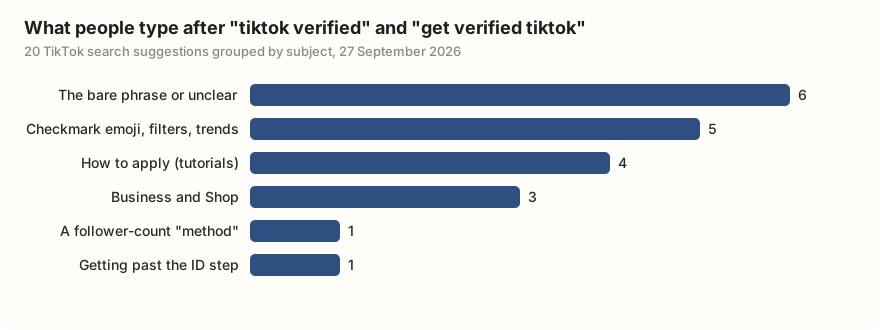
People searching TikTok mix the real badge up with lookalikes. We typed "tiktok verified" and "get verified tiktok" into TikTok's search bar and saved the 20 suggestions it offered. Seven are about shortcuts or copies: a checkmark emoji to paste into your name, a "verified" filter, a trend, a follower-count "method" and a way to skip the ID step. A checkmark emoji in your name is just text. The real badge comes only from TikTok's review.
| What the suggestion is about | Suggestions | Examples (as TikTok shows them) |
|---|---|---|
| The bare phrase, or unclear | 6 | tiktok verified account; tiktok verified 2026; get verified tiktok khmer |
| Checkmark emoji, filters and trends | 5 | tiktok verified emoji copy paste; get verified tiktok fillter; tiktok verified trend |
| How to apply | 4 | how to get verified on tiktok; tiktok verified badge tutorial 2026 |
| Business and Shop verification | 3 | tiktok verified business; get verified tiktok shop; get verified tiktok for business |
| A follower-count "method" | 1 | get verified tiktok 28 follwers method |
| Getting past the ID step | 1 | get verified tiktok without passport |
Data: TikTok search suggestions via TokConnect, pulled 27 September 2026, 10 per seed. Suggestions show what people type, not how often. Open the snapshot.
TikTok verification requirements
TikTok's help page names four tests: the account must be authentic, unique, active and notable, and it must follow the Community Guidelines and Terms of Service. The 2026 guides from Sprout Social, SocialBee and Stack Influence add two more that the app checks: a complete profile and a secured login.
| Criterion | What it means | Who says so |
|---|---|---|
| Authentic | A real person, business or organization. No fan, parody or tribute pages. | TikTok help page; every guide |
| Unique | One verified account per person or brand, except separate language accounts. | TikTok help page |
| Active | Logged in within the last 6 months. | TikTok help page; Sprout, SocialBee, Stack Influence |
| Notable | Written about in several news sources. Paid posts, press releases, social media posts and old or unrelated articles do not count. | TikTok help page; Sprout, SocialBee |
| Complete profile | Public account with a name, bio, profile photo and at least one video. | Sprout, Stack Influence, Sideshift |
| Secure | Two-step verification on and a confirmed email address. | Sprout, SocialBee, Stack Influence |
| Good standing | No serious Community Guidelines or Terms of Service breaks. | TikTok help page |
| Account age | TikTok has not published a minimum. MegaDigital says the account must be active for 6 months; the other guides read the 6-month rule as a recent login. | Sources disagree |
Sources: TikTok's verified accounts page (blocks automated reading; checked through the guides that quote it), Sprout Social (January 2026), SocialBee (January 2026), Stack Influence (updated September 2026), Sideshift (February 2026), MegaDigital (2026). Checked 27 September 2026.
Notable is the hard one. The request form asks for links to coverage about you. Stack Influence and LitCommerce say to send at least four articles, plus links to your verified profiles on other apps. Sprout reports that the form also asks personal accounts for a government ID and a live selfie, and business accounts for an email on the company's own domain or official documents. That is why "without passport" shows up in the suggestions. TikTok has not published a way around the ID step.
How many followers you need to get verified on TikTok
None. TikTok's help page says it does not consider follower or like counts, and every 2026 guide we checked repeats it. The badge follows press coverage, not views.
The guides still float numbers, and they do not agree:
| Source | What it says about followers |
|---|---|
| TikTok help page | Followers and likes are not considered |
| Birdeye (August 2026) | No fixed number; calls the 100,000 figure a myth |
| Popsters (2026) | 20,000 to 50,000 may be enough, but only with a big following elsewhere, press or a Wikipedia page |
| MegaDigital (2026) | No required number; many verified accounts pass 100,000 |
| LitCommerce (2026) | No published minimum; accounts "often around 500,000+" have better odds |
Sources linked in the table. Checked 27 September 2026.
Read those numbers as descriptions of who tends to get press, not as a rule. If you want the following first, the followers guide measures what the first 1,000 takes. The brand deals guide covers the media kit that often leads to the coverage TikTok asks for.
How to get verified on TikTok, step by step
- Open TikTok and tap Profile.
- Tap the menu (three lines), then Settings and privacy.
- Tap Account, then Verification.
- Pick the type. A personal account can ask for personal or institutional verification. A business account can only ask for business verification.
- Add your legal details, your news links and links to your verified profiles elsewhere, then send.
If Verification is missing from your Account screen, use TikTok's online verification form instead. Sprout, SocialBee and Sideshift all point there. TikTok has not published which accounts see the in-app option, and Sideshift says it is not offered in every region.
What to have ready before you apply
- Press links. Four or more articles from real news outlets about you or your brand. No paid posts, no press releases, nothing years old.
- Your final username. Changing it later removes the badge.
- Your final account type. Switching between personal and business removes it too.
- A complete, public profile. Name, photo, bio and at least one video. The bio ideas guide helps if yours is blank.
- Two-step verification on and a confirmed email, in Settings and privacy, under Security.
- ID ready. A government ID for a person; a company-domain email or registration papers for a business.
- Your verified profiles elsewhere. Instagram, YouTube or X links, if you have them.
- A clean record. TikTok checks that the account follows its Community Guidelines and Terms of Service.
Before you send it, check the profile the way a reviewer would, and check for copies. The "unique" rule is also why impersonators matter: if someone is posting as you, the badge is what lets your followers tell you apart.
Look up my TikTok profile @[my handle] and check it against TikTok's verification checklist: public, name, bio, photo, at least one video, posted recently. Then search TikTok for [my name or brand] and list any accounts using my name or photo that are not me.
Works in Claude, ChatGPT, Cursor and Gemini once TokConnect is connected. Get a free key (50 credits, no card) or see the setup guides.
An agent connected to TikTok through TokConnect can read your public profile, run the search and list lookalike accounts in one pass. It cannot get you press. That part is still yours.
How long review takes, and trying again
TikTok has not published a review time, and the guides give different answers:
| Source | Review time | Wait before reapplying |
|---|---|---|
| SocialBee (January 2026) | A few days | None stated |
| Birdeye (August 2026) | 3 to 5 business days in the app; up to 30 days by web form | 30 days |
| Stack Influence (September 2026) | Within 30 days | 30 days |
| Sideshift (February 2026) | No set time | 30 days |
| MegaDigital (2026) | A few days to weeks | 30 days |
Sources linked above. Checked 27 September 2026.
The guides say the answer arrives as a TikTok notification. Most agree on a 30-day wait after a refusal. Use that month to fix the gap. If you were refused, the likely reason is coverage, and sending the same links again will get the same answer.
Business verification and political accounts
Business verification is a different thing. TikTok's business verification page, updated June 2026, says any account type can apply to prove it is a real company. It unlocks business tools such as analytics, message tools and conversion buttons, and it shows as a "Verified" badge inside Business Suite, not as the blue check on your profile. The same page says the blue check is for high-profile accounts such as celebrities and major brands. Advertisers also verify their company with documents in Ads Manager, which TikTok's ads help page says can take up to two business days.
Government, politician and party accounts follow stricter rules. In a June 2025 filing to Washington State's election regulator, TikTok said these accounts in the US, including state and local candidates, must have the verified badge, and that getting it is the account owner's job. They apply in the app or by web form like anyone else. TikTok's political accounts policy also bars them from ads, gifts, tips, selling and campaign fundraising. Outside the US, TikTok's help page for these accounts calls verification optional in most markets but strongly recommended.
How people lose the blue check
The badge is tied to the account as TikTok checked it. Guides from Sprout, SocialBee, Sideshift and LitCommerce list the same triggers:
- Changing your username. Sideshift says the badge goes automatically.
- Switching account type, personal to business or back. The business vs creator account guide covers what else changes when you switch.
- Handing the account to a new owner.
- Breaking the Community Guidelines, or growing through fake activity.
TikTok has not published a way to remove your own badge; Sideshift says a username change is the only sure route.
Can you buy TikTok verification?
No. TikTok has no paid verification. Sprout Social puts it plainly: anyone claiming to sell TikTok verification "is not affiliated with TikTok".
The offers come as DMs, emails from a "verification team" and sites selling "pre-verified" accounts. Malwarebytes documented in August 2026 fake TikTok pages that congratulate you on being eligible for a badge and then ask for your login. Once they have it, the account is theirs. A bought "verified" account loses its badge anyway, because a new owner or new username removes it. Only ever apply inside the TikTok app or at tiktok.com.
Frequently asked questions
How many followers do you need to get verified on TikTok?
None. TikTok says it does not consider follower or like counts when it grants the blue check. Some guides mention 20,000, 100,000 or 500,000 followers, but those describe who tends to get press coverage, which is what TikTok actually asks for.
Can you buy TikTok verification?
No. TikTok has no paid verification, and anyone selling it is not connected to TikTok. Many of these offers are phishing pages that ask for your login. A bought "verified" account loses its badge anyway, because a new owner or a new username removes it.
Why can't I see the verification option on TikTok?
TikTok has not published which accounts see Verification under Settings and privacy, then Account. Update the app first. If it is still missing, use TikTok's online verification form at tiktok.com/legal/report/verification, which asks for the same details.
How long does TikTok verification take?
TikTok has not published a review time. 2026 guides report anything from a few days to 30 days, with web form requests at the slower end. If you are refused, most guides say you can apply again after 30 days.
Do you lose verification on TikTok if you change your username?
Yes. Guides from Sprout Social, SocialBee and Sideshift all say a username change removes the blue check, and switching between a personal and a business account does too. Pick your final name and account type before you apply.
Is TikTok business verification the same as the blue check?
No. Business verification proves a company is real and unlocks business tools. It shows as a Verified badge inside Business Suite, not as the blue check on your profile. TikTok says the blue check is for high-profile accounts such as celebrities and major brands.
Sources and data
- How to tell if an account is verified on TikTok (TikTok Help Center)
- Submit a Verification Request (TikTok)
- About business verification for TikTok accounts (TikTok for Business Help Center, updated June 2026)
- How to verify your business on TikTok (TikTok Ads Manager Help, updated September 2026)
- Government, Politician, and Political Party Accounts (TikTok Help Center)
- Updating our policies for political accounts (TikTok Newsroom)
- TikTok Inc. written response to the Washington Public Disclosure Commission (June 2025)
- How to Get Verified on TikTok: 6 Tips for Success in 2026 (Sprout Social, January 2026)
- How to Get Verified on TikTok in 2026: A Step-by-Step Guide (SocialBee, January 2026)
- How to Get Verified on TikTok in 2026: The Complete Guide (Stack Influence, updated September 2026)
- How to Get Verified on TikTok in 2026 (Sideshift, February 2026)
- How to Get Verified on TikTok without 100k Followers (Birdeye, updated August 2026)
- How to Get Verified on TikTok for Creator and Business (LitCommerce, 2026)
- How to Verify a TikTok Account: Guide to Success 2026 (MegaDigital)
- How to Get Verified on TikTok in 2026: Proven Tips and Tricks (Popsters)
- TikTok phishing: How to spot fake login and verification pages (Malwarebytes, August 2026)
- TikTok search suggestions for "tiktok verified" and "get verified tiktok", pulled 27 September 2026 (snapshot)