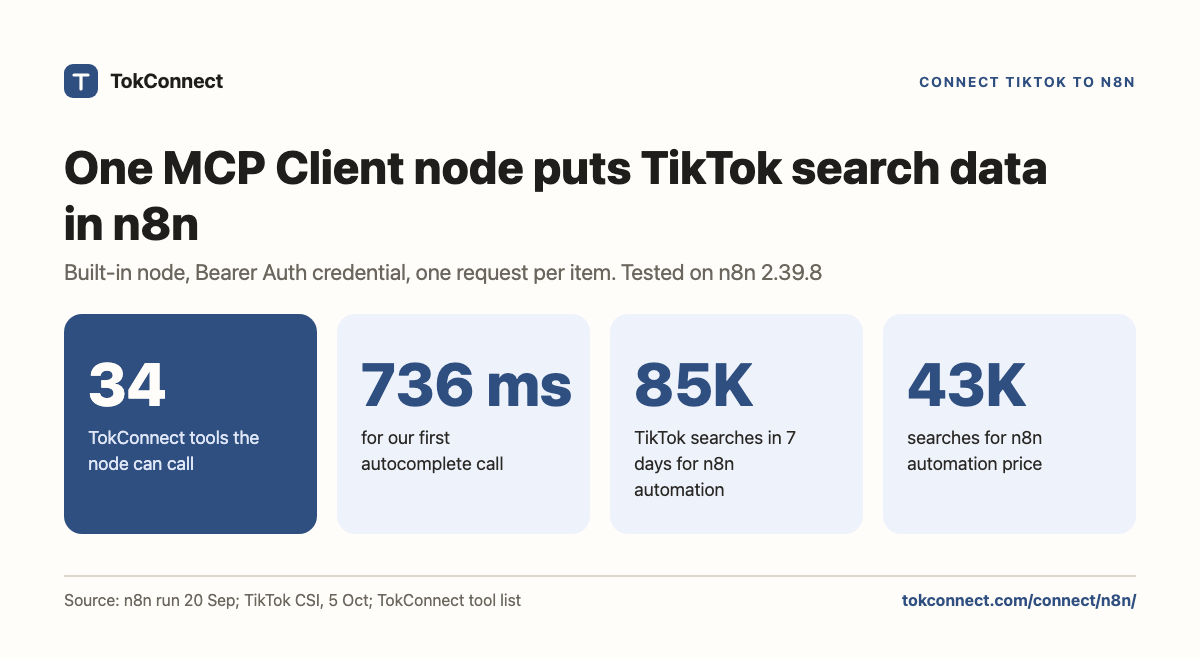

- Use the MCP Client node (not only the MCP Client Tool sub-node): Server Transport
HTTP Streamable, endpointhttps://mcp.tokconnect.com/mcp, AuthenticationBearer Auth. - The node runs once per input item. Ten items in means ten TikTok requests.
- n8n parses the tool's JSON text for you: the result sits at
$json.content[0].textas an object, so the next node can read.suggestionsor.topicsdirectly. - On TikTok, "n8n automation" had 84,708 searches and "n8n automation price" 43,204 in the 7 days to 5 October 2026.
Put all of TikTok in your n8n workflows. One built-in node connects TokConnect, and every run can pull live TikTok searches, videos, comments, creators, hashtags, sounds and TikTok Shop sales into a sheet, a Slack message or the next step. No AI Agent, no model, no community package.
- Get your key. Sign in with Google at app.tokconnect.com/api-key and copy your API key.
- Add the node. In n8n, add an MCP Client node. Set Server Transport to HTTP Streamable and the endpoint to
https://mcp.tokconnect.com/mcp. - Add your key. Under Authentication choose Bearer Auth, create a credential and paste the key.
- Pick a tool and run. Under Tool, choose From List and pick one of TokConnect's tools. Execute the workflow and the TikTok result lands in the next node, like any HTTP Request step.
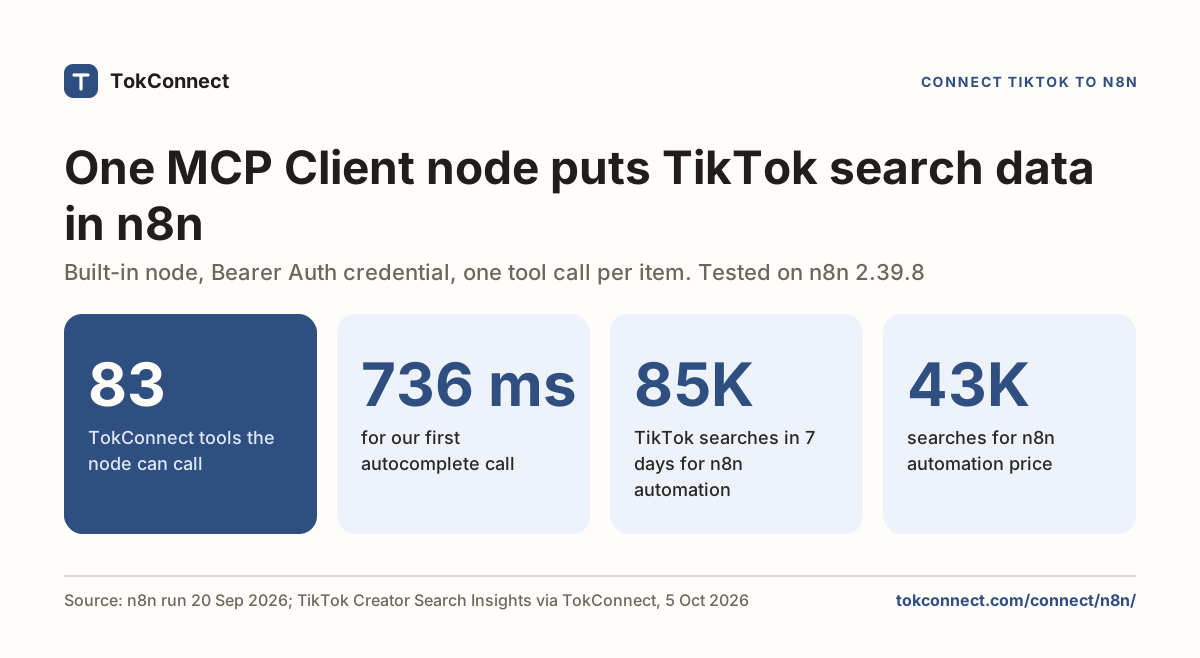
Both workflows on this page ran on n8n 2.39.8 on 20 September 2026, the first in 736 ms; the tool names have changed since, as the note under the second workflow explains. The node settings, the workflows to import and the fixes are in the setup details below.
Every plan, Free included, gets all 34 tools. Free gives 50 credits once, one credit pays for one lookup and failed lookups cost nothing. Paid plans start at $34.99 a month billed yearly ($49 billed monthly), with 500 credits a month on Starter. One call per item means 50 rows cost 50 credits, so the 50 free credits run one 50-row sheet.
The workflows to import are in the workflow snapshot (JSON). Prefer the HTTP Request node? Every paid plan includes the REST API.
What a workflow can pull every week
Each node takes a tool and a JSON input. Paste the input into the MCP Client node.
Node input · Tool: product_top_selling (this week's best-selling listings on TikTok Shop, with estimated sales)
{ "keyword": "[your product]", "window": "7d", "limit": 20 }Node input · Tool: demand_find_topics (what people search on TikTok, with searches and how many videos answer each one)
{ "keyword": "[your niche]", "limit": 20 }For the creators driving the most sales for a brand, pick creator_top_selling from the Tool list and fill the parameters n8n shows.
Setup details: the node settings
Add an MCP Client node (search the node panel for "MCP Client"; the one without "Tool" in the name). Fill it in like this:
| Field | Value |
|---|---|
| Server Transport | HTTP Streamable |
| MCP Endpoint URL | https://mcp.tokconnect.com/mcp |
| Authentication | Bearer Auth, then create a credential with your TokConnect key as the token |
| Tool | From List: n8n fetches the tool list from the server (all 34 TokConnect tools) once the endpoint and credential are set. Or By ID: type the tool name, for example demand_keywords |
| Input Mode | Manual (one field per parameter) or JSON (one object). JSON is easier to copy from this site and to build with expressions |
| Options | Timeout, in milliseconds (60,000 on the node we tested). Leave it unless a long comment pull times out |
Server Sent Events was still offered under Server Transport, marked deprecated, when we tested. TokConnect speaks Streamable HTTP, so leave the default. n8n's node docs list Bearer, header, multiple-header and OAuth2 authentication; Bearer with a TokConnect key is the route this page uses.
Where the key goes
In a credential, never in the node. Under Authentication choose Bearer Auth, click Create New Credential, paste the key. n8n stores credentials encrypted and strips them from workflow exports, so a workflow JSON you share or commit carries a credential reference, not the key. If you put the key inside the JSON input instead, it ships with every export.
Rotate by editing the credential; every node that references it picks up the new value on its next run.
Your first TikTok MCP call in n8n
Manual Trigger, then an MCP Client node with Tool demand_keywords, Input Mode JSON:
{
  "keyword": "protein",
  "limit": 5
}
Execute the workflow. The node returned in 736 ms:
{
  "content": [
    {
      "type": "text",
      "text": {
        "count": 5,
        "suggestions": [
          { "text": "protein" },
          { "text": "protein powder" },
          { "text": "protein for gym" },
          { "text": "protein food" },
          { "text": "protein meals idea" }
        ]
      }
    }
  ]
}
Data: TikTok autocomplete via TokConnect, executed in n8n 2.39.8 on 20 September 2026. Open the snapshot. Autocomplete is live, so your lines may differ.
One detail saves a Code node: MCP tools return their result as a JSON string inside content[0].text, and n8n parses it for you. The next node reads {{ $json.content[0].text.suggestions[1].text }} and gets protein powder, an object path, not a string to decode.
Two steps: suggestion in, search volume out
Chain a second MCP Client node, Tool demand_find_topics, Input Mode JSON, with an expression as the whole input:
={{ JSON.stringify({ keyword: $json.content[0].text.suggestions[1].text, limit: 3 }) }}The expression takes the second autocomplete suggestion from the first node and asks TikTok's search index for topics matching it. Executed the same day, the second node returned three records in 1,956 ms. All three were TikTok topic groups, phrases TikTok generates that pool many related searches, so their figures are not counts for one typed phrase:
| TikTok topic group returned | Topic-group figure, 7 days (pools many related searches) | Videos matched | Popularity score |
|---|---|---|---|
| types of protein powders (topic group) | 2,151,915 | 603 | 85 |
| adding protein powder to foods (topic group) | 4,337,700 | 0 | 86 |
| protein powders and protein snacks (topic group) | 4,421,341 | 435 | 86 |
The figure is TikTok's search popularity over the last seven days, global, pooled across the searches in each topic group. Videos matched is how many videos TikTok tied to the topic; zero is a content gap. Open the snapshot.
For a keyword list you want typed searches, the phrases people actually enter. Ask for limit: 20 and add a Filter node that drops records with a searchVolume of 5,000,000 or more, records of 1,000,000 or more whose trend7d starts under 5% of where it ends, and anything filed under TikTok's Featured Content. The next section shows what typed searches look like.
We ran both workflows on 20 September 2026, when these tools had their earlier names (search_suggestions and search_topics, with count in place of limit); the outputs above are from that run. Since 20 October 2026 the server lists them as demand_keywords and demand_find_topics, which is what From List mode shows.
Both workflows are in the snapshot with their node parameters. To import: File, Import from URL or paste the JSON, then attach your Bearer Auth credential to each MCP Client node, because credentials do not travel with the JSON.
What people search about n8n on TikTok
We ran the same topic search for "n8n" on 5 October 2026 and kept the typed searches that are about n8n. Demand sits in automation and price questions, not in "what is n8n".
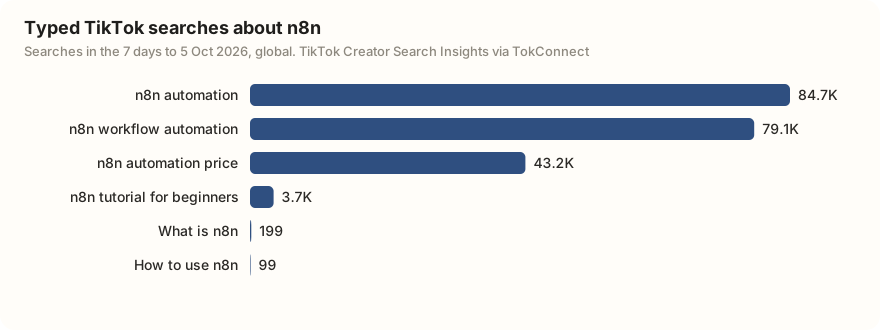
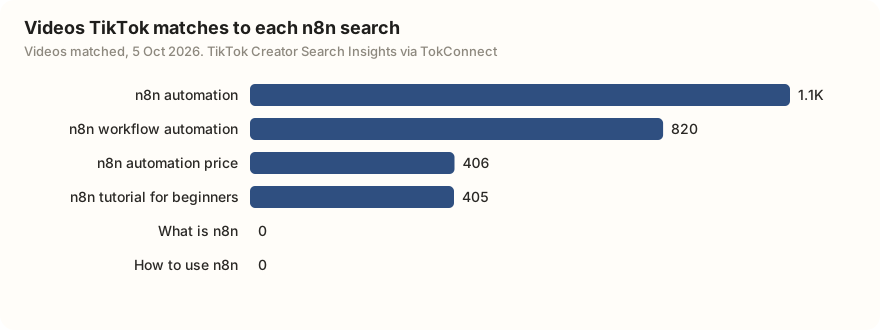
"n8n automation price" had 43,204 searches against 406 matched videos, about 106 searches per video, the thinnest coverage of the larger n8n searches. If you make n8n content, a plain pricing explainer has room.
One call per item
The MCP Client node runs once for each item it receives. Feed it a Google Sheets node with 50 keyword rows and it makes 50 calls, which is exactly what you want for a keyword list and exactly what you do not want by accident. When the upstream node returns many items and you need one call, put an Aggregate node in front, or a Limit node set to 1, or use Loop Over Items with a batch size and a Wait between batches.
For a weekly pull: Schedule Trigger, MCP Client with demand_find_topics ({"method": "trending", "limit": 20}), then a Google Sheets or Slack node. The trend research guide lists which tools to schedule and why.
Inside an AI Agent
If a model should decide which TikTok tool to call, use the MCP Client Tool sub-node attached to an AI Agent node. It takes the same endpoint and the same Bearer Auth credential, plus a Tools to Include setting (All, Selected or All Except). Selected is the sensible choice: expose demand_find_topics, demand_topic and demand_keywords for a search research agent, add product_top_selling and creator_top_selling for TikTok Shop sales estimates, and keep video out until you want the agent reading comment pages.
Find what people search on TikTok about [your niche]: run demand_find_topics with limit 20, keep only typed searches under 5,000,000 a week, and list each with its 7-day searches and video count, lowest videos first.
Paste it into n8n once TokConnect is connected.
The two workflows above ran through the n8n command line on n8n 2.39.8, MCP Client node version 1.1, against a TokConnect MCP server build on 20 September 2026 (run log). The AI Agent steps follow n8n's MCP Client Tool documentation, checked 20 September 2026.
Every TokConnect tool works the same way in the node.
The 34 tools cover TikTok's search demand (demand_find_topics, demand_topic, demand_keywords), videos, comments and captions (video_search, video), creators, sounds, hashtags, places and LIVE, the live TikTok Shop catalogue (shop_browse, product, shop) and Shop Analytics: TikTok Shop sales estimates from product_top_selling, shop_top_selling, creator_top_selling, video_top_selling, live_top_selling and category_trends. The server also ships six MCP prompts: winning products, find affiliates, competitor shop, product deep-dive, niche research and content ideas. The MCP Client node calls tools, so use the prompts from a chat client instead.
A Shop example for a scheduled sheet: MCP Client with product_top_selling and {"keyword": "[your product]", "window": "7d", "limit": 20} returns the week's best sellers with estimated revenue and units, one row per product.
Errors, and what they mean
| What you see | Cause | Fix |
|---|---|---|
| 401 when loading the tool list | The credential is missing, or the token was pasted with a space or newline. | Open the credential, paste a fresh key from the API key page, save, then reopen the Tool dropdown. |
| Tool list is empty in From List mode | The node fetches tools only after the endpoint and credential are both set. | Set both, close and reopen the node. By ID mode works without the list. |
| Unknown argument, or a validation error | A parameter name that the tool does not have. | Check the schema: demand_find_topics takes keyword, method, limit, language, category, channel, cursor; video_search takes keyword, method, limit, sort, date, cursor. |
| The node succeeds and returns an empty list | That is TikTok's answer for the query, not a connection fault. | Treat it as a finding. The troubleshooting guide separates the two. |
| Timeout on a comments pull | Large comment pages can exceed the 60-second timeout we saw on the node. | Raise Timeout under Options, or lower limit. |
Remove it, or rotate the key
Delete the MCP Client nodes, or deactivate the workflow, then delete the Bearer Auth credential from Credentials in the left sidebar. Deleting the credential is what revokes access from n8n's side; a node without a credential fails with 401. To rotate, make a new key on the API key page and edit the existing credential in place.
Same endpoint elsewhere: Claude Code, OpenClaw, Hermes. For scraping-style automations that n8n users often ask about, the TikTok automation guide covers what an MCP replaces.
How we got these numbers
Both workflows ran through the n8n command line (n8n import:workflow, then n8n execute) on n8n 2.39.8 with the MCP Client node at version 1.1, on 20 September 2026, against a TokConnect MCP server build. Timings are n8n's own execution times. The n8n search figures come from one search_topics call (now demand_find_topics) for "n8n" (20 records) on 5 October 2026. Search figures are TikTok's 7-day global search popularity; video counts are the videos TikTok matches to each search. We left out TikTok's topic groups, records that pool many related searches: a 7-day figure of 5,000,000 or more, a figure of 1,000,000 or more whose first daily reading is under 5% of its last, or TikTok's Featured Content category. We also left out typed searches TikTok matched loosely that are not about n8n ("number 8", "N2610S"). Node settings were re-checked against n8n's documentation on 5 October 2026.
Data: workflow runs, "n8n" topics, tool catalog, 21 October 2026 snapshot.
Key statistics
n8n's built-in MCP Client node runs one MCP tool per input item, so 50 rows from a Google Sheets node make 50 TokConnect calls.
A TikTok autocomplete call through n8n's MCP Client node returned in 736 ms, and a two-node workflow ending in a TikTok topic search returned in 1,956 ms, on 20 September 2026.
"n8n automation" was searched 84,708 times on TikTok in the 7 days to 5 October 2026, with 1,072 videos matched to the search.
All 5 statistics
"n8n automation price" was searched 43,204 times on TikTok in the 7 days to 5 October 2026, with 406 videos matched to the search.
"n8n tutorial for beginners" was searched 3,701 times on TikTok in the 7 days to 5 October 2026, with 405 videos matched to the search.
Frequently asked questions
Do I need an AI Agent node to use TikTok data in n8n?
No. The MCP Client node is a regular action node: pick a tool, give it parameters, and it returns the result as an item. The MCP Client Tool sub-node is the one that hangs off an AI Agent and lets the model choose tools itself. Use the plain node for scheduled pulls and pipelines, the tool sub-node when a model is deciding what to look up.
Where does the API key go in n8n?
In an n8n credential of type Bearer Auth, selected on the node under Authentication. n8n encrypts credentials at rest and keeps them out of exported workflow JSON, which is why the key must not be typed into the JSON input or an expression.
Why did my workflow make more calls than I expected?
The node executes once for every item it receives. A Google Sheets node that hands it 50 rows triggers 50 TikTok requests. Put an Aggregate or Limit node in front, or use a Loop Over Items node with a batch size, when you only want one call.
Can I use the older community MCP node instead?
You can, but there is no need on a current n8n. The built-in MCP Client node ships with n8n and speaks Streamable HTTP, which is the transport TokConnect uses. The community package predates it and adds an install step.
Does n8n have a TikTok integration?
n8n has no built-in TikTok node for search or research data. The route on this page uses n8n's built-in MCP Client node with TokConnect's MCP server, which gives a workflow 34 TikTok tools, TikTok's own search counts and TikTok Shop sales estimates included.
Sources and data
- MCP Client node (n8n docs, checked 5 October 2026)
- MCP Client Tool sub-node (n8n docs)
- MCP credentials (n8n docs)
- Aggregate node (n8n docs)
- Loop Over Items node (n8n docs)
- Transports: Streamable HTTP (Model Context Protocol specification)
- Two n8n workflows executed against the TokConnect MCP server, 20 September 2026 (snapshot)