
- Posting automation is allowed. TikTok publishes a Content Posting API, and schedulers like Metricool, Buffer and Later auto-publish on top of it.
- Anything needing TikTok's own sounds or effects still has to be finished in the app, whichever scheduler you pay for.
- Follow, like, comment and DM bots are prohibited by section 5 of TikTok's terms, which bars automated scripts that interact with the Services.
- Research automation is the one with real upside: a weekly pull of trending topics and content gaps, with search numbers attached.
- The whole weekly brief is a prompt plus a cron line, or 25 lines of Python against an MCP server. Filter out TikTok's topic groups (5,000,000+ searches) so the brief lists only phrases people type.
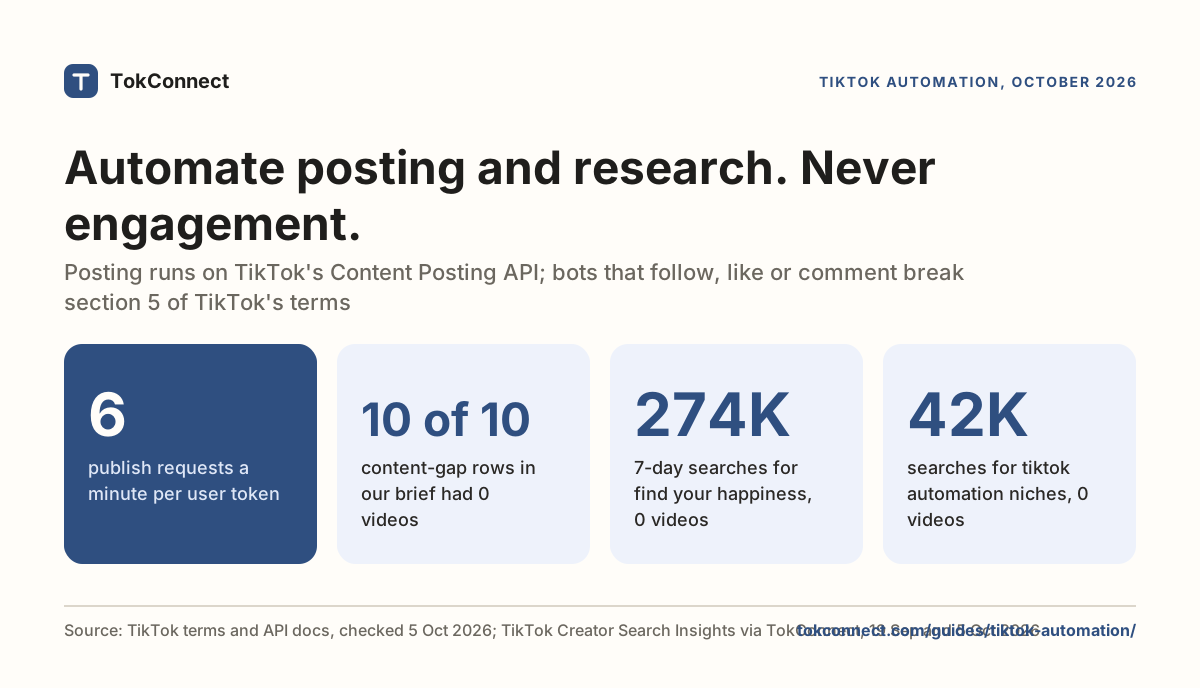
TikTok automation means three things with three answers: automating your posting is allowed through TikTok's Content Posting API, automating engagement breaks TikTok's terms and costs accounts, and automating research is allowed and saves the most time. Section 5 of TikTok's terms bars automated scripts that interact with the service. That clause also covers automated collection from TikTok's own app and site, so the brief below reads public data through TokConnect and never logs in or drives the app. A scheduled research pull is a different matter: one weekly brief found 10 typed searches with no videos in under two seconds.
Most articles with this title are listicles of posting schedulers. This one covers all three, says plainly which ones will get you banned, and then builds the third: a weekly trend brief that runs itself and saves a dated file every Monday morning. TokConnect's research agent answers the same questions whenever you ask; the build below makes a version that runs itself through its MCP server.
What are the three kinds of TikTok automation?
| What you want to automate | Allowed? | How it is done |
|---|---|---|
| Posting and scheduling | Yes | TikTok's Content Posting API, or a scheduler built on it |
| Follows, likes, comments, DMs | No | Bots that drive the app or site. Against the terms, enforced with bans |
| Research: trends, keywords, competitors, comments | Yes, from public data | TokConnect reads public TikTok data and never logs in to your account or drives the app |
The dividing line is simple once you see it. TikTok is happy for software to put content in and pull data out through a documented channel. It is not happy for software to pretend to be a person inside the app.
Does TikTok support posting automation?
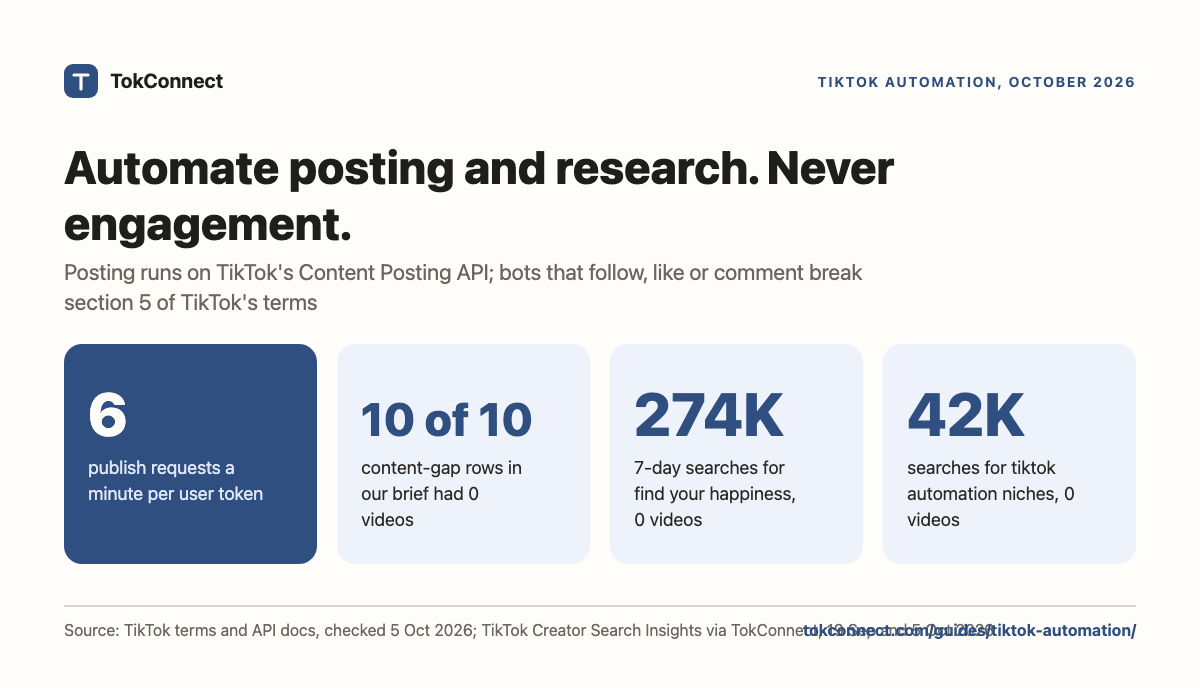
TikTok publishes a Content Posting API that lets an approved app upload and publish video and photo posts on a user's behalf. Every legitimate scheduler you have heard of is built on it, which is why they all behave similarly and hit the same limits: 6 publish requests a minute per user token, and private-only posts until the app passes TikTok's audit.
What the main ones actually do, in their own words:
- Metricool says it is "an official TikTok partner" and schedules with an auto-publish toggle across Personal, Creator and Business accounts.
- Buffer "can auto-publish many TikTok videos when they meet TikTok's publishing requirements", and says a Business account is not required. Videos that need in-app effects or trending sounds fall back to a notification you tap.
- Later schedules posts "to publish automatically", with the same notification fallback for anything the API cannot post directly.
TikTok also has a native scheduler inside TikTok Studio on the web, free and with no third party involved. Metricool's comparison points out the catch: the built-in scheduler covers Creator and Business accounts, while a partner tool will also post from a Personal one. If you have one account and you post from a laptop, start with the native scheduler and skip the subscription.
Read that effects point twice, because it is the real ceiling on posting automation. Anything that depends on TikTok's own editor, its sound library or its effects has to be finished in the app. A scheduler can carry a finished MP4 to a timestamp. It cannot use a trending sound for you.
Why will engagement automation cost you the account?
Auto-follow, auto-like, auto-comment, auto-DM and view bots are against TikTok's terms. The clause is not ambiguous. Section 5 of the terms of service, last updated 1 December 2025, lists what you may not do, and one item is to "use automated scripts to collect information from or otherwise interact with the Services". Interacting is the operative word: a follow bot is squarely inside it. TikTok's community guidelines on integrity and authenticity cover the same ground as fake engagement.
We are not going to list tools for this, because the tools are not the problem. The problem is that the thing you are automating is the thing you are trying to build. Engagement bought with a script produces followers who do not watch, which teaches TikTok's ranking that your videos are not worth showing. Then the account gets restricted and you have neither.
If a tool promises follows or comments on autopilot, it is driving a browser or a private endpoint while logged into your account. That is the exact activity the terms prohibit, and the account holding the risk is yours, not the vendor's.
Why is research automation the part worth building?
Here is the asymmetry. Engagement automation costs you the account. Posting automation saves a little time. Research automation saves the time you spend opening the app, reading trend lists, and guessing.
It is also the only one of the three where automation makes the output better rather than just faster. A human checks their niche when they remember to. A scheduled job checks it every Monday at 08:00, records the numbers, and shows you what moved since last week. That is a different quality of decision.
What you want out of it each week: the topics rising in your category, the content gaps (searched a lot, almost no videos), and where your own niche sits. All three are single calls against TikTok's search data. The trend research guide covers what to do with them.
Run the brief once by hand before you schedule it. Paste this into the research agent, or into ChatGPT, Claude or Cursor with TokConnect connected, and swap meal prep for your niche:
Pull this week's TikTok research for meal prep: the 10 biggest content gaps (typed searches with few or no videos) and the top trending topics in Food, each with 7-day searches and video count. Leave out TikTok's topic groups and tell me the three searches to film first.
One caution on scope. Automate the pull, not the judgement. A script can tell you that a search got 274,372 searches in a week and has no videos; it cannot tell you whether you can film it convincingly on a Tuesday evening with the kit you own. Every brief below ends with a human picking three rows.
How do you build a Monday trend brief?
Two versions of the same job. Pick the one that matches how you work.
Version A: a scheduled agent prompt
If you already run Claude Code or a similar agent with a TikTok research server connected, the whole automation is a prompt and a cron line.
Save this as monday-brief.md. It runs in your own agent, which can read and write the briefs/ folder:
Pull this week's TikTok research for a food and home-cooking account.
1. Trending topics in the Food category, top 10, with 7-day searches and video count.
2. Content gaps, top 10, with the same fields.
3. Search topics for "meal prep" and "weeknight dinner".
Write a brief of at most 400 words: the three topics I should film this week and why,
each with its search number and video count, and one line on what changed since
last week's brief in briefs/. Save it as briefs/YYYY-MM-DD.md.
Then schedule it. One line in crontab -e:
0 8 * * 1 cd ~/tiktok-briefs && claude -p "$(cat monday-brief.md)" >> cron.log 2>&1The "what changed since last week" instruction is the part that makes it worth reading. Week one is a list. Week six is a trend line.
You need a TokConnect key for this. Get an API key, free, no card, then set it as TOKCONNECT_KEY. A weekly brief is two to four lookups, so Free's 50 credits cover a few runs and Starter's 500 a month covers a daily brief.
Version B: 25 lines of Python
If you want the data in a file rather than in a chat, talk to the MCP server directly with the mcp package. This calls two tools and prints a Markdown table.
import asyncio, json, os
from mcp import ClientSession
from mcp.client.streamable_http import streamablehttp_client

URL = "https://mcp.tokconnect.com/mcp"
HEADERS = {"Authorization": f"Bearer {os.environ['TOKCONNECT_KEY']}"}

def rows(result):
    return json.loads(result.content[0].text).get("topics", [])

async def main():
    async with streamablehttp_client(URL, headers=HEADERS) as (read, write, _):
        async with ClientSession(read, write) as session:
            await session.initialize()
            hot = rows(await session.call_tool(
                "trending_topics", {"category": "Food", "limit": 10}))
            gaps = rows(await session.call_tool(
                "browse_topics", {"channel": "content_gap", "limit": 10}))

    print("## Monday trend brief\n")
    print("| Topic | 7-day searches | Videos | Why |")
    print("|---|---:|---:|---|")
    for t in hot:
        print(f"| {t['queryText']} | {t['searchVolume']:,} | {t['videoCount']:,} | Rising in Food |")
    for t in gaps:
        print(f"| {t['queryText']} | {t['searchVolume']:,} | {t['videoCount']:,} | Content gap |")

asyncio.run(main())The example above uses the Python SDK's 1.x line. In mcp 2.0 and later (2.3.0 is the current line on PyPI), the helper is streamable_http_client, the headers move onto an httpx2.AsyncClient passed as http_client, and the context manager yields two streams:
import httpx2
from mcp.client.streamable_http import streamable_http_client

async with streamable_http_client(URL, http_client=httpx2.AsyncClient(headers={"Authorization": f"Bearer {KEY}"})) as (read, write):
    async with ClientSession(read, write) as session:
        ...
Both forms return the same list of 34 tools. The script uses the names it was tested with, which still answer.
Redirect it to a file, add it to the same crontab, and you have a dated Markdown brief every week with no agent in the loop. It was written against mcp 1.30; the callout above has the change for 2.x. The MCP guide has the connection details and the Claude Code page has the config block.
What does the brief actually say?
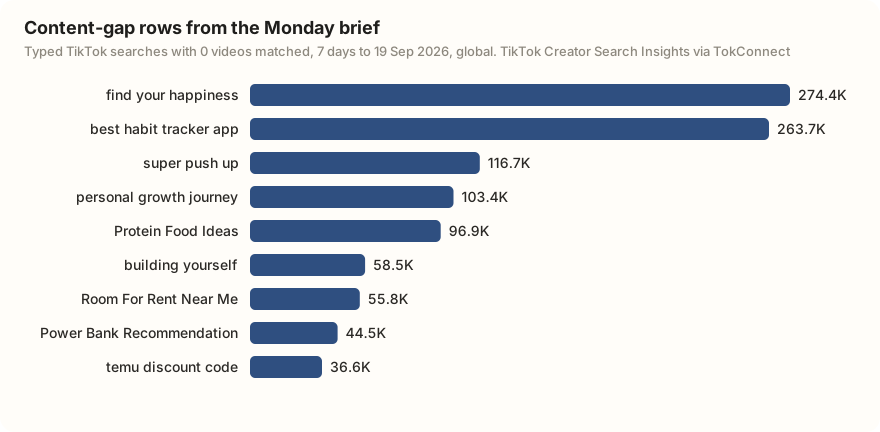
This is real output from the script above, trimmed to six of its ten content-gap rows. Every gap row is a typed search, a phrase people actually enter, and every one had zero videos matched.
| Typed search | 7-day searches | Videos | Why it is in the brief |
|---|---|---|---|
| find your happiness | 274,372 | 0 | Content gap |
| best habit tracker app | 263,720 | 0 | Content gap |
| super push up | 116,741 | 0 | Content gap |
| personal growth journey | 103,389 | 0 | Content gap |
| Protein Food Ideas | 96,890 | 0 | Content gap |
| Room For Rent Near Me | 55,794 | 0 | Content gap |
TikTok's own search counts · week to 19 Sep
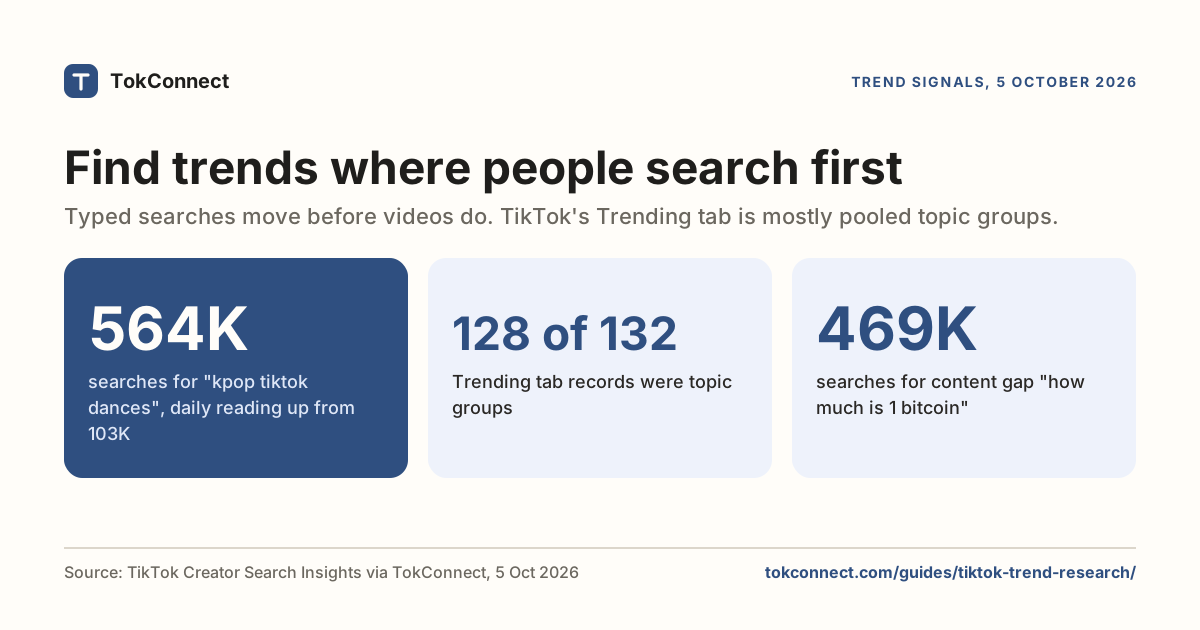
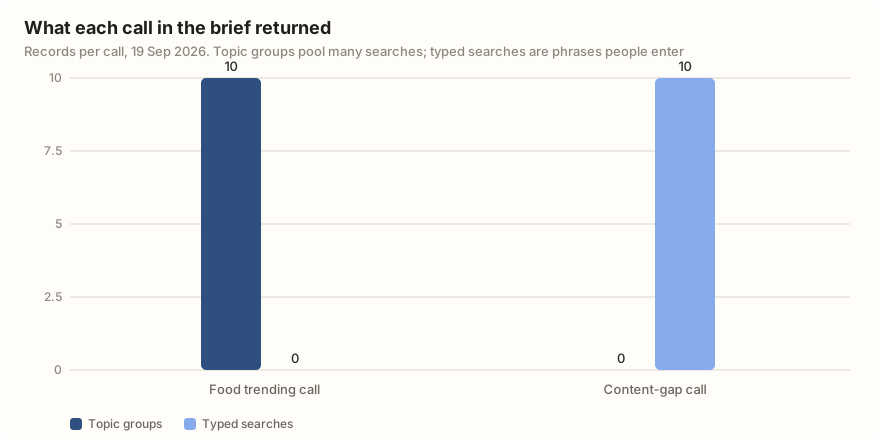
The other half of the run was the Food trending call, and every one of its ten rows was a TikTok topic group: a phrase TikTok generates that pools many related searches, such as "viral dessert ideas with minimal effort". Those pooled figures run into the tens of millions and are not counts for one phrase, so they are useful as a theme ("viral food tests are hot this week") and useless as a target. Filter them out before the brief reaches you: drop any record of 5,000,000 or more.
The whole run took under two seconds and replaces the half hour you would otherwise spend scrolling. The gap rows are where the work is: a few hundred thousand searches a week with nothing matched to them is a brief you can film. The content gaps page lists the full set, and the same topic search call works on your own niche: "tiktok automation niches" had 41,904 searches in the week to 5 Oct and no videos.
Add these lines to monday-brief.md:
Leave out any topic with 5,000,000 or more searches, or filed under TikTok's
Featured Content: those are topic groups that pool many searches.
Rank the rest by searches per video, lowest video count first.
We run this for ourselves too: the same brief, published weekly, so you can read ours before you build yours. And if you were planning to have an agent browse tiktok.com for this instead, we measured what that returns first.
How we got these numbers
The brief ran on 19 September 2026 with the mcp 1.30 Python package against TokConnect's MCP server: one trending topics call (category Food, 10 rows) and one trending topics call (content gaps, 10 rows).
On 5 October 2026 we ran one topic search call for "tiktok automation" (20 records); 18 were topic groups and 2 were typed searches. Searches are TikTok's 7-day global search popularity; videos are the videos TikTok matches to each search. A record counts as a topic group if its 7-day figure is 5,000,000 or more, or 1,000,000 or more with the week's first daily reading under 5% of its last, or TikTok files it as Featured Content.
Terms, API limits and scheduler claims come from TikTok's terms, Metricool's and Buffer's own pages, and 2026 coverage of the Content Posting API, 5 October 2026. Data: Monday brief run, "tiktok automation" topics, API facts.
Key statistics
Section 5 of TikTok's Terms of Service, last updated 1 December 2025, says users may not "use automated scripts to collect information from or otherwise interact with the Services".
TikTok's Content Posting API allows 6 publish requests a minute per user access token, and posts from an app that has not passed TikTok's audit stay private.
TikTok Studio's built-in scheduler works only for Creator and Business accounts, while Metricool, an official TikTok partner, also auto-publishes from Personal accounts.
All 5 statistics
All 10 content-gap rows in one weekly TikTok research brief were typed searches with 0 videos matched, led by "find your happiness" at 274,372 searches in the week to 19 Sep.
"tiktok automation niches" was searched 41,904 times on TikTok in the week to 5 Oct, and TikTok matched 0 videos to it.
Frequently asked questions
Is TikTok automation allowed?
It depends which kind. Scheduling and publishing posts through TikTok's Content Posting API is supported, and so is pulling data through an API. Driving the app or the website with a script to follow, like, comment or view is not: section 5 of TikTok's terms of service says you may not "use automated scripts to collect information from or otherwise interact with the Services". The terms were last updated 1 December 2025.
Can you automate TikTok posting?
Yes. TikTok's Content Posting API lets an approved app upload and publish videos and photo posts for a connected account, and the main schedulers auto-publish through it. The limit is creative: videos that use TikTok's trending sounds or in-app effects have to be finished in the app, so schedulers fall back to sending you a notification to tap.
Can an AI agent run my TikTok research on a schedule?
Yes, and this is the version worth building. Connect a TikTok research server to Claude Code or a similar agent, save a prompt that asks for trending topics, content gaps and your niche's numbers, and run it from cron once a week. The page above has the prompt, the cron line and a 25-line Python version.
How many posts can the TikTok API publish?
TikTok's Content Posting API allows 6 publish requests a minute per user access token. Until TikTok audits your app, everything it posts stays private. Schedulers built on the API inherit both limits.
Sources and data
- Content Posting API (TikTok for Developers)
- TikTok Terms of Service, section 5 (last updated 1 December 2025, checked 5 October 2026)
- Community Guidelines: integrity and authenticity (TikTok)
- How to schedule TikTok videos (Metricool, checked 5 October 2026)
- TikTok scheduling (Buffer, checked 5 October 2026)
- TikTok scheduler (Later)
- mcp Python SDK on PyPI (version 2.3.0, checked 5 October 2026)
- TikTok API rate limits in 2026 (Phyllo, July 2026)
- Monday trend brief run, 19 September 2026 (snapshot)