
- TikTok's own image search is a shopping tool: tap the camera icon in the Shop tab's search bar to match a photo against product listings. It rolled out to all users in the US and Southeast Asia in June 2024.
- Visual search tags ("Find Similar" on a paused post) are a separate feature. Turn them off under Settings and privacy → Playback → Display object tags.
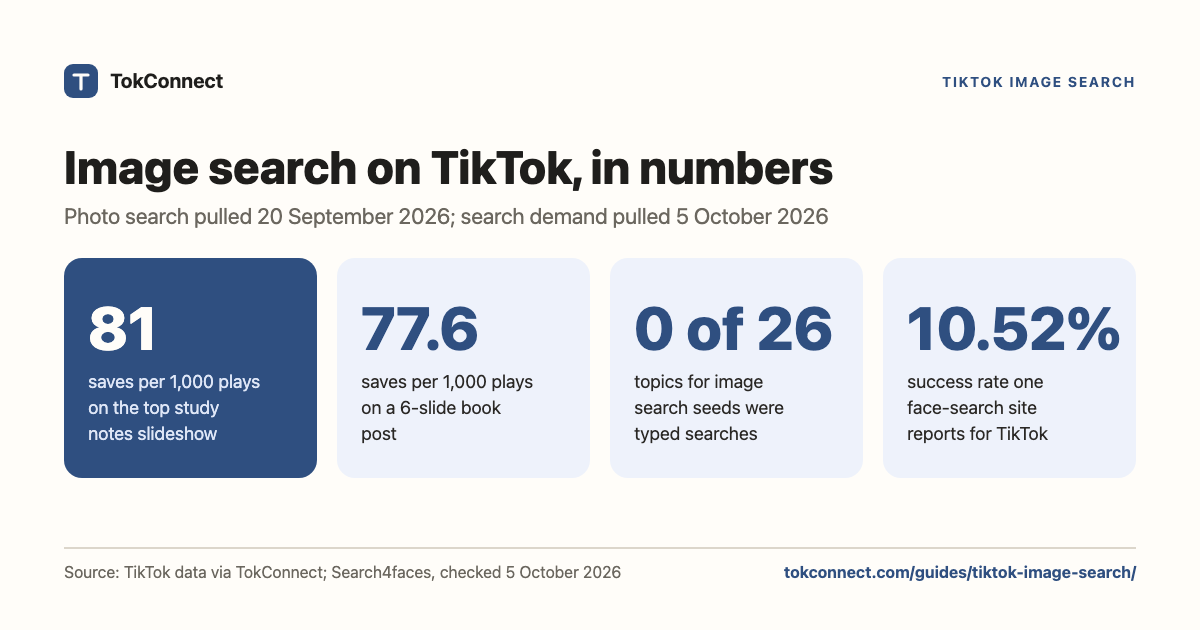
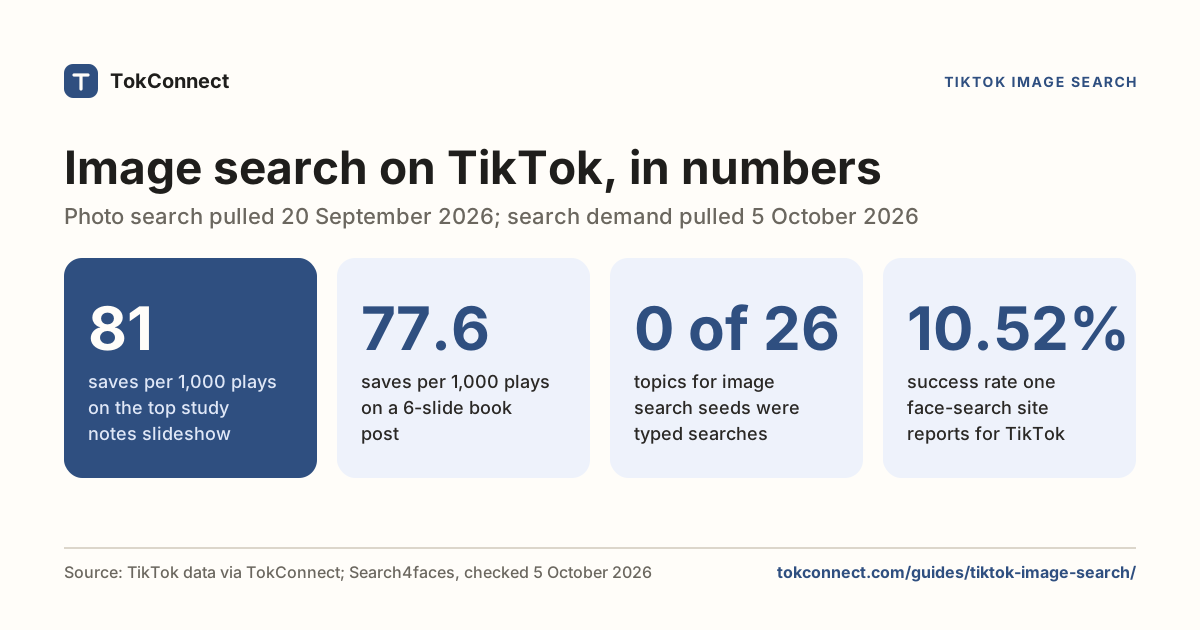
- TikTok has no reverse image search for finding a person's account. Third-party face-search sites exist; one reports a 10.52% success rate against a 2021 crawl, and the legal exposure is real.
- To search photo posts and slideshows by keyword, use the Photos tab in TikTok search, or search photo posts on TokConnect, which returns TikTok's photo results with slide order, saves and the author.
- People save photo posts: one study-notes slideshow banked 81 saves per 1,000 plays, which is the metric worth ranking on.
"TikTok image search" means three different things: a camera icon in the Shop tab that finds products from a photo, a reverse face search that TikTok does not offer, and keyword search of photo posts and slideshows. Photo posts are worth that search, because people save them: the top "study notes" slideshow had 81 saves per 1,000 plays.
TikTok has no reverse image search for identifying a person from their face, whatever other results for this query suggest. It does let you search photo posts by keyword, in the app and through TokConnect, which is the one most marketers and developers are after. TokConnect runs that photo search inside ChatGPT, Claude and Cursor, in its own research agent and through its API.
Building something? Skip to the photo API
What does TikTok's image search in the app do?
TikTok's image search is a shopping feature. Open the Shop tab, tap the camera icon in the search bar, then take a photo or pick one from your camera roll. TikTok matches it against product listings and shows you things you can buy. It does not search videos, captions or accounts.
After about a year of tests, TikTok rolled it out in June 2024 to all users in the US and Southeast Asia (Social Media Today, 12 June 2024), the two markets where TikTok Shop has the most traction. eMarketer read it as a move on Google's search share.
A second feature also gets called visual search: visual search tags. Pause a post, tap Find Similar, and TikTok identifies objects in the frame and offers similar posts under a Top tab and products under a Shop tab. Same object recognition, pointed at the feed instead of the camera.
The tags come from a toggle, not from your account settings generally. Go to your profile, open the menu, then Settings and privacy → Playback, and switch off Display object tags. The Shop camera icon is not something you can hide; it is part of the Shop tab's search bar.
What neither feature does: find the original post an image came from, or tell you who is in it. For that, keep reading.
Can you reverse image search to identify a TikTok user?
TikTok does not offer this, and there is no sign it plans to. You cannot upload a face and get an account.
Third-party face-search sites fill the gap by scraping profile pictures and running face recognition over them. Search4faces is one, and it is unusually open about its numbers. Its TikTok page listed 125,443,334 avatars indexed, 18.38% of them processed, and a 10.52% success rate, from a crawl it dates to March to September 2021. Nine attempts in ten return nothing, against a five-year-old index.
The legal position is worse than the hit rate. Scraping profile photos to build a face database is what got Clearview AI fined €30.5 million by the Dutch data protection authority in September 2024. Under GDPR a face template is special-category data, and Illinois, Texas and Washington have their own biometric privacy statutes. TikTok's terms also prohibit scraping the service. We are not recommending any of these sites.
People do look for this on TikTok. TikTok's autocomplete for "reverse image search" offered "reverse image search on tiktok" and "how to reverse image search on tiktok". Creator Search Insights returned no typed searches at all for "image search" or "reverse image search", only 26 of TikTok's topic groups, phrases it writes to pool many searches, and 19 of those had no videos (snapshot). So there is interest and almost nothing answering it.
If you have a screenshot of a post rather than a face, the ordinary tools work. Google Lens and TinEye find reposts of the same image elsewhere on the web, the creator's handle is usually burned into the TikTok watermark, and if you can read any caption text, searching those exact words on TikTok beats all of it.
How do you search TikTok photos and slideshows by keyword?
This is the useful one. TikTok indexes photo posts as their own search channel. Search any keyword in the app, then tap Photos in the row of tabs next to Top, Videos and Users, and you get slideshows only. It is a separate index, not a filter over video results.
Pull the same tab through an API and the response marks itself as the photo tab. Video search and photo search return different posts for the same word.
Search photo posts for your topic
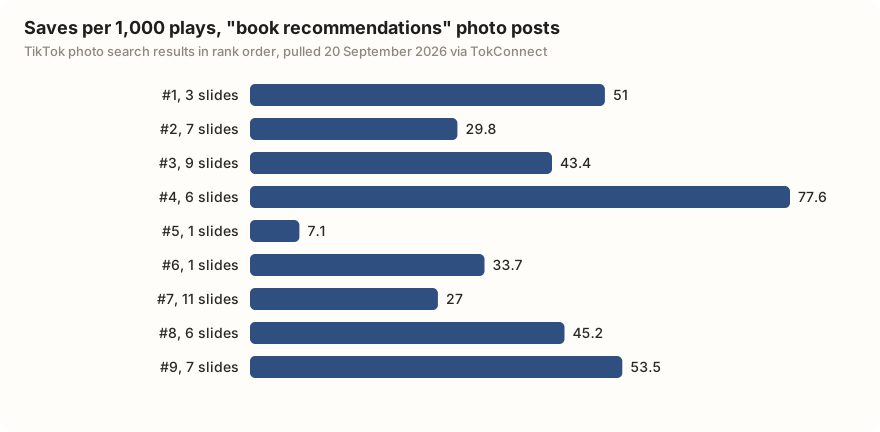
That matters because photo posts behave differently from video. People save them. For study notes, the top slideshow banked 361,667 saves against 4,454,690 plays, which is 81 saves per 1,000 plays. In our book recommendations pull, eight of the nine posts saved more than 25 per 1,000 plays. A slideshow is a reference you come back to.
What does a TikTok photo API result look like?
TokConnect's video_search tool, one of its 34 TikTok tools, searches TikTok's photo tab by keyword when you pass method: "photos", with limit (1 to 20) and a cursor for the next page. The responses below were captured under its earlier name, search_photos, which still answers; run the call once to see the current fields. It took keyword, count, offset and search_id, and handed back one native page of TikTok's photo tab. Here is the first result for study notes, trimmed:
{
 "aweme_type": 150,
 "aweme_id": "7525432200888651026",
 "desc": "#studytok #college #school #student #university #StudyTips #math #mathnotes",
 "create_time": 1752151226,
 "image_post_info": {
   "title": "Follow for part II ✨",
   "images": [ /* 5 slides, in display order */ ]
 },
 "statistics": {
   "play_count": 4454690, "digg_count": 493304, "comment_count": 1081,
   "share_count": 41467, "collect_count": 361667, "download_count": 90274
 },
 "author": {"uid": "…", "nickname": "mat***",
            "search_user_desc": "mat***"},
 "music": {"title": "party 4 u", "author": "luca"}
}
TikTok photo search · 20 Sep
Four things to know before you build on it. aweme_type: 150 is the photo-post marker. image_post_info.title is the headline drawn on the slide, which is separate from desc and often the better text to mine. collect_count is saves, the metric that makes photo posts worth tracking. And create_time is a Unix timestamp, here 10 July 2025.
The author object is inconsistent, and it will bite you. Some items carry the full profile with unique_id and follower_count; others carry a search stub where nickname is the display name and the handle sits in search_user_desc. Read both. video (v2: video_detail) on the same aweme_id returns the normalised version with photoPost: true, authorUniqueId and an imagePost block, so it is worth a second call when you need clean author fields.
Paging
Take cursor from the response and send it as offset; take log_pb.impr_id and send it as search_id; keep going while has_more is 1. A real pair of pages:
| Call | Returned | cursor | has_more | log_pb.impr_id |
|---|---|---|---|---|
{"keyword":"study notes","count":5} | 2 | 5 | 1 | 20260920150719AC7B813B01645C17638F |
{…,"offset":5,"search_id":"…17638F"} | 3 | 10 | 1 | 20260920150815AC7B813B01645C176AE0 |
TokConnect photo search · 20 Sep
Two traps in that table. cursor advances by the requested count, not the number of items you got, so asking for 5 and receiving 2 still moves you to offset 5. And count is a ceiling: a request for 20 returned 11, with response_cropped: 1 flagging that TikTok trimmed the page. Read what came back, never what you asked for. The same contract governs video search, covered in the search API guide.
How do you call it from Python?
Any MCP client works. With the official mcp package this is about twenty lines:
import asyncio, json, os
from mcp import ClientSession
from mcp.client.streamable_http import streamablehttp_client

URL = "https://mcp.tokconnect.com/mcp"
AUTH = {"Authorization": f"Bearer {os.environ['TOKCONNECT_KEY']}"}

async def photos(keyword, pages=3, limit=20):
    async with streamablehttp_client(URL, headers=AUTH) as (r, w, _):
        async with ClientSession(r, w) as s:
            await s.initialize()
            args = {"method": "photos", "keyword": keyword, "limit": limit}
            out = []
            for _ in range(pages):
                page = json.loads(
                    (await s.call_tool("video_search", args)).content[0].text)
                out += page["search_item_list"]
                if not page.get("has_more"):
                    break
                args["cursor"] = page["cursor"]
            return out

for it in asyncio.run(photos("study notes")):
    a = it["aweme_info"]
    author = a["author"].get("unique_id") or a["author"].get("search_user_desc")
    print(f'{a["statistics"]["collect_count"]:>8,} saves  '
f'{len(a["image_post_info"]["images"]):>2} slides @{author}')The example uses the Python SDK's 1.x line. In mcp 2.0 and later the helper is streamable_http_client, the headers move onto an httpx2.AsyncClient passed as http_client, and the context manager yields two streams instead of three:
import httpx2
from mcp.client.streamable_http import streamable_http_client

async with streamable_http_client(
        URL, http_client=httpx2.AsyncClient(headers=AUTH)) as (read, write):
    async with ClientSession(read, write) as session:
        ...
TokConnect is free to start, with no card. Paid plans start at $34.99 a month, billed yearly, and the pricing page has the rest. Client configs for Claude, Cursor and the CLIs are in the MCP guide.
What three things are worth building on it?
1. A slideshow trend tracker for one niche
Run the same keyword weekly, store aweme_id, create_time and collect_count, and diff the ID set. New IDs entering the first page are the posts TikTok is currently promoting for that search. Our single page for study notes held eleven posts spanning October 2023 to September 2026, six of them from 2026, so the tab mixes evergreen winners with fresh entrants. The movement is the signal, not the snapshot.
2. A saves-per-play leaderboard
Divide collect_count by play_count and you get a reference-value score that ignores how big the account is. For study notes:
| Account | Saves per 1,000 plays | Plays | Saves | Slides | Posted |
|---|---|---|---|---|---|
| @mat*** | 81.2 | 4,454,690 | 361,667 | 5 | 10 Jul 2025 |
| @stu*** | 69.8 | 324,824 | 22,684 | 6 | 23 Apr 2026 |
| @foo*** | 37.0 | 136,325 | 5,046 | 11 | 14 Oct 2023 |
| @kiy*** | 25.5 | 8,362,144 | 213,329 | 1 | 23 Mar 2025 |
| @fae*** | 18.0 | 321,137 | 5,788 | 11 | 13 Nov 2023 |
| @rom*** | 9.8 | 220,845 | 2,168 | 2 | 30 Sep 2024 |
Saves per 1,000 plays is saves divided by plays, times 1,000 · TikTok photo search, "study notes" · 20 Sep
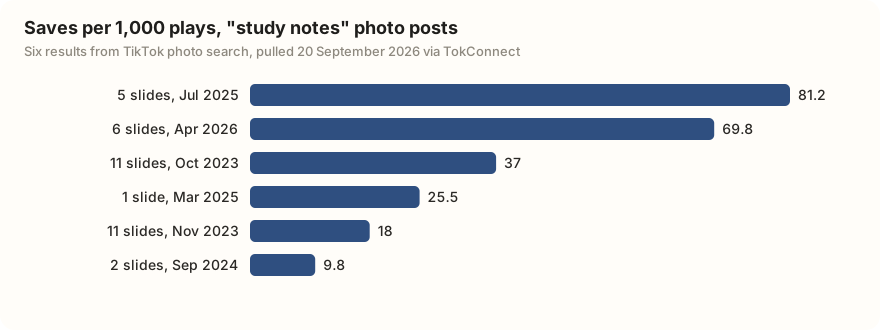
Note what the ranking does to the biggest post. @kiy*** has nearly twice the plays of everyone else combined and lands fourth, because a single-slide post gets watched and scrolled past. The multi-slide posts get kept.
3. A caption-pattern miner
Photo posts carry two pieces of text, and the on-slide title is the one worth studying. In our book recommendations pull, five of the nine posts filled it, and four of those five put a piece of the search phrase in it: "Book recommendations 🎀📖", "book recommendations 📚❣️", "Healing Fiction Recommendations 📚❤️" and "Top books of 2026".
The fifth went the other way with "Omfg, these books were WILD AF!" and still cleared 923,220 plays. Pull a hundred titles for your niche, count the openers, and you have the niche's actual hook formula instead of a guess.
Ask TokConnect:
Search TikTok photo posts for [your topic] and pull three pages. For each post give me the on-slide title, the caption, the slide count, plays, and saves per 1,000 plays. Sort by saves per 1,000 plays, then tell me what the top five have in common that the bottom five don't.
Do the scrapers return photo posts?
Mostly yes, if you feed them a URL or a profile. Keyword search of the photo tab is the part that is hard to find.
| Tool | Photo posts? | Priced at |
|---|---|---|
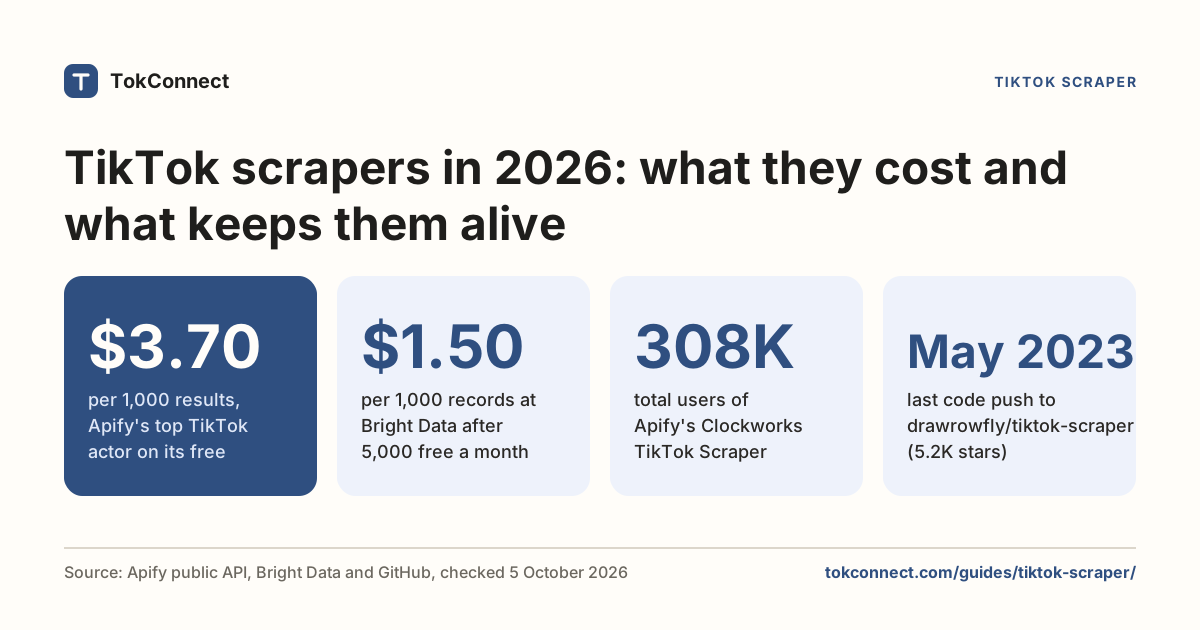
| Apify TikTok Scraper (clockworks) | Yes. Output carries isSlideshow and slideshowImageLinks, with a shouldDownloadSlideshowImages input | From $1.70 per 1,000 results |
| Apify TikTok Photo Scraper (scrapingmonkey) | Yes, and photo-native: images.url, images.width, images.height, image_cover | Pay per result; see its Apify page |
| Bright Data TikTok Posts | Not documented. The published schema is video shaped (video_url, video_duration) with no image or carousel field | $1.50 per 1,000 records, 5,000 free a month |
| TokConnect photo search | Yes, as TikTok's own photo tab page, by keyword | 1 credit per lookup, 50 free credits; paid plans from $34.99 a month |
Both Apify actors normalise TikTok's payload, so you get their field names, not aweme_type and image_post_info. Wanting the raw shape, or starting from a keyword rather than a list of URLs, is the gap. More trade-offs in the scraper guide and the map of every TikTok API.
If you are here to make slideshows rather than analyse them, the slideshow guide and slideshow ideas are the better pages. If you are building, the developer overview has the rest of the toolset.
How we got these numbers
On 20 September 2026 we searched TikTok photo posts through TokConnect for "study notes" (three pages) and "book recommendations", and pulled the full detail of one photo post. On 5 October 2026 we pulled search demand (20 topics each) for "image search" and "reverse image search", and TikTok's autocomplete for the same two phrases. Plays and saves are what TikTok showed on the day. Saves per 1,000 plays is saves divided by plays, times 1,000, our calculation. Creator Search Insights figures are TikTok's 7-day global search popularity.
A topic counts as a TikTok topic group, not a typed search, if its 7-day figure is 5,000,000 or more, or 1,000,000 or more with the first day under 5% of the last, or TikTok files it as Featured Content; every topic for the two image-search seeds met that rule, so we quote none of their figures.
Feature, price and face-search facts come from the linked pages, checked 5 October 2026. Data: study notes, paging, book recommendations, video detail, search demand and calculations.
Key statistics
The top TikTok photo post for "study notes" on 20 September 2026 had 361,667 saves against 4,454,690 plays, or 81 saves per 1,000 plays.
The most-saved TikTok photo post for "book recommendations" on 20 September 2026, a 6-slide post, had 485,723 saves against 6,255,955 plays, or 77.6 saves per 1,000 plays.
TikTok returned 0 typed searches among 26 unique topics for "image search" and "reverse image search" on 5 October 2026; all 26 were topic groups that pool many searches, and 19 had no videos.
All 5 statistics
TikTok's autocomplete for "reverse image search" on 5 October 2026 included "reverse image search on tiktok" and "how to reverse image search on tiktok".
One face-search site reports that only 10.52% of searches against its TikTok face index succeed, from profile pictures it collected between March and September 2021.
Frequently asked questions
Can I do an image search on TikTok?
Yes, but only for shopping. Open the Shop tab, tap the camera icon in the search bar, and take or upload a photo; TikTok matches it against product listings. It rolled out to all users in the US and Southeast Asia in June 2024. It does not search videos, captions or accounts, and it will not find the post an image came from.
How to find a TikTok with a picture?
TikTok itself cannot do this. If you have a screenshot of the post, run it through Google Lens or TinEye to find reposts elsewhere, and check the corner of the image for TikTok's watermark, which carries the creator's handle. If you can read any caption or on-screen text, searching those exact words in TikTok's search bar is the fastest route. To find photo posts on a topic rather than one specific post, use the Photos tab in TikTok search.
Can I find a TikTok user using their picture?
Not through TikTok. Third-party face-search sites scrape profile pictures and run face recognition over them, and they are both unreliable and legally risky: one of them publishes a 10.52% success rate against a crawl it dates to 2021, and Clearview AI was fined €30.5 million for building the same kind of database. We do not recommend them.
Is there a TikTok photo API?
There is no official one. TikTok's Research API queries videos only, and the Display and Content Posting APIs do not search. Scrapers return photo posts if you hand them a URL or a profile. For keyword search of TikTok's photo tab, TokConnect returns TikTok's photo results a page at a time, with slide order, saves, plays and the author, inside ChatGPT and Claude or through its API on any paid plan. See the search API guide.
How do I reverse image search on TikTok?
You can't inside TikTok: it has no reverse image search for posts or people. People do look for one: "how to reverse image search on tiktok" shows up in TikTok's own autocomplete. Use Google Lens or TinEye on a screenshot, check the watermark for the creator's handle, or search any caption text you can read.
Why do people save TikTok slideshows?
Because a slideshow works as a reference. The top "study notes" photo post had 81 saves per 1,000 plays, and eight of nine "book recommendations" photo posts saved more than 25 per 1,000 plays. That makes saves per play the metric to rank photo posts on.
Sources and data
- TikTok Adds Image Search for Similar Products in TikTok Shop (Social Media Today, 12 June 2024)
- TikTok launches image search in a swing at Google (eMarketer, June 2024)
- Clearview AI fined $33 million for an illegal facial recognition database (Forbes, September 2024)
- Apify TikTok Scraper (slideshow output fields and pricing, checked 5 October 2026)
- Bright Data TikTok posts schema (API reference)
- Search4faces TikTok face index (figures checked 5 October 2026)
- Apify TikTok Photo Scraper (pricing and fields, checked 5 October 2026)
- Bright Data TikTok Scraper (pricing, checked 5 October 2026)