
- Suggestions come from three inputs: what lots of people are searching, what you have searched and watched, and what is trending.
- Clearing your search history and switching off personalised search are two separate steps. Doing one and not the other is why they come back.
- No setting empties the search bar. Popular searches keep appearing even with personalisation off.
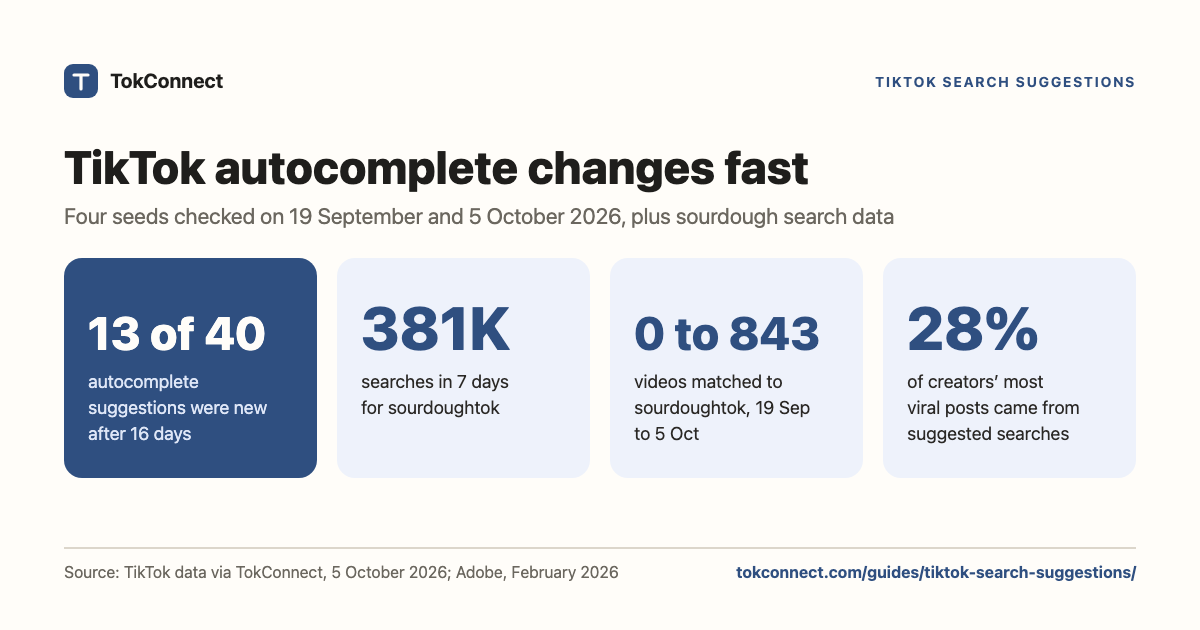
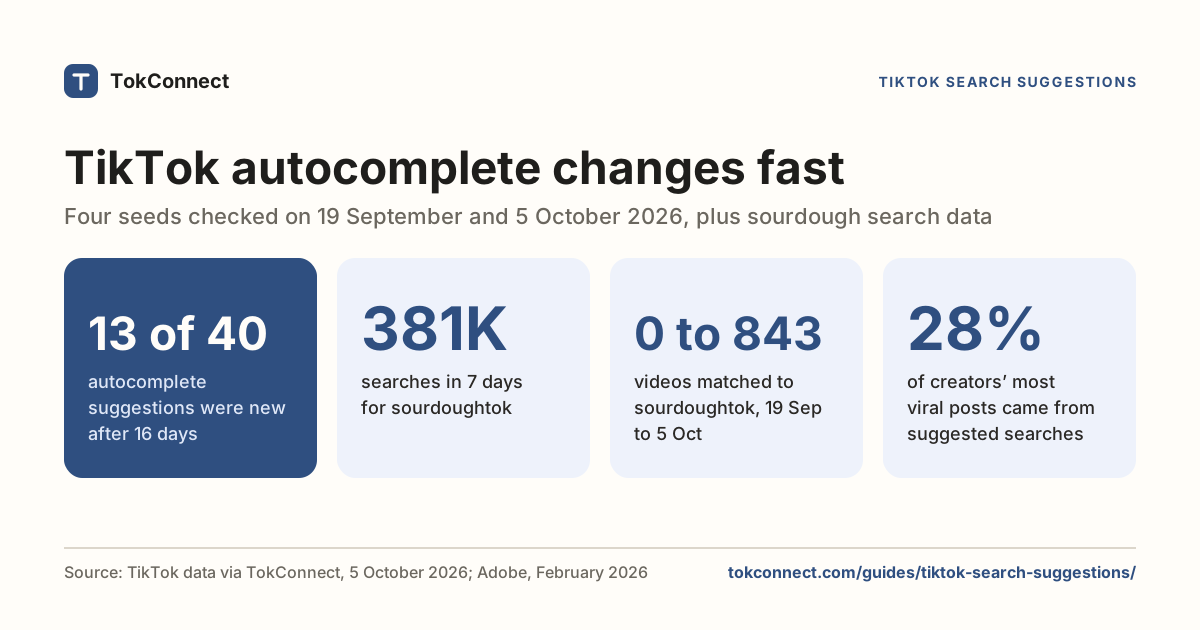
- Autocomplete moves fast: 13 of 40 suggestions for four seeds were new on 5 October 2026 compared with 19 September.
- Autocomplete carries no numbers. For volume, use Creator Search Insights typed searches: "sourdoughtok" had 380,614 searches in the 7 days to 5 October 2026.
TikTok search suggestions are the phrases TikTok puts in front of you before you have finished typing: the autocomplete list under the search bar, the "you may like" row of searches, and the search chip that appears under a video. TikTok builds them from what people are searching, what you have searched and watched, and what is trending, and they change fast: on 5 October 2026, 13 of the 40 autocomplete suggestions we tracked for four seeds were new compared with 16 days earlier.
If yours have turned strange, that is the personalisation, not a glitch, and you can clear the history behind it and switch the personalised version off. Skip to how to turn them off if that is why you are here.
If you make videos, the same list is the cheapest keyword research on the platform: a live read on how people phrase things, straight from the search box. It matters because people do search there: 49% of US consumers said they use TikTok as a search engine in Adobe's January 2026 survey of 807 people. The second half of this page shows real suggestion lists, how much they moved in 16 days, and the one thing they cannot tell you.
The three places suggestions show up
- Autocomplete in the search bar. Tap search, start typing, and TikTok completes the phrase. This is the list worth mining, because every entry is a phrase real people type.
- Suggested searches before you type. Open search and TikTok shows a set of ready-made queries, sometimes labelled "you may like". These lean on trending searches and on your own activity.
- The search chip under a video. While you are watching, a keyword box can appear near the caption. Tapping it runs that search. TikTok generates it from what it thinks the video is about, which makes it a useful signal for creators: if the chip under your video says something sensible, TikTok has understood the video.
Where do TikTok search suggestions come from?
Three inputs: what large numbers of people are searching on TikTok, what you have searched for and watched, and what is trending in your region. TikTok's help centre confirms the personal part, as of September 2026: turning off the personalised search setting shows you non-personalised results and recommendations and also changes suggested searches. This is based on TikTok's help page as last read before 5 October 2026.
That explains the pattern behind most "why is TikTok suggesting this" posts. A phrase goes around, enough people tap it to make it a genuinely popular search, and it then appears for everyone else as a popular search. Tapping one teaches the system that you liked it. The suggestions mirror search behaviour, including your own, and they are not a read on anything you said out loud or typed in a message.
How do you turn off or clear TikTok search suggestions?
Do both of two things: clear your search history, and turn off personalised search under Settings and privacy, then Content preferences. Doing only one is why suggestions come back, and neither removes them completely, because TikTok has no setting that empties the search bar.
The click-by-click menu paths, with screenshots of each route, are in the TikTok search history guide.
Mining TikTok search suggestions for keywords
Type a seed and read the completions. Here is what TikTok returned for six common seeds on 5 October 2026.
| Seed | What TikTok suggests |
|---|---|
| dinner ideas | dinner ideas easy · dinner ideas for family · dinner ideas healthy · dinner ideas recipe · dinner ideas at home · dinner ideas quick and easy · dinner ideas for kids · dinner ideas jamaica |
| side hustle | side hustles to earn money 2026 · side hustle in usa · side hustle for student · side hustle with ai · side hustle ideas · side hustles online · side hustle trinidad |
| skincare routine | skincare routines vlog · skincare routine for men · skincare routine asmr · skincare routine for teens · skincare routine night · skincare routine in order |
| gift ideas | gift ideas for teachers day · gift ideas for boyfriend · gift ideas for girlfriend · gift ideas for best friend · gift ideas for men · gift ideas for christmas |
| cleaning hacks | cleaning hacks for house cleaning · cleaning hacks kitchen · cleaning hacks for your home · cleaning hacks for bathroom · cleaning hacks for deep cleaning |
| budget | budget phones for 2026 · budget meal ulam ideas · budget gaming phone · budget challenge · budget app · budget save |
Data: TikTok search autocomplete. Open the snapshot for all 20 seeds.
Read those columns and the video briefs write themselves. "skincare routine for men" and "skincare routine in order" are two different videos with two different hooks. "budget" splits into money and phones, which tells you the word alone is useless as a target. "gift ideas for christmas" showing up in early October is the season arriving in the search box.
How fast suggestions change
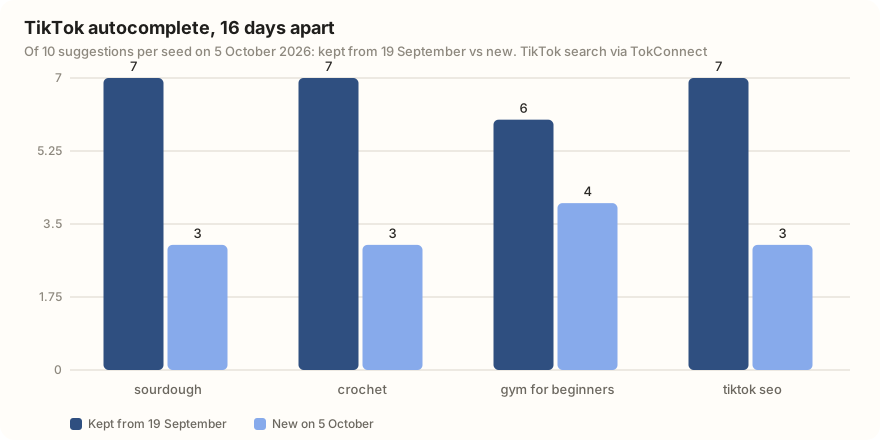
We pulled autocomplete for four seeds on 19 September 2026 and again on 5 October 2026. Across the 40 suggestions, 27 were still there and 13 were new.
| Seed | Kept | New on 5 October | Gone since 19 September |
|---|---|---|---|
| sourdough | 7 | sourdough toast ideas · sourdough discard recipes · sourdough | sourdough bread recipe · sourdough recipes ideas · sourdough baking |
| crochet | 7 | crochet flower · crochet tendencia 2026 · a non-Latin phrase | crochet items · crochet patterns · a non-Latin phrase |
| gym for beginners | 6 | for women · machine · guide · glutes | nyc · tips · plus size · leg |
| tiktok seo | 7 | tiktok seo keywords · tiktok seo strategy 2025 · a non-Latin phrase | tiktok seo tutorial · tiktok september 2026 · tiktok seo tips |
Data: TikTok search autocomplete, 19 September and 5 October 2026, 10 suggestions per seed. 19 September snapshot, 5 October snapshot.
"sourdough fail" survived both pulls. Nobody plans a video called that, and it is what people type at 11pm holding a flat loaf. Autocomplete surfaces the unglamorous phrasing that keyword brainstorms miss, and it is worth checking again every couple of weeks. Adobe's February 2026 survey of 554 US creators found that, on average, 28% of their most viral posts were based on TikTok's suggested searches (Adobe).
How do you get the counts behind autocomplete?
Order is not volume. TikTok ranks completions by a mix of popularity and relevance to you, and shows no number next to them. So autocomplete tells you which phrasings exist and roughly which are common, and stops there.
Creator Search Insights is where the counts live. We put the same sourdough seed through it. Five of the ten topics were typed searches:
| Typed search | 7-day searches | Videos, 5 Oct | Videos, 19 Sep |
|---|---|---|---|
| sourdoughtok | 380,614 | 843 | 0 |
| SourdoughBaking | 287,086 | 1,085 | 0 |
| extra sour sourdough | 284,785 | 164 | not returned |
| SourdoughTips | 265,673 | 772 | 0 |
| will it sourdough | 70,992 | 965 | 0 |
Data: TikTok Creator Search Insights, 7 days to 5 October 2026, global; 19 September figures from the same seed. Typed searches only. The other five topics were TikTok topic groups, such as "sourdough dough ball preparation", each a figure that pools many related searches in the millions, so we leave them out. 5 October snapshot, 19 September snapshot. What the numbers mean: TikTok search volume.
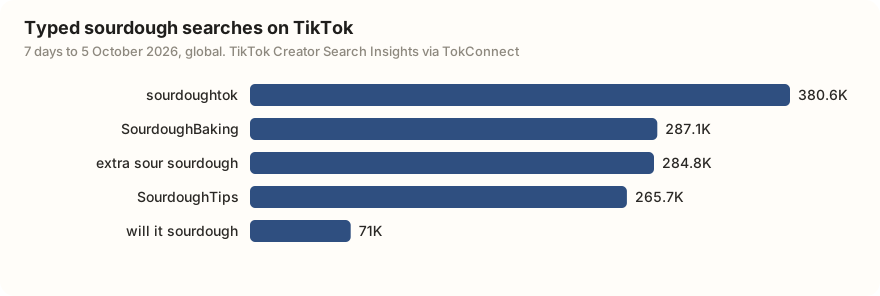
Notice that neither list contains the other. Autocomplete gave you "sourdough fail" and "sourdough for beginners"; the topic list gave you "extra sour sourdough" at 284,785 searches a week with only 164 videos. Use both: autocomplete for wording, topics for size. Gaps can also close: on 19 September four of these searches had no videos at all, and two of them, "Flat sourdough" and "make a sourdough", were no longer returned 16 days later. TikTok's matched-video counts are re-scored between pulls, so treat a zero as a signal, not a promise. The tool comparison covers who has which data.
Pulling suggestions at scale
Doing this by hand in the app is fine for one seed and miserable for thirty. If you have TokConnect connected to ChatGPT or Claude, hand it the seed list and let it do the typing. Our keyword research guide shows the full method.
Get TikTok search suggestions for these seeds: sourdough, sourdough starter, sourdough discard, bread baking, home baking. Combine the results, drop duplicates, and group them by intent (recipe, troubleshooting, equipment, beginner). Then look up the Creator Search Insights topics for the three biggest groups, keep only typed searches (not TikTok's topic groups), and give me each one's 7-day search volume and video count.
That returns far faster than a phone session, and it leaves you a table instead of a screenshot.
How we got these numbers
We pulled TikTok's autocomplete through TokConnect (10 suggestions per seed) for four seeds on 19 September and again on 5 October 2026, and for 20 common seeds on 5 October for the suggestions snapshot. We pulled search demand for "sourdough" (10 topics) on both dates. Searches are TikTok's 7-day global search popularity from Creator Search Insights; "Videos" is how many videos TikTok matches to the topic. Autocomplete has no counts and can differ by country and account.
A topic counts as a TikTok topic group, not a typed search, if its 7-day figure is 5,000,000 or more, or 1,000,000 or more with the first day under 5% of the last, or TikTok files it as Featured Content. TikTok samples and rounds these counts. The creator survey figures are Adobe's, from 554 US creators in February 2026. Data: 5 October pulls, 19 September autocomplete, 19 September topics.
Key statistics
13 of 40 TikTok autocomplete suggestions for "sourdough", "crochet", "gym for beginners" and "tiktok seo" were new on 5 October 2026 compared with the same seeds on 19 September 2026.
"sourdoughtok" was searched 380,614 times on TikTok in the 7 days to 5 October 2026, and TikTok matched 843 videos to it, up from 0 on 19 September 2026.
Four typed sourdough searches that had 0 matched TikTok videos on 19 September 2026 had between 772 and 1,085 matched videos by 5 October 2026.
All 5 statistics
68% of US TikTok creators said they use suggested searches when creating content, in Adobe's February 2026 survey of 554 creators.
Frequently asked questions
What are TikTok suggested searches based on?
Three things: searches that are popular across TikTok, your own search and watch activity, and what is trending in your region. TikTok's help centre confirms the personal part, noting that turning off the personalised search setting changes your suggested searches as well as your results.
How do I get rid of search suggestions on TikTok?
Clear your search history and turn off personalised search in Settings and privacy → Content preferences; popular and trending searches still appear. The menu paths are in the search history guide.
What should I do if I find inappropriate search suggestions on TikTok?
Report it from the search screen using TikTok's report or feedback option, and avoid tapping the suggestion, since tapping is part of what makes a phrase popular. Clearing your search history and turning off personalised search reduces how much your own activity feeds the list. If a child uses the account, TikTok's Family Pairing includes controls over what can be searched.
Where do TikTok search suggestions come from for creators?
The same place, which is why they are useful. Typing a seed into the search bar returns the exact phrasings people use, and the keyword chip under a video shows what TikTok thinks that video is about. Pair the phrasings with Creator Search Insights volumes to see which ones are worth making.
Why do my TikTok search suggestions keep changing?
Because they follow what people search, and that moves week to week. When we pulled autocomplete for four seeds on 19 September and 5 October 2026, 13 of the 40 suggestions were new, such as "crochet flower" and "sourdough discard recipes". Your own searches and watching change your list too, unless personalised search is off.
Sources and data
- How TikTok recommends content (TikTok Help Center)
- search on TikTok (TikTok Help Center)
- How TikTok creators use suggested searches (Adobe, survey of 554 US creators, February 2026, checked 5 October 2026)
- Creator Search Insights (TikTok Help Center)
- Using TikTok as a search engine (Adobe, survey of 807 US consumers, January 2026, published 17 February 2026)