
- Audience Insights in Ads Manager describes TikTok users active in the last 30 days, platform-wide, from paid and organic data. An ad account is required.
- TikTok Studio → Analytics → Followers gives gender, top territories and the follower activity chart, which is the only place TikTok publishes when your audience is online.
- Creator Search Insights attaches an age, gender and country breakdown to each search topic, describing people who searched, not people who follow you.
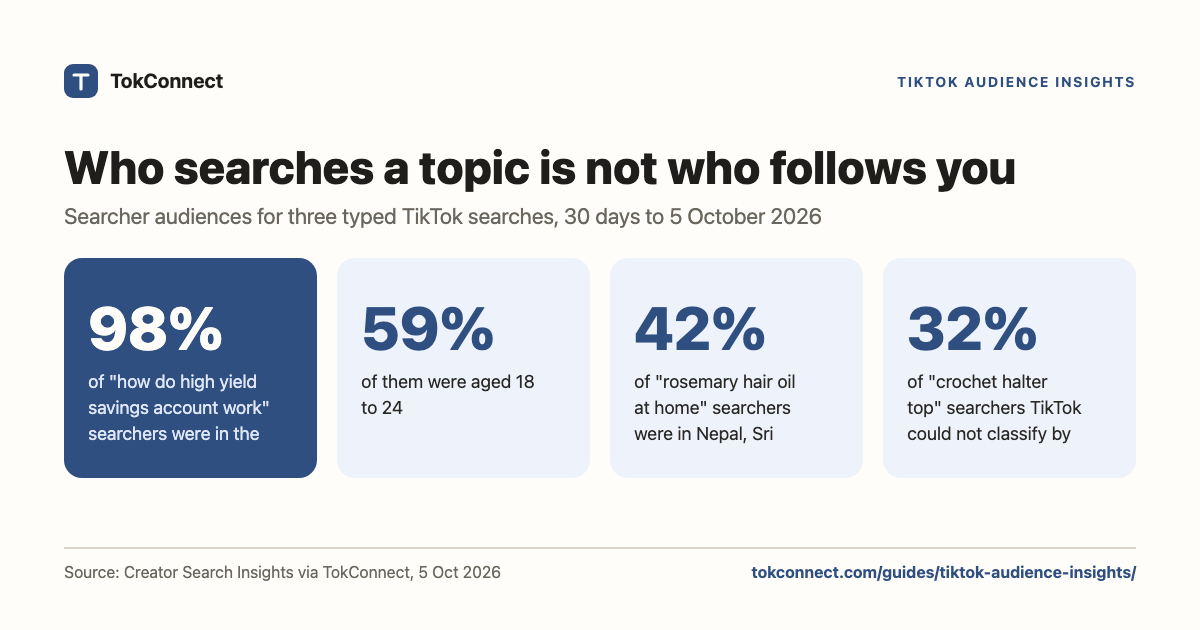
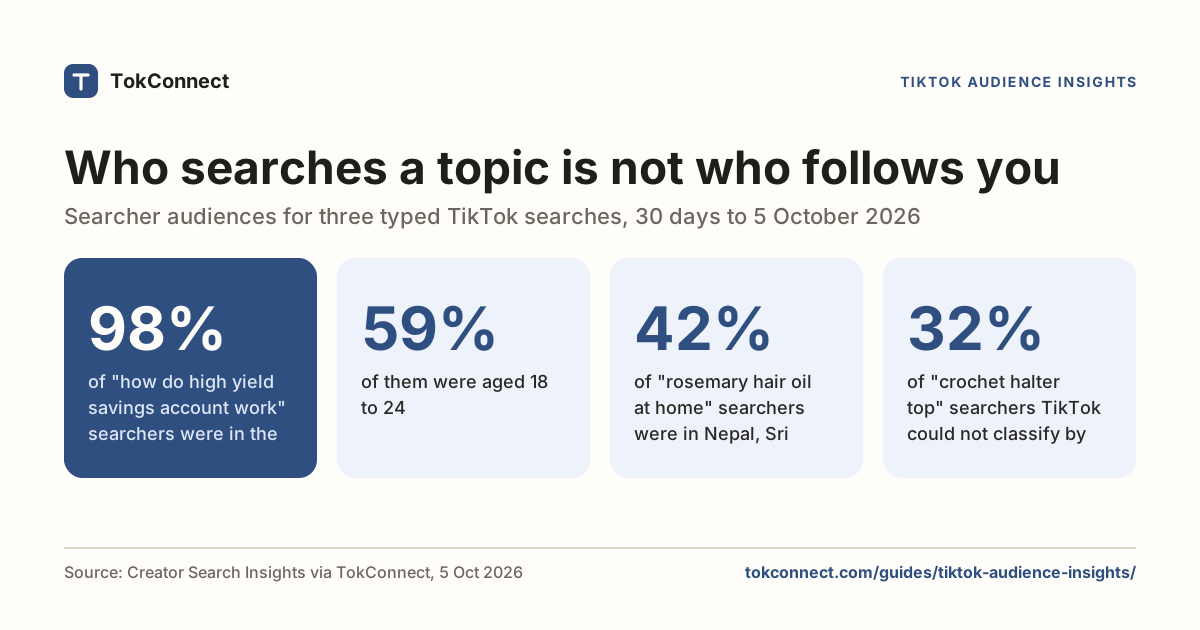
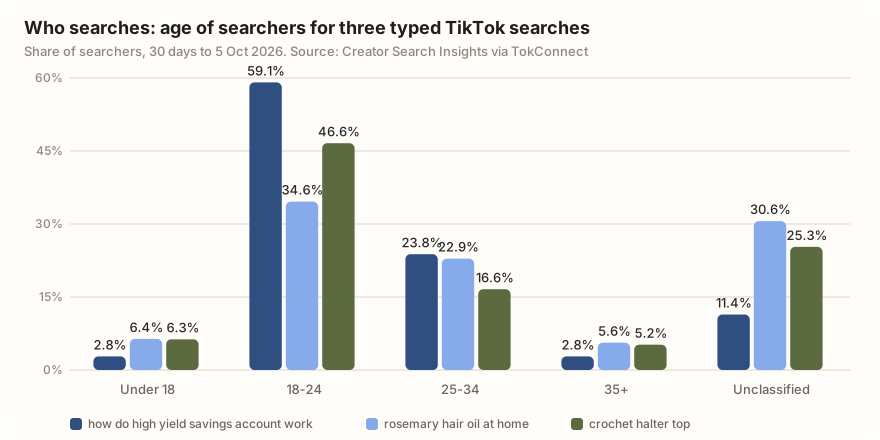
- A search's audience rarely matches the platform average: 98% of "how do high yield savings account work" searchers were in the US and 59% were 18 to 24, while 42% of "rosemary hair oil at home" searchers were in Nepal, Sri Lanka or Pakistan (30 days to 5 Oct).
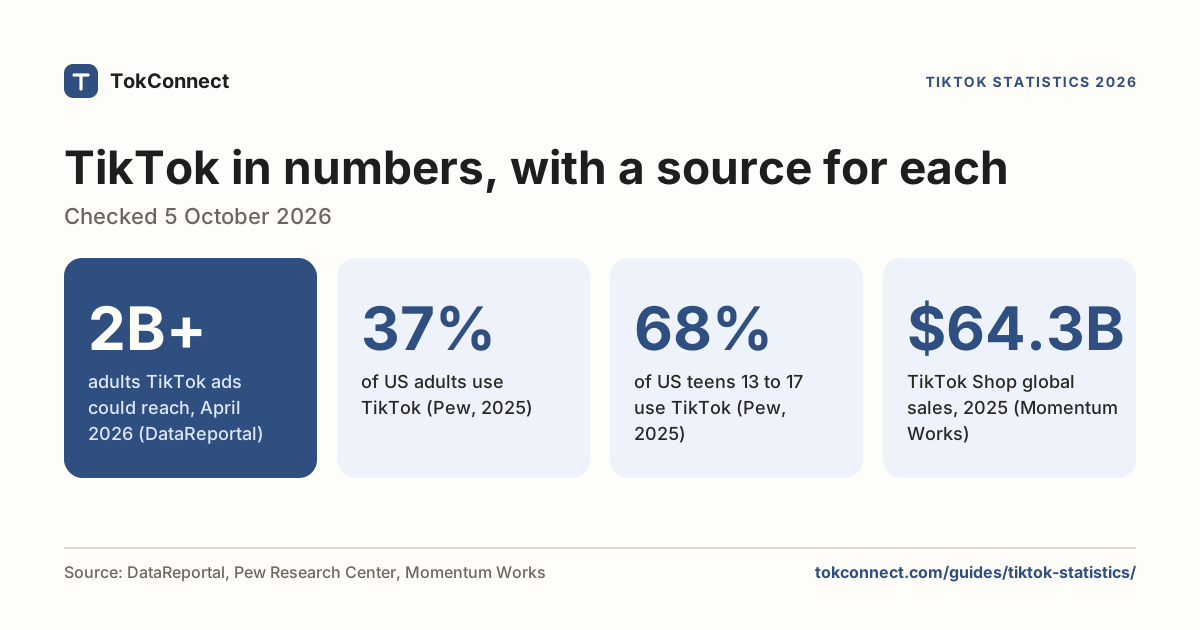
- 37% of US adults use TikTok and 68% of US teens do, per Pew. The 2 billion figure in headlines is advertising reach for adults, not users.
"TikTok audience insights" means three different datasets: Audience Insights in TikTok Ads Manager (platform-wide users, for advertisers), the Followers report in TikTok Studio (your own followers), and the audience panel on a search topic in Creator Search Insights (the people who searched it). The third is the one that describes demand: 98% of the people who searched "how do high yield savings account work" on TikTok were in the US, and 59% were aged 18 to 24 (30 days to 5 Oct).
Pick the wrong dataset and you get an answer to a question you didn't ask. This page explains each, where to click and what it shows, then uses the third on three real typed searches so you can see what the numbers look like.
What do people mean by TikTok audience insights?
| Dataset | Who it describes | Who can open it | Best for |
|---|---|---|---|
| Audience Insights, TikTok Ads Manager | TikTok users active in the last 30 days, platform-wide, filtered how you like | Anyone with an Ads Manager account | Sizing a paid targeting idea before you spend |
| Followers, TikTok Studio analytics | The people who already follow your account | Any account, in the app or at tiktokstudio.com | When to post, and where your existing audience lives |
| Topic audience, Creator Search Insights | People who searched that topic in the chosen window | Eligible adult creator accounts, app or tiktok.com/csi | Deciding whether a topic's searchers are your people |
The third is the only one that describes demand rather than an existing relationship.
What does Audience Insights in TikTok Ads Manager show?
It is built for media buyers. TikTok describes it as "aggregated information about TikTok users that have been active within the last 30 days, based on all TikTok data, paid and organic" (TikTok's help page).
To open it: go to TikTok Ads Manager, hover over Analytics, click Audience Insights. TikTok's help page now describes two views, Campaign Potential before a campaign and Campaign Reach across past campaigns. You need an ad account.
What you get, per TikTok's own documentation: age and gender, up to five countries or regions, device information (operating system, OS version, device price band), interests and behaviours (ad interest categories, and whether people watched, liked, commented on or shared videos in a category), app language, activity metrics like app opens and minutes used per day, and overlap between your custom audiences.
The device price band is the underrated field. If you sell something expensive, it tells you in one screen whether the interest cluster you picked skews towards phones that cost money. TikTok's own caveat is that the estimates are "not a guarantee of results", which is the standard warning on any pre-campaign sizing tool.
What do follower analytics in TikTok Studio show?
This is the one most creators mean. Open TikTok Studio → Analytics → Followers, either in the app or in TikTok Studio on the web.
The Followers tab gives you gender split, top territories (your five biggest countries) and follower activity: a bar chart of the hours and days your followers are most active on TikTok. That last chart is the answer to "when should I post", and it is the only place TikTok publishes it. Read it as the hour before your followers' peak, not the peak itself, so the video has time to collect early engagement.
The Viewers tab is separate and often more useful: it splits a video's audience into followers and non-followers, new and returning, with gender and location for each. On a video that travelled, the non-follower share is the number to watch.
The limit is obvious once you say it out loud. Follower analytics describes the audience you already have. It cannot tell you whether anyone is searching for the thing you are about to make.
Who searches a topic on TikTok, by age, gender and country?
Creator Search Insights attaches an audience panel to every search topic: age, gender and top countries for the people who ran that search. We looked at a 30-day window for one typed search in each of three unrelated niches. We picked typed searches of similar size (about 280,000 searches a week each), not TikTok's generated topic groups, because a group pools many different searches and its audience is a blend.
| Typed search | 7-day searches | Videos | Female | Male | Unclassified |
|---|---|---|---|---|---|
| how do high yield savings account work | 281,371 | 554 | 63.8% | 24.8% | 11.4% |
| rosemary hair oil at home | 284,885 | 747 | 56.1% | 13.7% | 30.2% |
| crochet halter top | 276,472 | 840 | 59.6% | 8.2% | 32.2% |
| Typed search | 4–15 | 16–17 | 18–24 | 25–34 | 35+ | Unclassified |
|---|---|---|---|---|---|---|
| how do high yield savings account work | 0% | 2.8% | 59.1% | 23.8% | 2.8% | 11.4% |
| rosemary hair oil at home | 2.8% | 3.6% | 34.6% | 22.9% | 5.6% | 30.6% |
| crochet halter top | 2.2% | 4.1% | 46.6% | 16.6% | 5.2% | 25.3% |
| Typed search | Top countries by share of searchers |
|---|---|
| how do high yield savings account work | United States 98.1%, other countries 1.9% |
| rosemary hair oil at home | United States 29.0%, Nepal 15.5%, Sri Lanka 14.9%, Pakistan 11.9%, Bangladesh 9.9% |
| crochet halter top | United States 23.6%, Philippines 11.0%, South Africa 9.2%, Nigeria 6.6%, Brazil 5.7% |
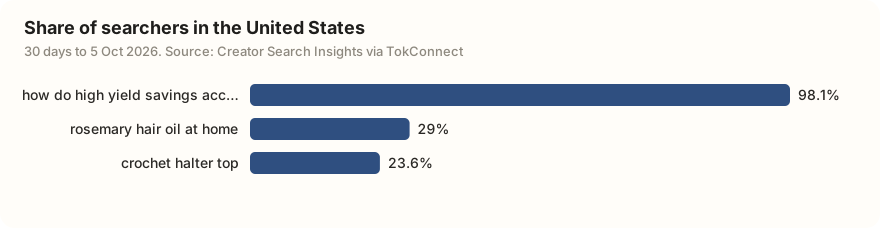
Audience shares are each value divided by TikTok's total. TikTok's own search data · 30 days to 5 Oct
Three readings worth having. The "unclassified" slice is large and genuinely unknown, not a hidden male majority; TikTok only places the searchers it can. The savings-account question is a young American question: high-yield savings accounts are mostly a US product, and 59% of searchers were 18 to 24. And the hair-oil search is mostly South Asian, with the US under a third, which you would not guess from a US feed.
That last point is the reason to look. Your topic's searchers are not the platform's average, and posting for the average is how you miss.
What are TikTok's platform-wide demographics?
For the platform-wide picture behind all of the above, use surveys and TikTok's own ad tools, and keep the two apart.
- 37% of US adults say they ever use TikTok, rising to 63% of 18 to 29 year olds, 44% of 30 to 49, 30% of 50 to 64 and 12% of over-65s. Women 42%, men 30%. Pew Research Center, November 2025, fielded February to June 2025.
- 68% of US teens aged 13 to 17 use TikTok, 61% of them daily and 21% "almost constantly". Pew Research Center, December 2025.
- 20% of US adults regularly get news on TikTok, and 43% of those aged 18 to 29 do. Pew, September 2025.
- TikTok's reported advertising audience passed 2 billion adults worldwide as of February 2026, and 153 million US adults. DataReportal, Digital 2026 mid-year update.
- The global ad audience split 30.7% aged 18 to 24, 35.3% aged 25 to 34, 16.4% 35 to 44, and 55.7% male, on DataReportal's January 2025 figures, the latest split DataReportal had published when we checked on 5 October 2026.
Every "TikTok has 2 billion users" headline is quoting advertising reach from TikTok's ad tools, which counts people aged 18 and over only, excludes China and India, and moves when TikTok changes its ad products. Survey numbers like Pew's measure people. Use the survey when you are describing humans and the ad figure when you are sizing a campaign.
In what order should you use all three?
Start with the topic audience, because it is the only one that describes people who have not found you yet. If a search's audience is 98% American and you only ship to the UK, that search is somebody else's. Then check TikTok Studio to see whether your existing followers overlap. Then, if there is budget, open Ads Manager and size it properly.
All three are one-screen-at-a-time tools, which is where this gets tedious at any scale. The topic audience data comes out through Creator Search Insights, and TokConnect exposes the same fields to an AI agent, so you can compare ten searches in a table instead of screenshotting ten panels.
Show age, gender and top countries for the top 10 typed searches about rosemary hair oil.
Change the topic after it opens.
For how big each search is next to Google, see TikTok vs Google search; for the paid Keyword Planner and how it differs from search demand, see the keyword research guide, which also covers the topic-finding half, and product research shows what to do when the audience turns out to be somewhere you weren't selling.
How we got these numbers
On 5 October 2026 we ran TokConnect's topic search for "high yield savings account", "rosemary oil for hair" and "crochet top" (20 topics each), chose one typed search of about 280,000 weekly searches from each, and pulled audience data for it over 30 days. Searches are TikTok's Creator Search Insights search popularity for the 7 days to 5 October 2026, global.
Audience shares are TikTok's relative values divided by its total; "unclassified" is searchers TikTok could not place. We skipped TikTok's generated topic groups: a fourth seed, "hair growth oil", returned only groups. Ads Manager facts are from TikTok's help page, checked 5 October 2026; platform-wide figures are from the Pew and DataReportal reports linked above. Download the data; the 19 September version is here.
Key statistics
98.1% of the people who searched "how do high yield savings account work" on TikTok in the 30 days to 5 October 2026 were in the United States.
59.1% of the people who searched "how do high yield savings account work" on TikTok in the 30 days to 5 October 2026 were aged 18 to 24, and 2.8% were 35 or over.
42% of the people who searched "rosemary hair oil at home" on TikTok in the 30 days to 5 October 2026 were in Nepal, Sri Lanka or Pakistan, against 29% in the United States.
All 6 statistics
"rosemary hair oil at home" was searched 284,885 times on TikTok in the 7 days to 5 October 2026, worldwide, with 747 matched videos.
TikTok could not classify the gender of 32.2% of the people who searched "crochet halter top" in the 30 days to 5 October 2026; 59.6% were female and 8.2% male.
37% of US adults said they use TikTok, rising to 63% of 18 to 29 year olds, in Pew Research Center's 2025 survey.
Frequently asked questions
How to find audience insight on TikTok?
It depends which audience. For your own followers, open TikTok Studio → Analytics → Followers in the app or in TikTok Studio on the web. For platform-wide targeting data, go to TikTok Ads Manager, hover Analytics and click Audience Insights. For the people who search a topic, open Creator Search Insights in the app or at tiktok.com/csi and scroll to the audience panel on any topic page.
How to check when the audience is most active on TikTok?
TikTok Studio → Analytics → Followers, then the follower activity chart. It shows the hours and days your followers are most active on TikTok, by your account's time zone. Post in the hour before the peak rather than at it, so the video has time to gather early engagement before your audience arrives.
Does TikTok analytics show who viewed your profile?
Profile views are a count, not a list, unless both you and the other person have turned on profile view history, which is a separate opt-in setting and only covers the last 30 days. Analytics itself shows totals and demographics, never named viewers.
Why does so much of the audience breakdown say unknown?
TikTok only classifies the users it has enough signal for, so the leftover share is genuinely unclassified rather than a hidden group. Across the three typed searches on this page, the unclassified gender share ran from 11.4% to 32.2%. Read the classified shares as shape, not precise population estimates.
Can I see the demographics of people who search a keyword on TikTok?
Yes. Every topic in Creator Search Insights has an audience panel with age, gender and top countries for the people who searched it. For example, 59.1% of people who searched "how do high yield savings account work" in the 30 days to 5 Oct were aged 18 to 24, and 98.1% were in the US.
Is TikTok Audience Insights free?
Ads Manager's Audience Insights needs an ad account; TikTok places it inside Campaign Potential and Campaign Reach. TikTok Studio follower analytics and the Creator Search Insights audience panel are free with a TikTok login.
Sources and data
- About Audience Insights (TikTok Ads Manager help, checked 5 October 2026)
- How to access Audience Insights (TikTok Ads Manager help)
- Americans' Social Media Use 2025 (Pew Research Center)
- Teens, Social Media and AI Chatbots 2025 (Pew Research Center)
- Digital 2026 mid-year global update (DataReportal)
- Social Media and News Fact Sheet (Pew Research Center, September 2025)
- Essential TikTok stats (DataReportal)
- Search audiences for three typed searches, 5 October 2026 (snapshot)
- Topic audience data, 19 September 2026 (earlier snapshot)