
- LIVE Studio is TikTok's free desktop streaming app for 64-bit Windows 10 and 11, with a Mac version in the US, UK and selected countries since early 2026.
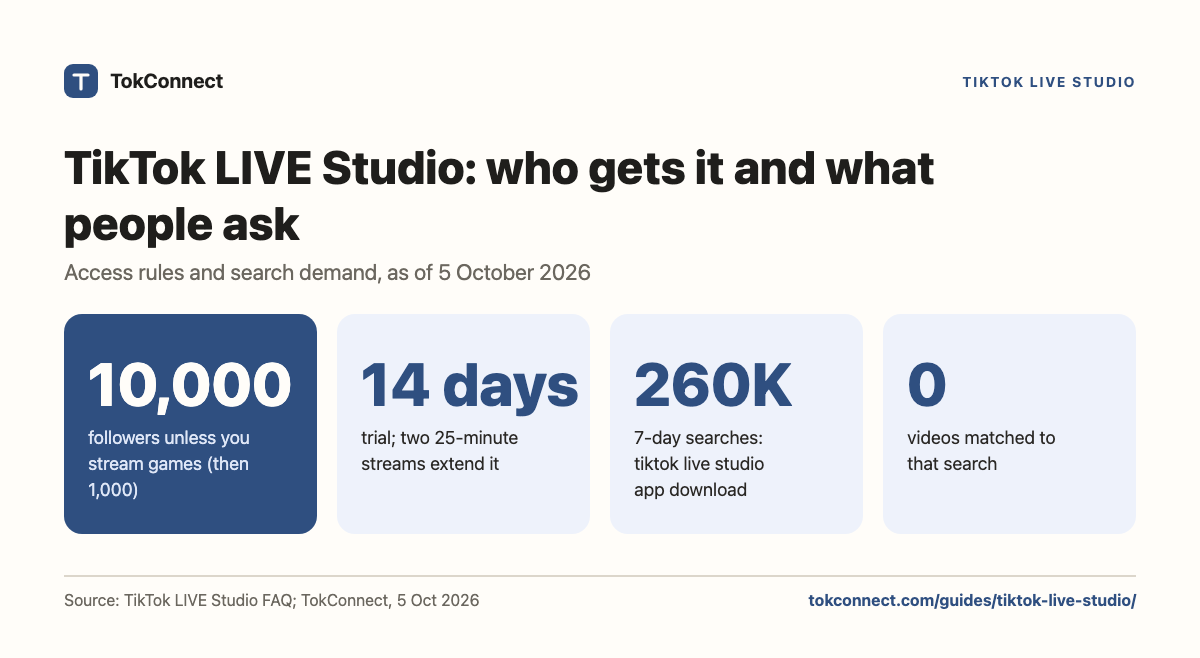
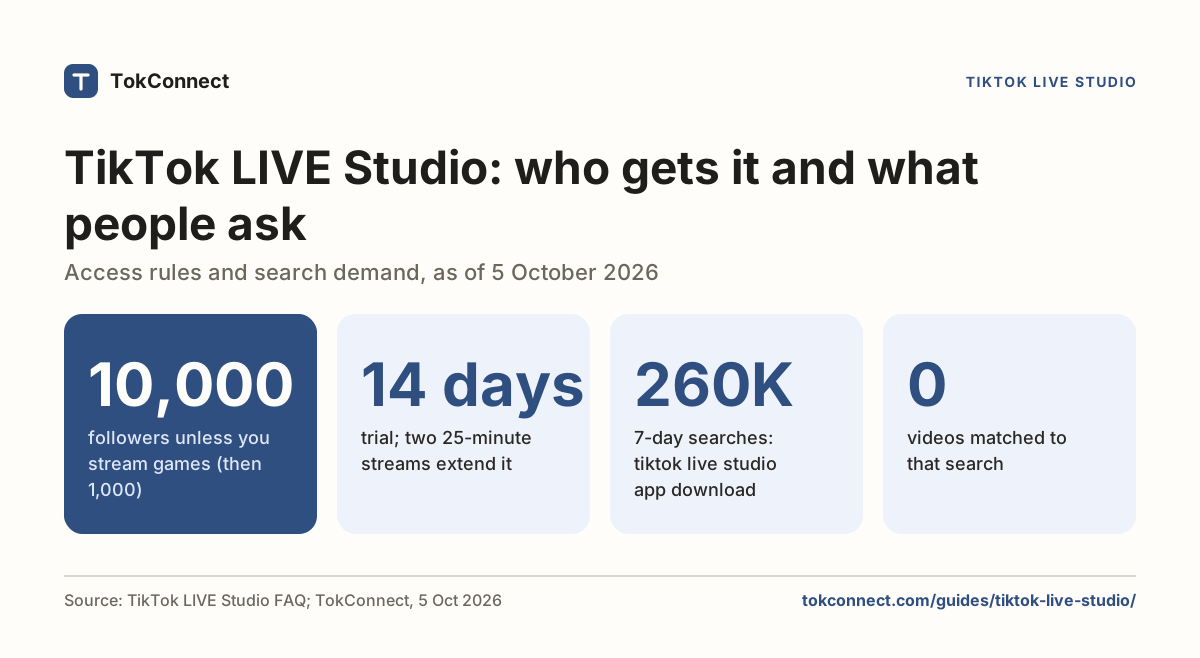
- TikTok's LIVE Studio FAQ asks gaming creators for 1,000 followers and everyone else for 10,000. Access starts as a 14-day trial; two 25-minute streams extend it to 180 days.
- Display capture, Virtual camera and Cast stay locked until you have done three 25-minute streams from LIVE Studio. This is the usual cause of a black screen on a new install.
- OBS and Streamlabs need a stream key from LIVE Center. TokTutorials reports that keys now come through TikTok creator networks; TikTok has not published the rule. Never share it.
- A missing download button means threshold, region, an expired trial or the wrong account. Reinstalling does not fix any of those.
TikTok LIVE Studio is TikTok's own free program for streaming to TikTok LIVE from a computer. It runs on 64-bit Windows 10 and 11, and on Macs in the United States, the United Kingdom and a few other countries. You get it from tiktok.com/studio/download, and the download button only appears when your account qualifies.
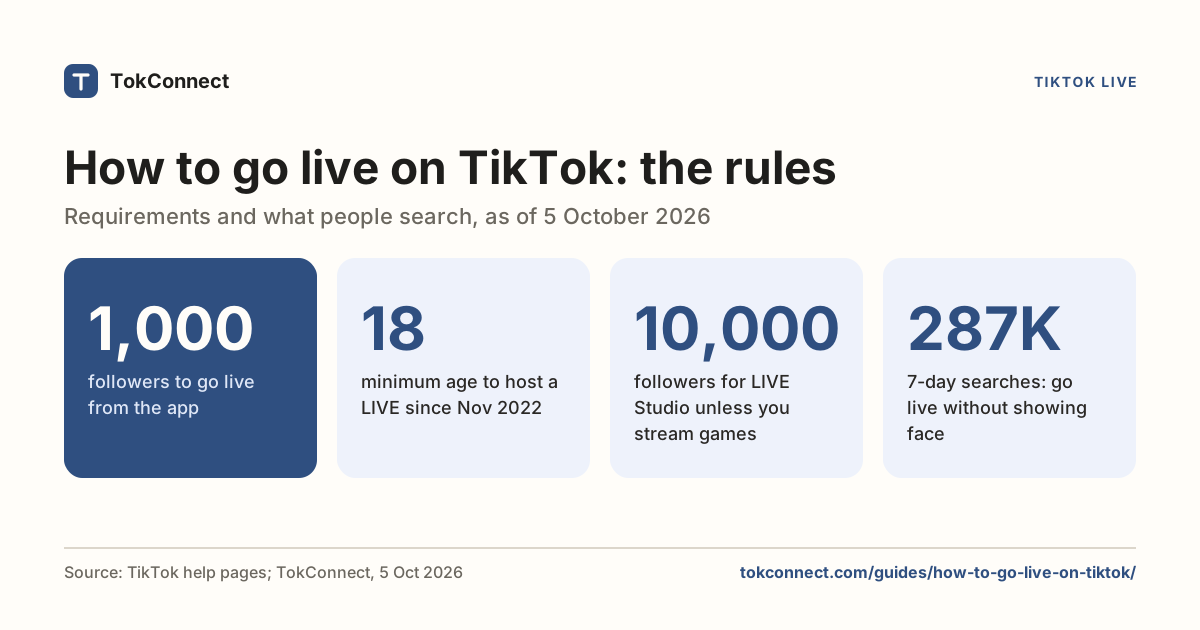
Qualifying is the hard part. TikTok's LIVE Studio FAQ sets the bar at 1,000 followers for gaming creators and 10,000 for everyone else, then hands out access as a trial you have to use or lose. The general LIVE rules (age 18, the 1,000-follower rule for phone streams, restrictions) are on the how to go live on TikTok page.
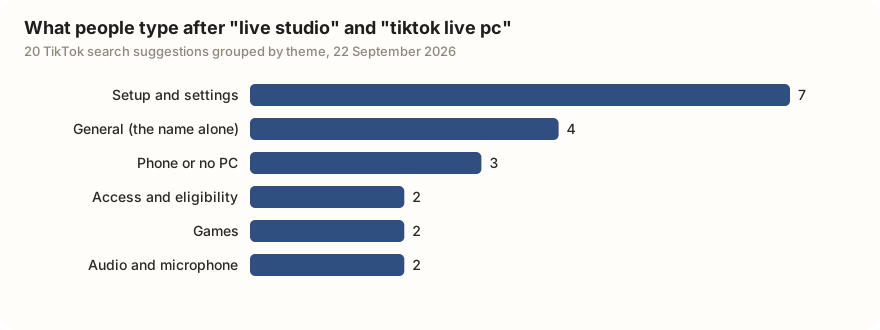
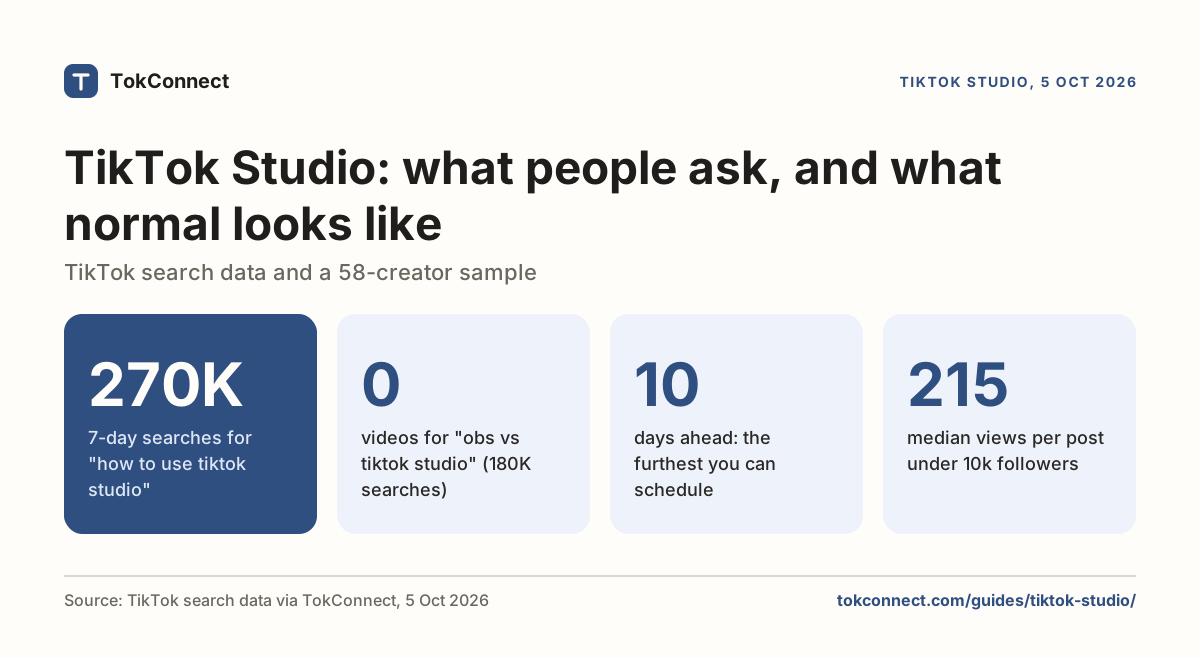
Of the 20 suggestions TikTok offered for those two searches, seven ask how to set it up, three ask for a phone version that does not exist, and two are about audio. Typed searches say the same: the three biggest LIVE Studio searches were about the download, fixing audio and setup, and TikTok matched no videos to any of them. Those groups shape this page.
What is TikTok LIVE Studio, and what is it not?
LIVE Studio is a desktop program that sends your camera, your screen or a game to TikTok LIVE, with scenes and overlays, much as OBS does for Twitch. TikTok introduces it on the LIVE Creator Hub as the way to go LIVE from a desktop computer. It is free, and it signs you in with your TikTok account, so there is no stream key to copy.
Two other things share the name. TikTok Studio is the upload and analytics tool; it does not stream. OBS Studio is free open-source software that streams anywhere once you give it a stream key.
What are the TikTok LIVE Studio requirements?
TikTok's download page lists a minimum of Windows 10 or 11 (64-bit), an Intel Core i3 9th generation or AMD Ryzen 5 3000 processor, and 8 GB of memory. TikFinity's guide (August 2026) repeats those numbers and adds that the Mac build comes in Apple silicon and Intel versions.
| Part | TikTok's minimum | For games or several sources |
|---|---|---|
| Operating system | Windows 10 or 11, 64-bit; macOS in selected countries | Same |
| Processor | Intel Core i3 9th gen or AMD Ryzen 5 3000 | Intel Core i5 11th gen or AMD Ryzen 5 5000 |
| Memory | 8 GB | 16 GB |
| Graphics | Built-in graphics for a camera-only stream | A separate card with hardware encoding; guides name a GTX 1650 or newer |
| Free storage | Not published; the installer is about 500 MB | 10 GB on an SSD, per guides |
| Upload speed | Not published; guides say 5 to 6 Mbps for 720p | 15 to 20 Mbps for 1080p at 60 fps |
TikTok's LIVE Studio download page, TikFinity (August 2026), SMMNut (June 2026) and SociallyIn (updated May 2026). TikTok's page last read 22 September 2026; the minimums re-confirmed in TikFinity's guide on 5 October 2026.
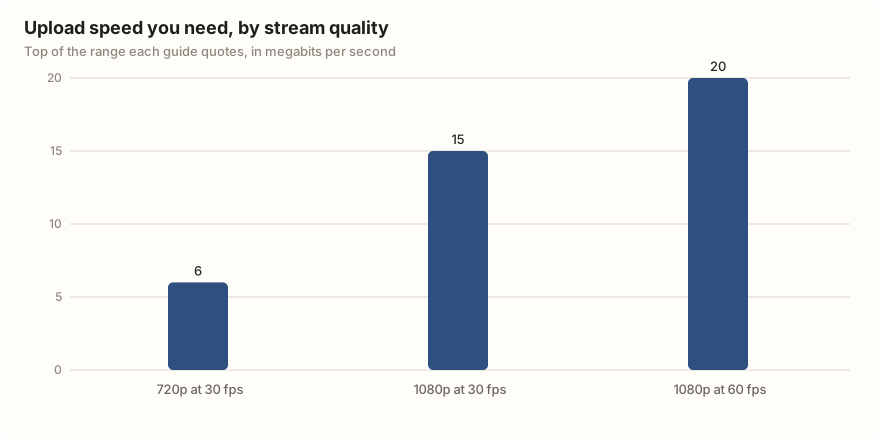
Upload speed matters more than the processor. Run a speed test on the connection you will stream from, then keep your bitrate at 70 to 80 percent of the upload figure, which is SociallyIn's rule.
Who can download LIVE Studio?
The download button shows only to accounts TikTok has approved. TikTok's LIVE Studio FAQ gives two thresholds: gaming creators need 1,000 followers and must already have posted game videos or gone LIVE with a game; everyone else needs 10,000. Both groups must be 18 or over, and the FAQ says the numbers vary by region. DemandSage (March 2026) and TikFinity (August 2026) report the same split.
TikTok changes these numbers and they vary by region, so trust the notice in the app. We last read TikTok's FAQ on 22 September 2026 and re-confirmed the figures in 2026 guides on 5 October 2026.
Access arrives as a trial. The FAQ says you get 14 days (re-confirmed in OneStream's 2026 guide on 5 October 2026), and if you stream from LIVE Studio for 25 minutes or more at least twice in that window, access extends to 180 days. Miss it and access is revoked; you reapply from the download page. OneStream's guide adds that keeping the 180 days rolling takes three 25-minute streams every 30 days. That figure comes from one guide only, so trust the notice in the app.
If you miss the thresholds but stream regularly elsewhere, TikTok's Apply for LIVE access page links to an application form. TikTok has not published how long a decision takes.
How do you install LIVE Studio and log in?
- Sign in at tiktok.com in a browser with the account you will stream from, then open the download page. A Windows button, or on a Mac a choice between Apple silicon and Intel, means the account qualifies.
- Run the installer, about 500 MB.
- Log in. The quickest way is the QR code: open TikTok on your phone and scan the screen.
- Let the setup check test your microphone, camera and upload speed, and accept the resolution and bitrate it suggests.
- Look at Your LIVE access in the top right. "Access not available" means this account has no desktop access yet; see the fixes.
Access belongs to the account, not the computer.
How do scenes, sources and layouts work?
A scene is one arrangement of what viewers see; a source is one thing inside it. TikTok's help page What's a source? lists camera feeds, screen captures, text and images. Guides from January and August 2026 give the full menu: Camera, Display capture, Game capture, Window capture, Capture card, Image, Video, Link (a web page, which is how alert overlays get in) and Widgets such as a LIVE goal.
Game capture is the source for a full-screen game; TikTok's capture source page says LIVE Studio picks up any full-screen game on its own. Window capture takes one program; Display capture takes the whole monitor.
Three sources start locked. Display capture, Virtual camera and Cast unlock after three streams of 25 minutes or longer from LIVE Studio; phone streams do not count and validation can take up to 48 hours. TikFinity reports the rule, and the same message shows up in creator how-to videos. If Display capture is greyed out on a new install, this is why.
Layouts come in three shapes: Vertical (the phone shape), Landscape, and Dual, where the viewer picks.
How do the quality and audio settings work?
Start with what the setup check suggested. Under 10 Mbps of upload, stream 720p at 30 frames per second; a steady 720p looks better than a stuttering 1080p. With 15 Mbps or more, 1080p at 30 fps is safe, and 1080p at 60 fps is for games on a wired connection.
The Audio Mixer sits in the bottom-left corner and lists every sound source; pick your microphone there, not only in Windows. It has noise suppression (Medium or High) and echo cancellation for people on speakers. Set Windows and LIVE Studio to the same sample rate, 48 kHz, or your voice drifts out of sync over a long stream.
What moderation tools work from the desktop?
Chat runs in a panel on the right while you stream. From there you can pin a comment, mute a viewer for a set time, block them, and add moderators; TikTok's LIVE Studio help has a page on adding moderators. Keyword filters carry over from the app: up to 500 words of 30 characters each, per TikTok's page on comments on LIVE.
How does the stream key route work for OBS and Streamlabs?
A stream key is a password that lets any streaming program push video into your LIVE. TikTok issues it in LIVE Center: sign in at tiktok.com, click Go LIVE in the left menu (it opens livecenter.tiktok.com/producer), add a title and topic, click Save and Go LIVE, and the Server URL and Stream key appear at the bottom of the dashboard. Paste both into OBS under Settings, Stream, Custom. Restream, BIGVU (July 2026) and TikTok Stats (August 2026) describe the same clicks.
Who gets a key is the catch. Phone LIVE access does not bring one, and TikTok has not published the criteria. StreamHouse calls it a narrower group whose rules have shifted by region and over time. TokTutorials (January 2026) says that in practice keys now come through TikTok's official creator networks, agencies that are free to join and can request access for their creators. If livecenter.tiktok.com/producer bounces you back to the LIVE Center home page, your account does not have it yet.
The key does not last. Restream says it changes each time you log out; TokTutorials says you need a fresh one for each stream. Streamlabs has its own TikTok connection with a gaming quota, covered on the go live page.
Anyone holding the key and server URL can broadcast on your account until the key changes, and the strike for what they show lands on you. Keep it off screen, out of Discords, and away from "key generator" tools that ask for your TikTok login. If it leaks, log out of TikTok on the web, which kills the key.
How do phone LIVE, LIVE Studio and OBS with a stream key compare?
| Phone LIVE | LIVE Studio | OBS with a stream key | |
|---|---|---|---|
| Runs on | A phone with the TikTok app | Windows 10 or 11 (64-bit); Mac in selected countries | Windows, Mac, Linux |
| Who can use it | 1,000 followers (varies by region), 18 or over | 1,000 followers for gaming creators, 10,000 for others, 18 or over, trial rules | Accounts TikTok grants encoder access; TikTok has not published the rule |
| What you can show | Front or back camera, phone screen share | Camera, game, window, display, capture card, images, video, web overlays | Anything OBS captures |
| Gifts and LIVE goals | Yes | Yes; gifts show in chat and in a Goals widget | Gifts arrive; you need a third-party overlay to show them |
| Multi-guest, co-host, battles | Yes | Yes; co-host up to 4 on screen, multi-guest up to 8 | No |
TikTok's LIVE Studio help pages on dynamic effects and LIVE goals; TokTutorials (November 2025) for guest counts; TikFinity (January and August 2026) for the OBS settings.
What can't LIVE Studio do?
It does not have the phone's effects library. The Dynamic effects panel gives one-click combinations of a filter, a layout change and a sound, but the face filters you scroll through on the phone are not there.
Gifts do work: they show in the chat panel, and TikTok's help center has a page on setting a LIVE goal from inside LIVE Studio, so a June 2026 guide that says the app has no gift interface is behind. You cannot switch scenes while a co-host or multi-guest session is running, per TokTutorials (November 2025).
There is no phone version; the three "live studio on phone" suggestions lead nowhere. TikTok has not published a complete list of phone-only LIVE features, so test what you rely on in a short stream first.
What should you do when TikTok LIVE Studio is not working?
Almost every failure below is an account decision or a locked source, not a broken install. Reinstalling, a VPN and new camera settings fix none of them, as an August 2026 guide spells out.
| Problem | Likely cause | What to do |
|---|---|---|
| Download button missing | Under the threshold for your creator type; a region where LIVE Studio is not offered (the FAQ says the button does not show there); an expired trial; a Mac outside the listed countries; the wrong account signed in on the browser | Check the account first. If the trial expired, the FAQ says to reapply from the download page |
| "Not eligible" or "Access not available" | TikTok has not granted this account desktop access | Click Your LIVE access, top right, and choose Get access or Apply if shown. Keep going LIVE from the phone, check Settings and privacy, Account, Restrictions, and confirm the approved account is signed in |
| Black screen on a capture | Display capture is locked until three 25-minute streams clear validation; Window capture used on a full-screen game; an old graphics driver; an app with a transparent background | Use Game capture for games and run LIVE Studio as administrator if the game does. Update the driver. For transparent-background apps, a September 2024 thread routes them through OBS's virtual camera with a green-screen filter, but Virtual camera is also locked at first. TikTok has not published a fix |
| Stream key not showing | The account lacks encoder access; livecenter.tiktok.com/producer redirects to the LIVE Center home | TikTok has not published a fix. Routes are a creator network, the application page, or LIVE Studio, which needs no key. If you had a key before, look for a restriction notice in the app |
| No sound, no game sound, or voice out of sync | Wrong device in the Audio Mixer; Windows microphone privacy setting off; speakers not added as a source; mismatched sample rates; a Bluetooth headset | Pick the microphone in the mixer, allow desktop apps to use it in Windows Privacy, add speakers to the mixer for game sound, set 48 kHz in both places, test with a wired headset, and restart the app if a new microphone is not listed |
TikTok LIVE Studio FAQ; TikFinity (August 2026); SMMNut (June 2026); TikTok Stats (August 2026); RottenWiFi (August 2026).
What do people ask TikTok about LIVE Studio?
| Theme | Suggestions | What TikTok suggested |
|---|---|---|
| Setup and settings | 7 | live studio setup tiktok; live studio tutorial; live studio comment faire (French); live studio как стримить (Russian, "how to stream"); tiktok live pc tutorial; tiktok live pc setup; tiktok live pc set up |
| General | 4 | live studio; live studio TikTok; tiktok live pc; live stream pc tiktok |
| Phone or no PC | 3 | live studio mobile; live studio on phone; live studio ผ่านมือถือ (Thai, "via mobile") |
| Access and eligibility | 2 | live studio application approved; tiktok live pc requirements |
| Games | 2 | tiktok live pc roblox; tiktok live pc mlbb |
| Audio and microphone | 2 | tiktok live pc audio; tiktok live pc microphone |
TikTok search suggestions, two queries of 10 · 22 Sep
Two of the suggestions name games (Roblox and Mobile Legends). Check how crowded your topic is before you build a stream around it.
Ask TokConnect (swap in your topic):
Search TikTok LIVE for [your topic] and tell me how many rooms are live and how big they are.
Run it in the research agent Use it in ChatGPT or Claude →
TikTok's LIVE search returns a partial list, so read the count as a floor, not a total. Run it at the hour you plan to stream, on two different days. If the topic is crowded, the followers guide covers how to pick a narrower angle.
How we got these numbers
LIVE Studio rules come from TikTok's LIVE Studio FAQ, download page and help center, last read on 22 September 2026. On 5 October 2026 TikTok's pages blocked automated reading, so we re-confirmed the follower thresholds, trial rules and minimum specs in 2026 guides (TikFinity, OneStream, DemandSage). Hardware advice above the minimum, upload speeds and stream-key routes come from the guides named next to each claim.
The search figures were pulled through TokConnect's MCP server. On 22 September 2026 we ran autocomplete for "live studio" and "tiktok live pc" (10 suggestions each) and grouped them by theme by hand. On 5 October 2026 we ran topic search for "tiktok live studio" (20 topics).
Searches are TikTok's global search popularity over 7 days. A record counts as a topic group, not a typed search, if its 7-day figure is 5,000,000 or more, or 1,000,000 or more with the week's first reading under 5% of its last, or TikTok files it as Featured Content; 17 of the 20 fell in that group, including "tiktok live studio setup", so the page quotes only the three typed searches. Data: suggestions, topics.
Key statistics
TikTok LIVE Studio asks for 1,000 followers from gaming creators and 10,000 from everyone else, plus age 18, with the numbers varying by region.
TikTok LIVE Studio access starts as a 14-day trial, and two streams of 25 minutes or more from LIVE Studio in that window extend access to 180 days.
TikTok LIVE Studio's minimum Windows computer is a 64-bit Windows 10 or 11 PC with an Intel Core i3 9th generation or AMD Ryzen 5 3000 processor and 8 GB of memory.
All 6 statistics
"tiktok live studio app download" was searched 260,021 times on TikTok in the week to 5 Oct, and TikTok matched 0 videos to it.
"how to fix audio on tiktok live studios" was searched 96,870 times on TikTok in the week to 5 Oct, and TikTok matched 0 videos to it.
"live studio setup tiktok" was searched 31,703 times on TikTok in the week to 5 Oct, and TikTok matched 0 videos to it.
Frequently asked questions
Is TikTok LIVE Studio free?
Yes. TikTok LIVE Studio costs nothing to download or use, and it does not take a cut beyond the normal share TikTok keeps from gifts. What it costs you is eligibility: the download button appears only for accounts that meet the follower and age rules, and access starts as a trial you keep by streaming.
Is TikTok LIVE Studio on Mac?
Yes, in selected countries. TikTok's install page, updated in March 2026, says the Mac version is available in the United States, the United Kingdom and selected other countries, with separate Apple silicon and Intel builds. Outside those countries the download page shows only Windows, and older guides still say Windows-only. If you cannot get it on a Mac, OBS with a stream key is the other desktop route.
How many followers do you need for LIVE Studio?
TikTok's LIVE Studio FAQ says 1,000 followers for gaming creators who have already posted game videos or gone LIVE with a game, and 10,000 for everyone else. You must also be 18 or over. TikTok adds that the numbers vary by country or region. Phone LIVE access at 1,000 followers does not by itself unlock LIVE Studio for a non-gaming account.
Can I use OBS with TikTok?
Yes, if your account has a stream key. Sign in at tiktok.com, click Go LIVE in the left menu, set a title and topic, click Save and Go LIVE, and copy the Server URL and Stream key into OBS under Settings, Stream, Custom. Not every account with LIVE access gets a key; TikTok has not published the rule, and TokTutorials reports that in 2026 keys come through a free creator network. The key changes every session, so copy it right before you go live.
Why can't I download LIVE Studio?
The button appears only for accounts TikTok has approved. The usual causes are being under the 1,000 (gaming) or 10,000 (other) follower threshold, an account region where LIVE Studio is not offered, a trial that expired because you did not stream twice for 25 minutes, or being signed in to the wrong account in the browser. If your trial expired, TikTok's FAQ says to reapply from the download page.
Does LIVE Studio work for gaming?
It is built for it. Gaming creators get in at 1,000 followers instead of 10,000, and Game capture picks up any full-screen game on its own. Use Game capture rather than Window capture for a black screen, aim for 1080p at 60 fps only on a wired connection with 15 to 20 Mbps of upload, and remember that Display capture stays locked until you have done three 25-minute streams. A capture card source handles a console.
Sources and data
- Download LIVE Studio (TikTok)
- LIVE Studio Help Center FAQ (TikTok)
- Install and start LIVE Studio (TikTok LIVE Studio Help Center, updated March 2026)
- Apply for LIVE access (TikTok LIVE Studio Help Center)
- What's a source? (TikTok LIVE Studio Help Center)
- Add a capture source to share your computer screen (TikTok LIVE Studio Help Center)
- Add moderators to manage LIVE chat comments (TikTok LIVE Studio Help Center)
- Use dynamic effects (TikTok LIVE Studio Help Center)
- Set a LIVE goal to welcome more Gifts (TikTok LIVE Studio Help Center)
- Go LIVE from your desktop computer with LIVE Studio (TikTok LIVE Creator Hub)
- Comments on TikTok LIVE (TikTok Help Center)
- How to Use TikTok LIVE Studio: Setup Guide (TikFinity, August 2026)
- How To Stream On TikTok With OBS (TikFinity, updated January 2026)
- TikTok Live Studio Guide 2026 (SMMNut, June 2026)
- TikTok LIVE Studio System Requirements (SociallyIn, updated May 2026)
- How to Set Up TikTok LIVE Studio in 2026 (TokTutorials, January 2026)
- How to Get a TikTok LIVE Stream Key in 2026 (TokTutorials, January 2026)
- How to Use Co-Host, Battles and Multi-guest in TikTok LIVE Studio (TokTutorials, November 2025)
- How to Get Live Access on TikTok in 2026 (OneStream)
- How Many Followers on TikTok to Go Live (DemandSage, March 2026)
- How to Get a TikTok Stream Key (Restream)
- How to Get Your TikTok Stream Key and Go Live from PC in 2026 (BIGVU, July 2026)
- How to Stream on TikTok With OBS in 2026 (TikTok Stats, August 2026)
- How to Get a TikTok LIVE Stream Key and Server URL (StreamHouse)
- How to Fix Access Not Available on TikTok LIVE Studio (RottenWiFi, August 2026)
- Help with TikTok Live Studio (itch.io community thread, September 2024)
- TikTok search suggestions for "live studio" and "tiktok live pc", pulled 22 September 2026 (snapshot)
- TikTok search topics for "tiktok live studio", pulled 5 October 2026 (snapshot)