tokconnect
- Profile, Edit profile, Add next to Links (or the Website field), paste the full https:// address, Save. One link only, and it works in the mobile app; most guides say desktop has no field.
- Four guides updated July to September 2026 say a personal account needs 1,000 followers for the link; one from May 2026 says the minimum was dropped in 2024. TikTok has not published a rule. Your Edit profile screen is the only test.
- A business account gets the link at any follower count, but loses trending sounds, Creator Rewards and Shop affiliate. Do not switch for the link alone.
- Links in captions and comments are plain text. Creators say "link in bio" in the video, pin a comment with the address, and keep it short.
- Of 30 bios from accounts TikTok ranks for six niche searches, 19 point the reader at the link and 24 ask for some action. None of the 40 TikTok search suggestions about links mentions followers or a missing field.
To add a link to your TikTok bio, open the app, tap Profile, tap Edit profile, tap Add next to Links (or scroll to the Website field on older versions), paste the full address starting with https:// and save. If that option is not on your screen, the usual reason is a personal account with under 1,000 followers. This page shows how to add a link to your TikTok bio on a phone and on desktop, what to do when the field is missing, and what the accounts TikTok already ranks do with theirs.
Two facts up front. A link typed into a caption or a comment is plain text on TikTok; nobody can tap it. And TikTok has never published how many profile visitors tap the bio link, so anyone quoting a click rate is guessing.
What people type into TikTok about links
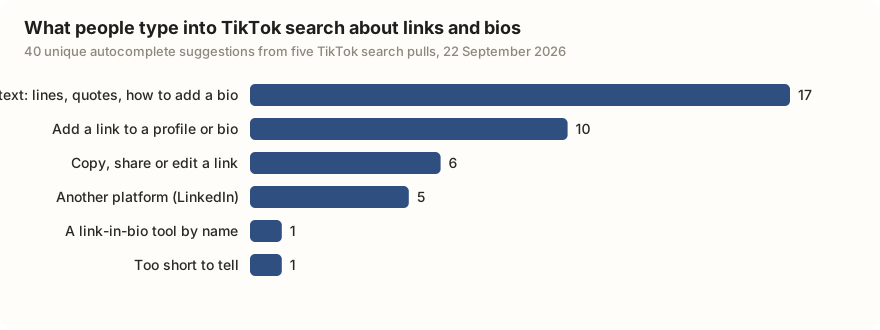
We pulled TikTok's own search suggestions for five phrases ("link in bio", "tiktok link", "link in bio tiktok", "add link tiktok bio", "tiktok bio link") and sorted the 40 unique results by what the person wanted.
| What the person wanted | Suggestions (of 40) | Example |
|---|---|---|
| Bio text: lines, quotes, how to add a bio | 17 | "tiktok bio lines short" |
| Add a link to a profile or bio | 10 | "add link in tiktok" |
| Copy, share or edit a video or profile link | 6 | "tiktok link copy" |
| Another platform (LinkedIn) | 5 | "linkedin tiktok" |
| A link-in-bio tool by name | 1 | "linktree" |
| Too short to tell | 1 | "tiktok link" |
Data: TikTok search suggestions via TokConnect, pulled 22 September 2026, five pulls of up to 10 suggestions each. Open the snapshot. Non-English suggestions were sorted from rough translations, noted in the file.
Not one of the 40 mentions followers, 1,000, a business account or a missing field. Inside TikTok people ask how to add a link or copy one; the "why is my link not showing" question lives on Google, which is probably how you got here.
Who can add a link to a TikTok bio
TikTok has not published a follower rule on any help page we could cite. The wording guides quote from the app is that you can add a website link if you have at least 1,000 followers or a Registered Business Account. Here is what the 2025 and 2026 guides say, and where they disagree.
| Account | Website link | Sources checked |
|---|---|---|
| Personal, under 1,000 followers | No field, in four guides updated July to September 2026. One May 2026 guide says TikTok dropped the minimum in mid-2024. | Stan (16 Sep 2026); Neal Schaffer (19 Sep 2026); Linkero (19 Aug 2026); SocialRails (18 Jul 2026); UniLink (2 May 2026) |
| Personal, 1,000 or more | Yes. Stan says the field can take 24 to 48 hours to appear after you cross 1,000. | Stan; SocialRails |
| Business | Yes, at any follower count. In some regions TikTok asks you to register the business first (legal name, address, licence number); SocialRails puts that review at 2 to 5 business days. | Buffer (9 Dec 2025); Shopify (20 Jul 2026); SocialRails |
| Any account, holder under 18 | SocialRails says the holder must be 18 or over. TikTok has not published this. | SocialRails |
| Instagram and YouTube buttons | No follower minimum. Availability changes by region, and creators reported them missing in late 2025 (below). | Neal Schaffer; Replug (11 May 2026) |
Sources: Stan, Neal Schaffer, Linkero, SocialRails, UniLink, Buffer, Shopify, Replug, and TikTok's Switching to a Business Account page. Checked 22 September 2026.
Four recent guides say the 1,000 rule still applies to personal accounts; one says it is gone. Our followers guide hit the same disagreement. The test that beats every guide: open Edit profile. No Website field and no Add next to Links means the rule applies to you.
How to add a link to your TikTok bio on iPhone and Android
The steps are the same on both phones. TikTok has shipped two versions of the Edit profile screen, so step 3 has two forms.
- Open TikTok and tap Profile at the bottom right.
- Tap Edit profile under your bio.
- Newer app: next to Links, tap Add, then choose Website. Older app: scroll down to the Website field.
- Paste the full address, including https://. TikTok does not add it for you, and a bare "mysite.com" can save as text or fail.
- Tap Save. Then open your profile the way a visitor would and tap the link to check it works.
You get one link. To change or remove it, go back to the same field. If you need several destinations, point this one at a page that lists them (tools section below).
Adding the link on desktop
Probably not. SocialRails, Neal Schaffer and Buffer say the Website field exists only in the mobile app, by design. UniLink says desktop works with the same rules, and Replug says it does "in some regions". To try: at tiktok.com, click your photo, then View profile, then Edit profile, and look for Website. If it is not there, use the phone.
Instagram and YouTube buttons
The same Links row lets you connect Instagram, YouTube and Lemon8 as buttons on your profile. Tap Add, pick the platform, sign in to that account and approve. There is no follower minimum, and TikTok's help page Linking another social media account covers it, without naming a threshold.
Then there is what happened in November 2025. A thread on r/NewTubers, "Did TikTok remove the ability to have a YouTube link?", and a Threads post from 25 November 2025 both reported the options gone from Edit profile. Guides revised in September 2026 describe the buttons as present again. TikTok has said nothing either way, so treat it as a regional or temporary change and check your own screen.
Why the link field is missing or greyed out
Match what you see to the row below. The first row explains most cases.
| What you see | Likely cause | What to do |
|---|---|---|
| No Website field, no Add next to Links | Personal account under 1,000 followers | Grow past 1,000, or switch to a business account (next section) |
| Still missing after you passed 1,000 | Stan reports a 24 to 48 hour delay; SocialRails and Linkero blame old app versions | Wait two days; update the app; force close it; log out and back in |
| Field gone after it used to work | Linkero: business verification lapsed and the account reverted. UniLink: recent Community Guidelines strikes; the account must be in good standing | Check Account status in Settings and privacy; re-verify the business |
| Missing on a business account, holder under 18 | SocialRails says 18 or over is required. TikTok has not published this | Nothing until 18 |
| Missing on desktop | The field is mobile-only in most guides | Use the app |
| Missing in your country | Replug and UniLink say a few countries still gate the feature | No fix we can recommend |
| "Action cannot be completed" when you save | Since March 2023 TikTok blocks app store links on personal accounts, including through link pages that lead there (TechCrunch) | Link to a website instead, or use a business account |
| Link saved but shows as plain text | Missing https:// | Re-enter the full address |
Sources: Stan, SocialRails, Linkero, UniLink, Replug and TechCrunch, 8 March 2023.
Under 1,000 followers: the business account trade
Switching to a business account puts the Website field on your screen at once. The path is Profile, the menu in the top corner, Settings and privacy, Account, Switch to Business Account, then pick a category. It is free and you can switch back. The business account guide lists every feature that changes; the one that matters here is music.
A business account can only use TikTok's Commercial Music Library, about a million cleared tracks, so most trending sounds vanish from Add Sound and you cannot Duet or Stitch videos that use chart music. Business accounts are also shut out of the Creator Rewards Program and Shop affiliate commissions, which the money guide explains. Stan's own guide, which sells a link tool, says business accounts lose trending sounds and copyrighted music "which can hurt your content's reach". If your videos ride trending audio, the link costs more than it earns. Get to 1,000 first. Switching back later is free, but business verification does not carry over.
The r/digital_marketing thread from May 2026, "Any workaround to add a clickable link in TikTok bio before 1k followers (without business account)?", asks the question in one line. Every guide we read gives the same answer: there is no third option. What creators do while they wait is in the next section.
Links in captions and comments
They do not work. Colorado State University's social media team put it flatly in March 2025: TikTok does not allow clickable links in post captions, and a link in the comments is "Still not clickable. Just text." Neal Schaffer says the same of on-screen text. TikTok is built to keep people in the app, and the profile link is the one door out.
So creators route people to that door. They say "link in bio" in the caption and out loud in the video. They pin a comment with a short address written out so viewers can copy it (SocialRails). Some put their domain in their display name (SocialRails) or type it into the bio text (Buffer), where it shows but cannot be tapped. None of this is new: a July 2022 thread on r/shopify, "How is everyone getting their Shopify links in their TikTok bios", was asking the same thing four years ago.
Link-in-bio tools: what they are and when you need one
A link-in-bio tool is a one-page website that lists several links. You paste its address into TikTok's single field, and visitors pick from the list. You need one if you have more than one destination: a shop, a newsletter, a YouTube channel, a booking form. You do not need one for a single destination. Shopify's July 2026 guide notes that TikTok recommends a direct link to your website over a page with several links, and that guide prices Linktree at free with paid plans from $6 a month, Hoo.be at free with paid from $8, and LinkShop at $15 a month. We have not tested any of them and have no click data for them. "linktree" was the one tool name TikTok's own suggestions returned.
Two cautions. A link page does not get around the 1,000 rule; it goes in the same field. And since March 2023 TikTok blocks personal accounts from linking to app store pages, even through a link page. On traffic, no TikTok page and no guide we read gives a number for how many profile visitors tap the link. Measure it yourself: add utm_source=tiktok to the address or use a shortener that counts clicks, then compare with the profile views in the analytics guide.
What the accounts TikTok ranks do with their link
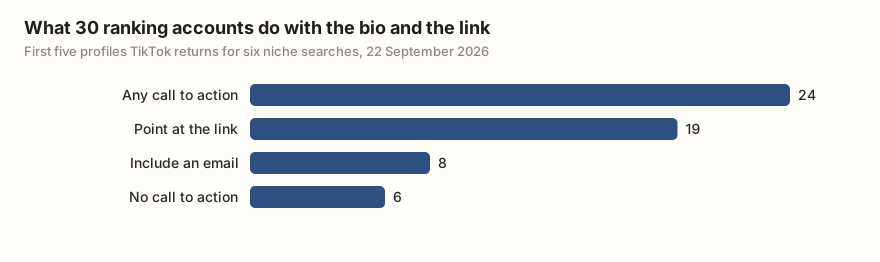
For the bio ideas guide we read the bios of the first five accounts TikTok returns for six searches (fitness, cooking, personal finance, skincare, small business, travel), 30 profiles in all. The bio text tells you what they think the link is for.
| What the bio does | Bios (of 30) |
|---|---|
| Any call to action (link, shop, email, follow) | 24 |
| Points the reader at the link (an arrow, "link below") | 19 |
| Includes an email address for brands | 8 |
| No call to action at all | 6 |
Data: TikTok public profiles, pulled 22 September 2026, first five user-search results for six niches. Open the snapshot; the counts used here are also in the suggestions snapshot. The profile data shows the bio text, not whether the Website field was filled. Handles are not on this page.
About 6 in 10 of these bios point at the link, and 8 in 10 ask the reader to do something. Nobody points an arrow at nothing, so the link field is set on most ranking profiles in these niches. The useful pattern is in the wording: the better bios say what the link is before they point at it ("Free workout programs, link below"); four of the five small business bios ask for the order without saying what the shop sells. The username guide shows the same accounts from another angle.
That took six user searches and 30 profile reads. An agent connected to TokConnect does the same for your niche and reads the bios for you.
Pull the bios of the 20 accounts ranking for [my niche] and tell me how many have a link and what it points to. Search TikTok users for [my niche], open each profile, and for every account list the follower count, the bio text, whether the bio points at a link, and what kind of destination it names (shop, course, newsletter, other platform). Then summarise what the accounts under 100,000 followers do differently.
Works in Claude, ChatGPT, Cursor and Gemini once TokConnect is connected. Get a free key (100 credits, no card) or see the setup guides.
If most accounts under 100,000 in your niche point at a shop or a course, that is what a link is for in that niche. If almost none do, the link is not where the money is there, and the money guide shows what is.
Frequently asked questions
How many followers do you need to add a link on TikTok?
On a personal account, 1,000, according to guides updated in July, August and September 2026 (Stan, SocialRails, Linkero, Neal Schaffer). One guide from May 2026 says TikTok dropped that minimum in mid-2024. TikTok itself has not published the number on a page we can cite. A business account gets the Website field at any follower count. Instagram and YouTube buttons have no follower minimum where they are offered.
Why is my TikTok bio link not showing?
Most often because the account is personal and under 1,000 followers, so the field is not there to fill. If you just crossed 1,000, Stan reports a 24 to 48 hour wait. Other causes guides list: an outdated app, a lapsed business verification that turned the account back to personal, recent Community Guidelines strikes, being under 18, a country where the feature is gated, or looking on desktop, where most guides say the field does not exist. Update the app, log out and back in, and check Account status in Settings and privacy before assuming a rule change.
Can I add a link to my TikTok bio without 1,000 followers?
Only by switching to a business account, in Settings and privacy, then Account, then Switch to Business Account. The field appears at once, though in some regions TikTok asks you to register the business first. The cost is real: business accounts can only use the Commercial Music Library, so most trending sounds disappear, and they cannot join the Creator Rewards Program or earn Shop affiliate commissions. If you would rather keep those, put the address in your bio text (visible but not tappable) and pin a comment with it until you reach 1,000.
Can you put a clickable link in a TikTok caption or comment?
No. TikTok does not make links in captions, comments or on-screen text tappable; they show as plain text. The profile link is the only clickable way out of the app for an ordinary account. Creators work around it by saying "link in bio" in the caption and the video, pinning a comment with a short address that viewers can copy, and sometimes putting the domain in their display name.
Can I add a link to my TikTok bio on a computer?
Usually not. SocialRails, Neal Schaffer and Buffer say the Website field is mobile-only and its absence on tiktok.com is by design. UniLink says desktop works with the same rules and Replug says it does in some regions. To check, log in at tiktok.com, click your photo, View profile, Edit profile, and look for Website. If it is not there, do it in the app on your phone.
How do I add my Instagram or YouTube to my TikTok profile?
Tap Profile, then Edit profile, then Add next to Links, choose Instagram, YouTube or Lemon8, sign in to that account and approve the connection. A button appears on your profile and there is no follower minimum. Availability varies by region, and in November 2025 creators on r/NewTubers and Threads reported the options missing; guides revised in September 2026 describe them as present again. If you do not see them, TikTok has not said why.
Sources and data
- Switching to a Business Account (TikTok Help Center)
- Linking another social media account (TikTok Help Center)
- About business verification for TikTok accounts (TikTok for Business Help Center, updated June 2026)
- TikTok Link in Bio Requirements: A Complete Guide for 2026 (Stan, updated 16 September 2026)
- How to Add Links to Your TikTok Bio, Step-by-Step for 2026 (Neal Schaffer, revised 19 September 2026)
- TikTok Link in Bio Not Showing? Fixes for 2026 (Linkero, 19 August 2026)
- TikTok Link in Bio: Complete 2026 Guide with Requirements and Workarounds (SocialRails, updated 18 July 2026)
- How To Add a Link To Your TikTok Bio (Shopify, 20 July 2026)
- How to add a link to your TikTok bio in 2026 (Replug, edited 11 May 2026)
- TikTok Link in Bio Requirements, 2026 Update (UniLink, 2 May 2026)
- How to Add a Link to Your TikTok Bio, and What to Do If You Can't (Buffer, 9 December 2025)
- How to Add a Link to a TikTok Post, and Why It's Not Like Other Platforms (Colorado State University Social Media, 18 March 2025)
- TikTok begins blocking links to app store pages from creators' bios (TechCrunch, 8 March 2023)
- Threads post reporting TikTok removed YouTube and Instagram profile links (25 November 2025)
- r/digital_marketing, May 2026: "Any workaround to add a clickable link in TikTok bio before 1k followers (without business account)?" (creator thread)
- r/NewTubers, November 2025: "Did TikTok remove the ability to have a YouTube link?" (creator thread)
- r/shopify, July 2022: "How is everyone getting their Shopify links in their TikTok bios" (merchant thread, cited by title)
- TikTok search suggestions for link and bio phrases, pulled 22 September 2026 (snapshot)
- Bios of 30 accounts ranking for six niche searches, pulled 22 September 2026 (snapshot)