 tokconnectStart free
- TikTok has no always-on Wrapped. It publishes "Year on TikTok" round-ups each December (4 to 6 December from 2021 to 2024) and made personal recap videos in December 2020 and December 2025.
- Nothing is announced for 2026 as of 30 September 2026. If the pattern holds, expect the public lists in the first week of December.
- Your own stats are already available: request your data as JSON under Settings and privacy → Account → Download your data. The file stays downloadable for up to four days.
- TikTok Studio keeps about 60 days of analytics, so creators who want a full-year recap should screenshot their Overview and Content tabs every month.
- In TikTok's search data, "nyfw outfits" went from nothing recorded before August to 8,141,924 searches in 7 days on 17 September 2026, while the summer's "chopped labubu" meme had fallen to 1.2% of its July high.
There is no TikTok Wrapped you can open any time of year, the way Spotify has one. What TikTok does is a year-end round-up of trends and creators every December, often called "Year on TikTok", and, in 2020 and 2025, a personal recap video. Nothing has been announced for 2026 as of 30 September 2026. If TikTok keeps its pattern, the public lists land in the first week of December.
You don't have to wait. Your own TikTok year is already in two places: the "Download your data" file, which holds your watch history, likes and comments, and TikTok Studio, which shows your posts' views and followers for up to 60 days. Below is how to get both, what a free recap site does with them, and a look at what the whole of TikTok searched for between May and September 2026.
TikTok Wrapped 2026: what TikTok has actually released
Since 2020 TikTok has published a year in review each December, usually in the first week. We found reports of a recap about you personally in only two of those years. This is the record, with the date each one appeared:
| Year | What TikTok released | When | A recap of your own year? |
|---|---|---|---|
| 2020 | "Year on TikTok" Top 100 lists, plus the first personal recap video: time on TikTok, the kinds of videos you watched, favorite sounds and effects, comments and shares | Personal recap from 21 December 2020 (TechCrunch) | Yes, from an icon on the For You feed or a banner on Discover |
| 2021 | "Year on TikTok 2021": top videos, creators and trends | 6 December 2021 (TikTok Newsroom) | No reliable report found |
| 2022 | "Year on TikTok 2022" lists such as Breakthrough Stars and TikTok Taught Me | 6 December 2022 (Adweek) | No reliable report found |
| 2023 | "Year on TikTok 2023": girl dinner, the Roman Empire trend, top US videos | 6 December 2023 (TikTok Newsroom) | No reliable report found |
| 2024 | Year-end recap: "very demure, very mindful", Brat summer, Moo Deng | 4 December 2024 (Tubefilter) | No reliable report found |
| 2025 | "Best of 2025" and Year in Music round-ups, then a personal Year in Review video built from your public posts, which you could edit and share | Round-ups from 5 December; personal recap reported 22 December 2025 (Social Media Today) | Yes, built from your public posts |
| 2026 | Nothing announced | Checked 30 September 2026 | Unknown |
The December round-ups are about TikTok as a whole. The 2025 recap covered what you posted, not what you watched, so the Spotify-style stats most people want (hours watched, most-watched creators) came from TikTok for certain only once, in 2020.
How to see your own TikTok year right now
Everything a Wrapped would show already sits in three places in your account.
1. Request your data file
- Open your profile and tap the menu (three lines) at the top right.
- Go to Settings and privacy → Account → Download your data.
- Choose All data, or pick categories, and choose JSON as the format. Recap sites read JSON; TXT is easier to read yourself.
- Tap Request data. TikTok says the file can take a few days to prepare and notifies you when it's ready.
- Download it from the same screen once TikTok says it's ready. The file is available for up to four days, so grab it quickly (TikTok Help Center; TechCrunch).
The file includes your viewing history, likes, comments and account settings. TikTok notes that some data isn't included, especially where it would expose other people. Request it in the last days of December if you want the whole year in one file.
2. Turn the file into a recap
The best known free option is Wrapped for TikTok. You load your JSON file and it shows total videos watched, session lengths, likes and when in the day you scroll. The site says the recap "is generated locally in your browser" and that it isn't affiliated with TikTok. Influencer Marketing Hub's walkthrough covers it step by step.
A recap only needs the data file. Any site that asks you to sign in with TikTok, or to pay to unlock "your Wrapped", wants something else. Open the file in your browser first so you know what you're sharing.
You can also paste parts of the JSON into ChatGPT or Claude and ask for counts: videos watched per month, your most-liked creators, your busiest day.
3. Check TikTok Studio, Watch history and Screen time
- TikTok Studio → Analytics shows views, profile visits, followers and your top posts for the last 7, 28 or 60 days or a custom range (TikTok Help Center). It keeps about 60 days, so screenshot the Overview tab once a month (TikTok Studio guide).
- Settings and privacy → Activity center → Watch history lists what you watched, newest first, going back 180 days (SociallyIn). Search history and comment history sit next to it; see TikTok search history.
- Settings and privacy → Screen time shows your daily time and sends a weekly summary (TikTok Help Center). That's the closest TikTok gets to "hours spent".
Show me the most-viewed posts from @[account] this year, with their plays, likes and posting dates.
What a homemade TikTok recap can and can't show
| Wrapped-style stat | Where to find it | How far back |
|---|---|---|
| Videos you watched | Data file (watch history) or Activity center | File: what TikTok includes; in-app list: 180 days |
| Likes and comments you gave | Data file; Activity center → Comment history | What TikTok includes in the file |
| Time spent on TikTok | Screen time dashboard | Daily and weekly, not a full year |
| Your top posts, views and followers gained | TikTok Studio → Analytics | 60 days, plus a custom range |
| What everyone else searched | Creator Search Insights | 7-day figure, with longer history per topic |
The missing piece is a full year of time spent, which no TikTok screen adds up for you.
The year on TikTok search: what people looked for in 2026
TikTok's December lists show which trends TikTok picked; its search data shows what people typed. On 30 September 2026 we pulled 180 days of TikTok's search history for searches tied to moments of the year. TikTok's 180-day history has some implausible readings in April, so we excluded April and report 30 April to 29 September. Each point is the "Search popularity" figure Creator Search Insights shows: searches in the previous 7 days, worldwide.
| Search | Peak day | Searches in 7 days at peak | On 29 September | Now vs peak |
|---|---|---|---|---|
| chopped labubu | 27 July | 13,019,031 | 160,318 | 1.2% |
| nyfw outfits | 17 September | 8,141,924 | 4,180,453 | 51.3% |
| back to school asmr | 18 August | 1,222,639 | 292,152 | 23.9% |
Data: TikTok Creator Search Insights via TokConnect, 180-day global series pulled 30 September 2026. Searches are TikTok's 7-day figure on each date. Snapshot with every daily point.
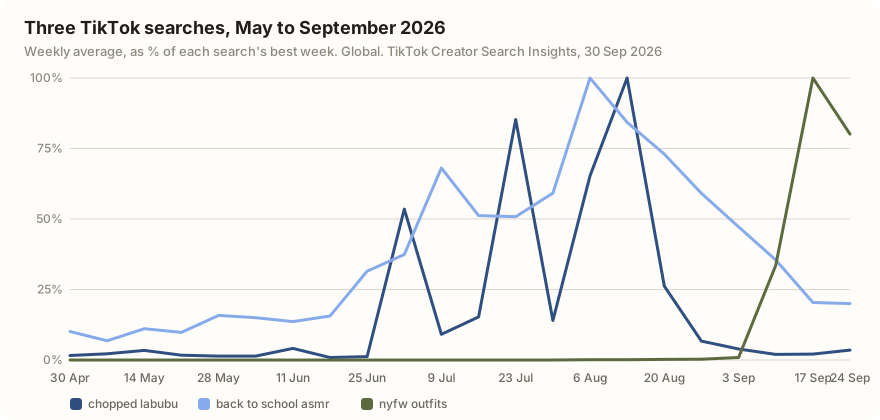
Labubu was the summer. "Chopped labubu", the meme search about "chopped" (ugly) Labubu dolls, rose in two waves: a jump in early July, a daily high on 27 July, and its best week from 13 August. It has since fallen to 1.2% of that high.
School and fashion close the year. "Back to school asmr" climbed steadily from June and peaked in the week from 6 August, and it still holds about a quarter of its peak. "Nyfw outfits" had nothing recorded until August, then reached 8,141,924 on 17 September around New York Fashion Week. It's the only one of the three still near its high.
One more finding matters if you try this yourself. Across our 12 searches for the year's big moments ("world cup", "labubu", "halloween costume", "summer outfits" and more), 214 of the 240 topics TikTok returned were its own topic labels. The one we checked, "FIFA and World Cup rankings", has no history: it reads zero every day until 16 September, months after the World Cup was played. For a year view, look for the specific phrases people type, like "back to school asmr", not TikTok's summary labels. The TikTok trends 2026 report runs the same method across six categories.
What were the biggest TikTok searches of 2026 in [your niche]? Show when each one peaked.
Making your own year-in-review post
If TikTok repeats its 2025 recap, it will build a video from your public posts. You can make a better one with numbers.
- Pick three to five posts by data, not memory. Screenshot TikTok Studio's Content tab every month so you have the whole year.
- Put one real number on screen per clip: views, saves or followers gained that month.
- Tie your year to the year. The searches above show what everyone was doing each season; open with the clip that matches one of those peaks.
- Say "2026 recap" or "my year on TikTok" in the caption and on screen. TikTok matches search words literally, so name the thing people will type in December.
When did searches for [a topic] peak on TikTok this year? Show the 180-day search line and the top videos from that week.
How we got these numbers
On 30 September 2026 we ran 12 searches about big 2026 moments (Coachella, the World Cup, Labubu, back to school, the Met Gala, Halloween costumes, summer outfits) through TikTok's Creator Search Insights data and took the top 20 topics for each: 240 topics, of which 214 were TikTok's generated labels at 1.5 million or more and 26 were typed searches (topics snapshot). We then pulled the 180-day global history for eight topics and kept the three that matched a clear moment of the year with believable readings. We dropped "Coachella fits" because its April readings ran up to hundreds of times its usual level, which isn't plausible, and we also left out a hotel search with an unexplained spike and "The gala", whose high point was an April reading. Two topics read zero until 2 August, which may be a gap in TikTok's stored history rather than zero searches.
"Searches" is TikTok's search popularity figure: searches in the last 7 days, worldwide (what TikTok search volume means). Daily readings jump a lot, so the chart uses weekly averages. You can check any of these in Creator Search Insights, in the TikTok app or on desktop at tiktok.com/csi with a TikTok login, one topic at a time and with no export. Or ask TokConnect "when did searches for back to school asmr peak this year?" and get the line, the peak and the numbers in one answer. TokConnect shows public search trends and public posts; it can't see your private watch history, so your personal recap still comes from your data file.
Frequently asked questions
Does TikTok have a Wrapped?
Not an always-on one like Spotify's. TikTok publishes "Year on TikTok" lists of top trends and creators each December, and it made a personal recap video in December 2020 and a Year in Review video from your public posts in December 2025. For anything else, use your data download.
How do I see my TikTok Wrapped 2026?
TikTok hasn't announced a 2026 recap as of 30 September 2026. To see your year now, request your data under Settings and privacy → Account → Download your data in JSON format, then load it into a recap site that works in your browser, such as Wrapped for TikTok. Creators should also check TikTok Studio analytics, which covers 60 days.
When does TikTok's year in review come out?
Usually the first week of December: 6 December in 2021, 2022 and 2023, and 4 December in 2024. The 2025 round-ups started on 5 December, and the personal recap video was reported on 22 December 2025.
Is Wrapped for TikTok safe?
Wrapped for TikTok says it builds your recap locally in your browser and isn't affiliated with TikTok. It only needs your data file, never your password. Be wary of any recap site that asks you to log in with TikTok or pay to unlock your results.
How can I see how many hours I spent on TikTok this year?
TikTok doesn't add up a full year for you. Settings and privacy → Screen time shows daily time and a weekly summary, and your data download includes watch history that a recap site can count. Your phone's own screen time report is the other source.
How do I see my most watched TikTok videos?
Open Settings and privacy → Activity center → Watch history for the last 180 days. For your own posts, TikTok Studio's Content tab lists your recent posts with their views. See our search and watch history guide.
Sources and data
- TikTok launches its first personalized annual recap feature, Year on TikTok (TechCrunch, 21 December 2020)
- Year on TikTok 2021 (TikTok Newsroom, 6 December 2021)
- TikTok releases Year on TikTok 2022 lists (Adweek, December 2022)
- Year on TikTok 2023 (TikTok Newsroom, 6 December 2023)
- TikTok's 2024 recap (Tubefilter, 4 December 2024)
- TikTok adds seasonal animations, personalized Year in Review summaries (Social Media Today, 22 December 2025)
- Requesting your data (TikTok Help Center)
- How to download your TikTok videos and data (TechCrunch, 17 January 2025)
- Wrapped for TikTok (third-party, not affiliated with TikTok)
- Using TikTok analytics (TikTok Help Center)
- Screen time (TikTok Help Center)
- 180-day search series for eight topics pulled 30 September 2026 (snapshot)
- Top 20 topics for 12 seeds about 2026 moments pulled 30 September 2026 (snapshot)