 tokconnect
Start with the job
“TikTok API” does not identify one connection or one permission set. Your choice depends on the work: organic topic research, advertising operations, approved academic research, or content publishing. Ask that question before you compare endpoints or client libraries.
TokConnect is an independent vendor. Its remote MCP endpoint gives compatible AI clients research tools for topics, videos, creators, comments, and reports. It does not make TokConnect an official TikTok product.
MCP and a TikTok API solve different layers of the system. MCP defines the client-to-tool conversation: initialization, tool discovery, and a named tool call. The underlying provider connection retrieves the research record. A client can use MCP without learning a vendor’s per-tool REST shape, while TikTok’s first-party APIs expose their own access, scopes, and endpoints.
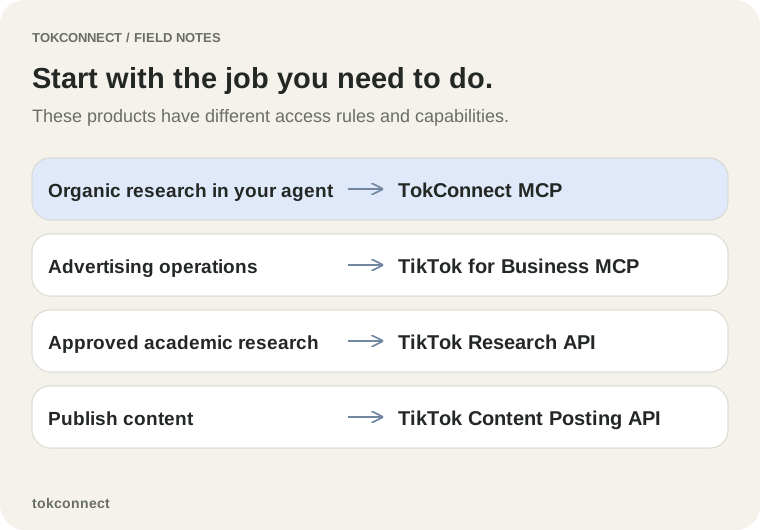
Compare access and capabilities
| Need | Product to evaluate | Access and boundary |
|---|---|---|
| Research topics, videos, creators, and comments in an AI client | TokConnect MCP | Bearer key with a compatible MCP client; independent organic research service |
| Advertising functions through an agent connection | TikTok for Business MCP | TikTok Business product and its own setup |
| Approved research into public TikTok data | TikTok Research API | Approval-based program for qualifying researchers |
| Publish video content | TikTok Content Posting API | Posting product with its own developer rules and review |
Read the official page for the product you select. TikTok can change eligibility, scopes, and client setup. A source page beats a copied configuration block from an unrelated integration.
The Research API requires qualification and approval under TikTok’s program. The Content Posting API requires a registered app, the relevant product configuration, approved scope, and authorization from the target user; TikTok’s posting guide documents those prerequisites. A TokConnect key does not grant either access path.
Choose TokConnect for an evidence-backed research brief
Use TokConnect when an agent needs to inspect organic topic records, video results, creators, or comments, then write a brief with the source records attached. Configure the client with https://mcp.tokconnect.com/mcp and Authorization: Bearer YOUR_TOKCONNECT_KEY. MCP uses JSON-RPC messages over Streamable HTTP; TokConnect has no public REST endpoint for each tool.
For [topic], retrieve matching topic records, inspect [n] relevant videos, collect a bounded comment sample from [one selected video], and produce a brief that separates observed records from the proposed content test. Keep URLs, IDs, retrieval time, and missing fields.
Check the product boundaries before implementation
TokConnect supports research operations. It does not post content, manage ads, extract transcripts, watch videos, promise a creator’s complete video feed, or guarantee demographic coverage. The hosted connection disables saved topics. A compound research tool can make several upstream requests while using one MCP call; later tool calls and pages add calls.
TikTok Business MCP and the Content Posting API serve different jobs. The Research API carries a separate approval requirement. Avoid a design that treats access to one product as permission to use another.
For example, an agency that needs a client-ready organic brief can use a TokConnect topic record, a bounded video set, and selected comments in its agent workflow. A team that needs to send a finished video to an authorized TikTok profile should evaluate the Content Posting API instead. The source evidence and access controls differ because the work differs.
Record the chosen product in the architecture note before the team writes code. Include the user action, required authorization, client or app owner, and expected output. A clear record prevents a research integration from absorbing publishing or advertising requirements after its first implementation.
Make the selection record
| Question | Record before you build |
|---|---|
| Who uses the connection? | Agent user, ad operator, approved researcher, or publishing app owner |
| What action follows? | Research brief, advertising task, research study, or publish request |
| What evidence must remain? | Topic IDs, video URLs, comments, API approval, or publish authorization |
| What cannot the connection do? | State the documented limitation in the implementation note |
For organic research setup, read TikTok MCP. For topic data flow, read Creator Search Insights through MCP. For bounded video pages, use the video search reference.
Compare implementation paths before you commit
An MCP client starts with a server endpoint, authentication, initialization, tool discovery, and named tool calls. TokConnect owns the server side of that protocol. A first-party TikTok API integration starts with TikTok registration, the product’s approval path, tokens or scopes, and its endpoint contracts. The team should document those steps before it budgets implementation work.
| Implementation need | Evidence to retain |
|---|---|
| TokConnect research agent | Client configuration, tool inputs, source records, and output limits |
| TikTok Research API project | Approved project, client registration, and query conditions |
| Content posting integration | Registered app, approved scope, user authorization, and publish status |
Use the product’s official documentation when a team changes an access path. The Research API guide documents client registration and client access tokens; the posting guide documents its own authorization requirements.
Choose an operating model
An interactive agent workflow suits a strategist who asks a bounded question, reads source records, and ends with a reviewed brief. The client owns the conversation and the researcher owns the final selection. A backend batch workflow suits a team that runs a defined query set on a schedule and stores redacted records for a later analyst. The batch job needs explicit page caps, deduplication, retry limits, and an owner for failed runs. MCP can support either client style; it does not supply the storage, approval, or review process.
| Operating model | Keep | Failure owner |
|---|---|---|
| Interactive organic research | Prompt, inputs, returned IDs and URLs, selected evidence | Researcher reviews missing fields before making a recommendation |
| Scheduled batch collection | Job version, inputs, each page, deduplicated IDs, timestamps, errors | Engineering owns retries and alerts; analyst owns interpretation |
| Publishing integration | Authorized user, media source, scope approval, publish ID and status | App owner handles authorization and failed publication |
Select a path from an output
Choose the connection from the output you must produce. An organic content team that needs a reviewable brief can use TokConnect to retrieve a topic, a bounded video sample, and comments, then keep IDs and source links. It should stop there when the output is a creative recommendation. It does not need posting scope.
A team that must publish a finished video to a user’s account needs the Content Posting API path. TikTok’s current Direct Post guide requires a registered app, the Content Posting API product, approval and target-user authorization for video.publish, and a valid media source. A content-research key is unrelated to those requirements. A team that needs approved academic access to TikTok public content should evaluate the Research API and its project approval flow instead of treating a research-tool server as a substitute.
Advertising operations have their own decision point. Evaluate TikTok’s Business MCP server or Ads Manager when the output concerns ad accounts, campaigns, or advertising audiences. The topic-demographic result in this library is not a campaign audience definition. Keep an ads workflow’s audience filters, account permissions, and campaign evidence inside the ad product.
Check changeable product rules
TikTok can change eligibility, required scopes, limits, and endpoint behavior. Check the official product page during implementation, save its review date, and attach it to the decision record. The official Research API documentation describes an approved research client, client credentials, bearer-token access, query conditions, and its own cursor and search ID paging. The official Content Posting guide documents the app, scope, and authorization prerequisites. Those facts support choosing a product; they do not prove that a specific account already qualifies.